Retrieving Block Results
If you hold a run's executionId, this endpoint reads back what one block inside that run produced -
not the flow's final answer, but the stored result of a single step. Name the run and the block's
result alias, and one GET request returns it. Use it to pull an intermediate value out of a run, to
watch a long run's progress block by block while it is still going, or to read a value from inside a
loop that the FlowRunner™ flow itself can no longer see. To ask how the run itself is doing, use
Checking a Run's Status. The examples on this page use a flow named
Cart Summary: it fetches a shopping cart and walks its products in a
List Iterator.
Endpoint (GET)
https://api.flowrunner.ai/
            {workspace-id}/
            {api-key}/
            automation/flow/
            {flow-id}/
            execution/
            {execution-id}/
            block/result?alias={alias}&occurrence={n}
| Placeholder | Value | Where it comes from |
|---|---|---|
{workspace-id} |
The workspace the flow belongs to | Workspace Settings ▸ General ▸ Credentials - see Workspace Settings |
{api-key} |
The workspace's API key | Same place |
{flow-id} |
The flow's id, case-sensitive | The browser's address bar while the flow is open in FlowRunner - the segment after /flow/ |
{execution-id} |
The run you are reading from | The executionId that Call Flow (Non-Blocking) returned when it started the run |
{alias} |
The block's result alias, URL-encoded. Required | The block's Reference Result Data As field - see Finding the alias |
{n} |
Which run of the block to return, counting from 1. Optional - the default is the last one | Only meaningful for a block inside a loop - see Blocks that ran more than once |
Encode the alias. Aliases routinely contain spaces and punctuation - FlowRunner's own default is
the block's name followed by Result, which gives you values like Priciest so far? Result. Leaving
alias off entirely is refused with HTTP 400.
Only GET. POST, PUT, and DELETE are refused with HTTP 405. The flow does not have to be
LIVE: this reads run history, so it keeps answering for runs of a flow you have since stopped.
The URL is a credential. It embeds your workspace's id and API key and it returns your runs' stored data, so keep it server-side. The key belongs to the whole workspace, not to this flow.
Finding the alias
The lookup key is the block's Reference Result Data As value, not the name on the canvas. Select
a block in the flow editor and the field is in its settings; FlowRunner fills it in for you as the
block's name plus Result, and whatever it says there is what this endpoint expects. It is the same
identifier the Expression Editor binds a block's result to, so if a later block in the flow can read
the value, this endpoint can return it.
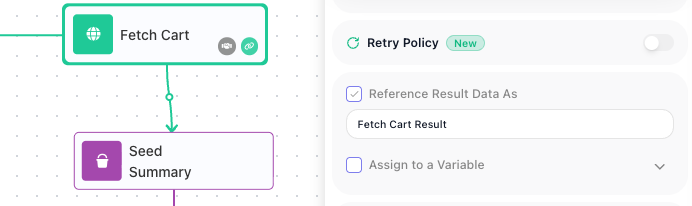
Before you build a client on an alias:
- A default alias follows the block's name. Leave Reference Result Data As switched off and the
block still publishes its result, under its name plus
Result- but rename the block and that alias changes with it, which breaks a client calling the old one. Tick the box and type the alias you want and it stays put through renames; do that for any block a client fetches. See the Flow Editor. - An alias can be switched off. It is a checkbox, and builders are advised to clear it on blocks whose result nothing later reads - see Passing Data Between Blocks.
- Return Result blocks have no alias at all - the field is absent from that block, so the one thing this endpoint cannot hand back is the flow's own answer. That is what Call Flow (Blocking) is for.
Making the call
Copy, then replace the workspace id, the API key, the flow id, and the execution id with your own -
the ids below are from a run of our Cart Summary flow. The alias is URL-encoded, and curl's
--data-urlencode saves you doing that by hand:
curl -G "https://api.flowrunner.ai/{workspace-id}/{api-key}/automation/flow/819B4600-FCB4-424A-B05E-1E6976C255AE/execution/038909A2-CA70-45D3-A3D9-294ABE77CCC8/block/result" \
     --data-urlencode "alias=Fetch Cart Result"
The answer names the block, says when it ran, and carries what it produced:
{
  "executionId": "038909A2-CA70-45D3-A3D9-294ABE77CCC8",
  "alias": "Fetch Cart Result",
  "executedAt": "2026-08-25T23:47:31.842Z",
  "occurrence": 1,
  "occurrenceCount": 1,
  "result": { "id": 28, "products": [ { "id": 182, "title": "Green Crystal Earring", "price": 29.99 } ] }
}
result is the block's value, exactly as the flow saw it. A block that produces no value of its own
- a Condition, for example - answers with "result": null. That
is a normal result, not a failed block.
A block that failed answers with an envelope instead. When the block itself threw - a request that
could not be made, a rejected credential - result carries the failure rather than a value:
"result": {
  "data": { "code": 28082, "message": "The URL address 'https://invalid.invalid/x' is incorrect or does not exist." },
  "errorCode": 28082,
  "httpCode": null,
  "success": false
}
The call itself is still 200, because the run and the block both exist - the 28xxx codes and the
non-200 statuses below are reserved for lookups that fail. Read success and errorCode; httpCode
is null when no HTTP exchange happened, as for a DNS failure. A block guarded by a
Handle Error still counts as failed and answers this way; the
Handle Error block itself succeeded, so its own result is the caught error as a plain value.
Blocks that ran more than once
A block inside a List Iterator or a
Repeat executes once per pass, and the run stores every pass.
occurrenceCount tells you how many there were and occurrence tells you which pass you are looking
at, counting from 1. Leave the parameter off and you get the latest pass.
This is where the endpoint does something the flow cannot. A result produced inside a loop is scoped to its pass: each pass overwrites it, and nothing produced inside the loop is readable once it ends, which is why builders lift values out with a variable declared outside the loop (see Passing Data Between Blocks). This endpoint reads the stored run instead of the flow's live data, so every pass is still there:
{ "alias": "Priciest so far? Result", "executedAt": "2026-08-25T23:47:34.453Z",
  "occurrence": 6, "occurrenceCount": 6, "result": null }
Add &occurrence=1 for the first pass, 2 for the second, and so on. Passes count from 1, so
occurrence=0 is refused rather than meaning the first one. Asking for a pass that does not exist is
refused with 28162, and the refusal tells you the real count:
curl -G "https://api.flowrunner.ai/{workspace-id}/{api-key}/automation/flow/819B4600-FCB4-424A-B05E-1E6976C255AE/execution/038909A2-CA70-45D3-A3D9-294ABE77CCC8/block/result" \
     --data-urlencode "alias=Priciest so far? Result" --data-urlencode "occurrence=7"
{
  "code": 28162,
  "details": {
    "occurrenceCount": 6
  },
  "message": "Occurrence 7 is out of range: the block was executed 6 time(s)."
}
Reading a result while the run is going
A block's result is readable the moment that block finishes - the run does not have to be over. That is what makes this usable for progress: poll the alias of a block partway through a long flow and you learn how far the run has got, and what it found, without waiting for the end.
Until the block runs, the same call is refused with 28161, and the refusal carries the run's
current status so one request tells you both things:
{
  "code": 28161,
  "details": { "status": "RUNNING" },
  "message": "Block with result alias 'Priciest so far? Result' has not been executed."
}
28161 does not confirm your alias
While a run is still RUNNING or PENDING, an alias that does not exist anywhere in the flow is
also answered with 28161, not with the unknown-alias error. Only once the run reaches
COMPLETED or TERMINATED does a bogus alias start answering 28159 - driven on both a COMPLETED and a TERMINATED run. So a client that polls
from the moment it starts a run cannot use 28161 to check its spelling - verify the alias
against a finished run first.
A block on a branch the run never took behaves the same way: it stays 28161 while the run is open,
and once the run is over that block never executed at all.
Errors
A refusal comes back as HTTP 404 or 409 with a JSON code, message, and details. A missing
alias or a wrong method is refused at the HTTP level with a problem report instead.
| Code | What it means | What to do |
|---|---|---|
28068 |
No such run under that flow | Check both ids. This is also the answer when the execution id is real but belongs to a different flow |
28159 |
The finished run's flow version has no block with that alias | Check the spelling against the block's Reference Result Data As field. A Return Result block answers this too - it has no alias |
28161 |
The block has not executed yet. details.status carries the run's current status |
Poll again if the run is still open. Read the warning above before treating it as a bad alias |
28162 |
The occurrence you asked for is out of range. details.occurrenceCount carries the real count |
Ask for a pass between 1 and occurrenceCount |
9000 |
No workspace with that id | Re-copy the Workspace ID from Workspace Settings ▸ General ▸ Credentials |
| HTTP 400 | alias was left off |
It is required. The body is a problem report with title and detail, not a FlowRunner code |
| HTTP 405 | POST, PUT, and DELETE are refused |
Use GET |
Related
- Checking a Run's Status - whether the run is still going, and how it ended
- Call Flow (Non-Blocking) - starting the run, and the
executionIdthis call needs - Call Flow (Blocking) - getting the flow's own answer, which no alias returns
- Inspecting a Run - the same stored input and output on screen
- Passing Data Between Blocks - where result aliases come from and how flows read them