Billing
How much your automations can run is set by your plan. Every workspace has a monthly execution allowance - the number of times its flows may run in a month - and the Billing page is where you see which plan you are on, what each one offers, and move to a larger one when your flows start to outgrow their room. That same allowance is what the executions counter at the top of the navigation counts against.
What counts as an execution
An execution is one run of a flow - one instance. Each time a flow produces an instance, the counter goes up by one, and that single count covers everything the run does from beginning to end. A run that works through fifty blocks counts the same one as a run through two: the loops, retries, waits, and parallel branches inside it add nothing on their own.
Only a LIVE version of a flow produces billable instances - a version you are still building or testing produces none. An instance counts when:
- The LIVE flow is set off on its own - a trigger fires, a schedule comes due, a form is submitted, or an outside system calls it over the API.
- You launch one by hand with Run Instance on the LIVE flow.
- One flow runs another as a step, with a Call Flow block or from the Flows as Actions palette. The called flow starts its own instance, so it spends its own execution on top of the flow that started it.
These do not spend an execution:
- Test runs. Trying a flow out while you build it - running it from the editor to watch what it does - is free. Only Run Instance on a LIVE flow is billable.
- An inline SubFlow. It runs as part of the same instance, so it adds nothing.
A run counts from the moment it starts, whether or not it ends well. A flow that begins and then errors out has still produced an instance, so it spends an execution the same as one that finishes cleanly.
Plans and allowances
FlowRunner™ offers a ladder of plans - Free, Starter, Growth, Professional, and Business - each trading a higher monthly price for a larger execution allowance, plus a custom Enterprise plan for needs beyond Business. The cards show each plan's price and monthly allowance side by side; the row scrolls sideways, so the higher plans sit off the right edge until you scroll to them.
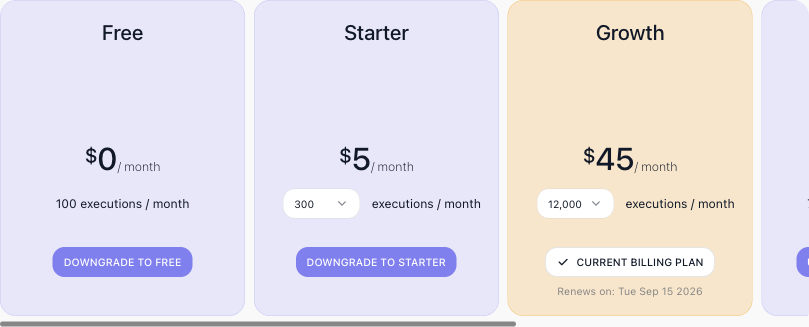
The plan you are on is marked Current Billing Plan and carries its renewal date. Starter and Growth each carry a selector beside the price that raises the allowance without moving plans - Starter from 300 executions at $5 to 3,000 at $15, Growth from 12,000 at $45 through 30,000 at $89 to 60,000 at $149 - so outgrowing a plan's first rung does not mean jumping to the next plan. To move up instead, use the plan's upgrade button; See detailed comparison opens the full plan-by-plan breakdown, and Contact us arranges an Enterprise plan. Manage Subscription, at the top right of the Billing page, opens Stripe's customer portal in a new tab; you enter your account email there and Stripe sends you a sign-in link. When your flows begin bumping against the allowance - the executions counter climbing toward its limit before the month is out - raise the allowance or move up a plan to give them more room.
What else the plan sets
Executions are the main meter, and two more things follow the plan:
- How far back your run history shows. The Instances list, the Dashboard and Performance views, the Logs and a CSV export all reach back over the plan's execution log visibility: 24 hours on Free and Starter, 7 days on Growth, 30 on Professional, 90 on Business, unlimited on Enterprise. Older runs are not deleted - the Instances page counts how many it is holding back, and moving up a plan brings them back into view. See Inspecting a Single Run.
- Bulk workspace export. Building a workspace archive needs Growth or above; exporting a single flow version works on every plan.
Two rules on the Free plan: an account may hold one Free workspace, so a second workspace cannot be created on it or moved down to it, and a new workspace lands on Free when no trial applies. Moving to Free needs no payment method; moving to any paid plan - up or down - needs one on file.
Starting on a trial
A new workspace begins on a 14-day trial of the Professional plan, with no card required to create it. The trial is granted once per account, not once per workspace: the entitlement is checked against both the account and the email address it registered with, so deleting an account and signing up again with the same address does not earn a second one. Your second and later workspaces are therefore created without a subscription and stay suspended until you subscribe to a plan for them - that is the normal outcome, not an error.
To convert a trial before it runs out, pick a plan on this page. That ends the trial immediately and charges the new plan straight away, and it does so even when you pick the plan the trial is already on, or a cheaper one - a downgrade is not a way to defer the charge. A payment method has to be attached to the workspace first; without one the change is refused.
If a trial is never converted, the trial ends and the charge is attempted anyway. When there is no card, or the card declines, the subscription is left past due rather than cancelled - a cancelled subscription cannot be restarted, and a past-due one can still be paid. The workspace is suspended and the owner is sent a payment-failed notification. While a payment is outstanding the workspace navigation carries a past due label and the Billing page offers a button to pay the outstanding invoice; paying it lifts the suspension on its own, and until then the workspace cannot be moved to Free either. A workspace that has paid before is not suspended by a single failed renewal - only a final cancellation does that.
Running out of executions
The allowance is not a surprise you meet at the end of the month. As the counter climbs, FlowRunner warns the workspace at 80%, 90% and 95% of the allowance, in the console and by email, with the warning sharpening each time.
At 100% the flows stop. Runs already in progress are not the point - no new instance starts until either the next billing cycle begins and the counter resets, or the workspace moves to a plan with more room. Nothing is lost while it is stopped: flows, logs and configuration are all still there, and raising the plan starts them again.
Changing plan mid-month
The two directions deliberately do not mirror each other:
- Moving up takes effect at once. You are charged a prorated amount for the days left in the current cycle, the execution counter resets to the new plan's full allowance, and the renewal date does not move.
- Moving down takes effect at the end of the cycle. There is no refund for the current month, you keep the current plan and its allowance until the cycle ends, and the new rate applies from the next renewal.
That asymmetry is why an upgrade late in a cycle is cheap in money but full in allowance, and why a downgrade cannot be used to undo one. A plan change also reaches runs already in progress: their run and wait allowances are re-stamped to the new plan, so a run that a downgrade narrows ends at its next block rather than immediately.
What a workspace without a paid subscription cannot do
Two operations are refused unless the workspace is on a paid subscription - exporting a flow version, and building or downloading a workspace transfer archive (which also needs Growth or above):
| The subscription is | The reason given |
|---|---|
| on a trial | Not available on a trial subscription; upgrade to a paid subscription to use it. |
| cancelled | Not available with a cancelled subscription; renew to use it. |
| past due | Not available while a payment is outstanding; update the payment method to use it. |
Importing is deliberately untouched - the restriction is on taking work out of a workspace, not on putting it in. Cloning a flow version is unaffected too, because the copy never leaves.
Payment methods
Before a workspace can be charged - moved onto a paid plan, or up from the one it is on - it has to be tied to a payment method. Until it is, the upgrade buttons stay disabled, and a free-credit balance shown at the top of the Billing page keeps your flows running in the meantime.
You add and manage payment methods on the account-level Payment Methods page, reached from your account menu at the bottom of the left navigation. It has two parts.
The first lists your payment methods - the cards and payment accounts on your account. Add a payment method hands off to a secure Stripe checkout to enter your details; each saved method then shows its type, its identifier, and the workspaces it covers.
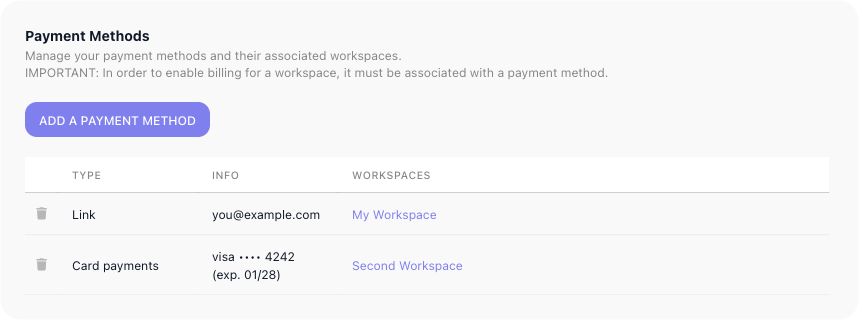
The second is a Workspaces overview - every workspace you have, each with its billing plan (a workspace still on its trial reads, for example, Business (Trial)), the payment method assigned to it, and its subscription renewal date. You assign a workspace's payment method from this table; you change its plan back on the workspace's own Billing page.
Related
- Workspace - the executions counter, and the areas a workspace holds