Notifications
Once a flow is LIVE, its runs happen without you watching, so FlowRunner™ tells you when something happened that you would want to know about - a run that terminated, a payment that failed, a limit you are close to. Those messages collect in the notification panel, and this page is about reading them and keeping the list under control.
Opening the panel
The bell in the top-right of the console opens the panel down the right-hand side. The badge on the bell shows how many messages are waiting, so you can tell at a glance whether anything arrived without opening anything; the panel's title repeats the full count.
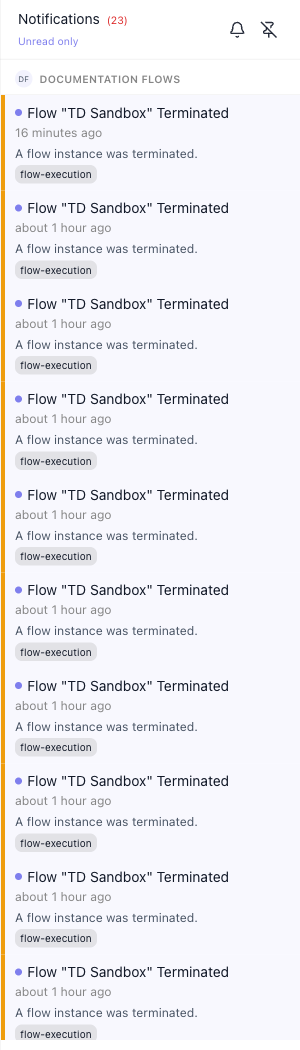
Clicking anywhere outside the panel closes it again. The second icon in its header pins it open instead, so it survives moving between screens - useful while you are watching a flow you started a moment ago, and the reason the panel is sometimes already open when you arrive.
What a notification tells you
Each entry shows:
- The title - what happened; for a run, the flow it happened to, so a glance down the column is enough to spot the one that matters.
- When it arrived - a time, or how long ago.
- A line of detail under that.
- A source chip - the part of the platform the message came from, such as
flow-execution.
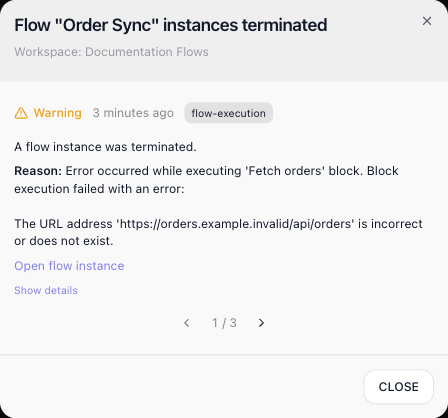
A dot at the start of a row marks it as one you have not read yet; opening an entry does not clear it. Click an entry to open it in full: the pop-up adds a level - Warning for a terminated run, Info for an export that is ready - and the reason behind it, which for a terminated run is the block that failed and its error. Open flow instance goes to the run itself, and Show details lists the message's raw data: the flow, its version, the run's id and the reason.
Terminated runs of one flow share an entry
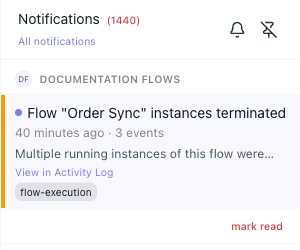
A flow whose runs keep terminating shows up once, with a count, instead of filling the panel. Runs of the same flow that terminate within the same hour share one entry: it reads Flow "Order Sync" instances terminated, its time line gives the span and the number of runs ("Today at 1:47 pm–1:48 pm · 3 events"), and the arrows in its pop-up step through the runs one by one (1 / 3). The same happens when you stop a flow while several of its runs are still going. A different flow, or the next hour, starts a new entry. Only terminated runs are grouped; every other kind of message arrives as its own entry.
Runs you launched yourself that terminate do not also pop up in the corner of the screen; they wait in the panel.
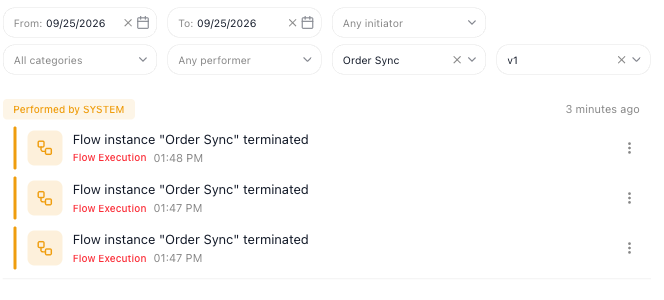
View in Activity Log on a grouped entry opens the Flows Activity Log, filtered to that flow and version from the start of that hour to the latest run, with one row per run:
Workspace and account messages
The panel belongs to you, so it lists messages from every workspace you belong to, each under that workspace's heading - like the DOCUMENTATION FLOWS heading in the panel above. Messages about something you asked for yourself, such as an instance export being ready, sit under YOUR ACCOUNT at the top:
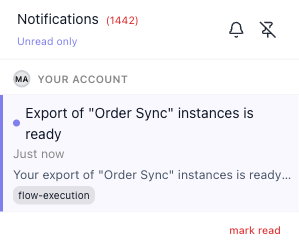
A message like this also pops up in the corner of the screen as it arrives, and stays until you close it with its ×. Its view details link opens the same pop-up an entry in the panel does:
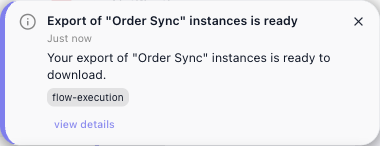
The entry carries no download link; the link to the file goes to the address on your account.
Emails about a workspace name it too, so you can tell which workspace a message is about when you belong to several. The name ends the subject line, after a dot (Execution limit almost reached · Acme Prod), and appears in a WORKSPACE bar at the top of the message. This covers execution-limit warnings, billing and payment emails, a workspace suspended, reactivated or deleted, team invitations and terminated flows. Emails about your account alone, such as a sign-in code or a password change, carry no workspace name.
Changes to flows and keys
The notification panel also tells you when a workspace's flows or its API key change. These entries arrive under the workspace's heading (N is the version number):
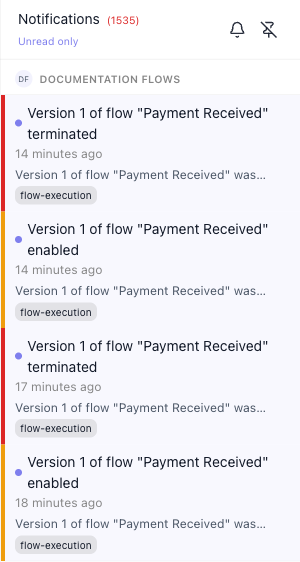
- a version started - Version N of flow "…" enabled
- a version stopped - Version N of flow "…" terminated. This means the version was stopped, not that a run failed; failed runs read Flow "…" instances terminated
- a version given a new schedule - Schedule changed for version N of flow "…"
- a version deleted - Version N of flow "…" deleted
- a flow exported - Flow "…" exported
- a flow deleted - Flow "…" deleted
- the workspace API key regenerated - API key regenerated, with a
securitychip. Update everything that calls FlowRunner with the old key, including External Callback URLs and webhook triggers from custom extensions - see Workspace Settings
Starting and stopping a flow twice leaves four entries, newest first:
Creating or renaming a flow, creating a version, saving or deleting a key on the API Keys page, and deploying or configuring a custom extension are recorded in the Change Log without a notification.
Keeping the list short
Use these to keep the list short:
- The link under the panel title switches which messages are listed. It reads Unread only while you are seeing everything, and All notifications once you have narrowed it - each time, the label names the view you would move to.
- mark read under a workspace's messages marks that section's messages as read in one go. It is there whenever the section has unread messages, even while Load more still has more to show. Its tooltip names the section, for example "Mark all Documentation Flows notifications as read". The messages drop out of the unread list and stay read after a reload; under All notifications they are still there.
Related
- Inspecting a Single Run - opening the run behind a flow-execution message
- Compliance & Security - the Flows Activity Log that View in Activity Log opens
- Billing - the execution-limit warnings that arrive here