Value Router
This block takes one value and sends the flow down a named path based on what that value is. You name the paths and tell each one which value or values it should match.
How it works
You give the block a single value to look at - the Value to Evaluate. You then add a branch for each outcome you care about, give the branch a name, and tell it what the value has to be for that branch to win. Every branch name becomes its own output connector on the block, so you build different steps off each one. When the flow reaches the block, it checks your branches from top to bottom and leaves through the first one whose match succeeds. There is always one extra branch, Everything Else, that catches any value none of your branches claimed.
How a branch decides it matches is its Value Mode, and there are five to pick from:
- Single Value - the branch wins when the value equals one exact value you give it.
- Single List - you point the branch at a list (built by a transformer, carried on a trigger event, or returned by an earlier block), and it wins when the value equals any item in that list.
- Collection of Values - you type several values by hand, and the branch wins when the value equals any one of them.
- Range of Values - you set a low and a high bound, and the branch wins when the value falls between them, both bounds included.
- Quick Range - the same list-or-range idea written as a shorthand in square brackets: commas separate individual values and a dash marks a range, as in
[1,2,5,7]or[1-5]; text values go in quotes, like["January","March"].
You act on a Value Router by building different steps off each connector, not by reading a value afterward - the routing is what the block does. It still stores the value it routed on under the alias Value Router Result, which a later step can reference if it needs that value, but most flows never read it back.
When to use it
Reach for it when one known value decides which path the flow takes and there are several possible paths - dispatch on a product type, a status code, an order status, a category. A Condition splits the flow into only two paths from a single test, so routing one value across four or five cases would mean stacking Conditions; one Value Router holds all of those cases in a single block and stays far easier to read. It matches values exactly, by the rules you set, so the routing is predictable and repeatable. When the path instead depends on a judgment that cannot be reduced to matching a value - the mood of a message, the intent behind a request - an AI Router is the block that can read natural language and decide.
Example
Suppose a flow handles incoming support tickets, and each run starts with one ticket in Initial Data. Every ticket carries a category, and you want to send each ticket to the team that handles it. Here is a sample ticket the flow is starting with:
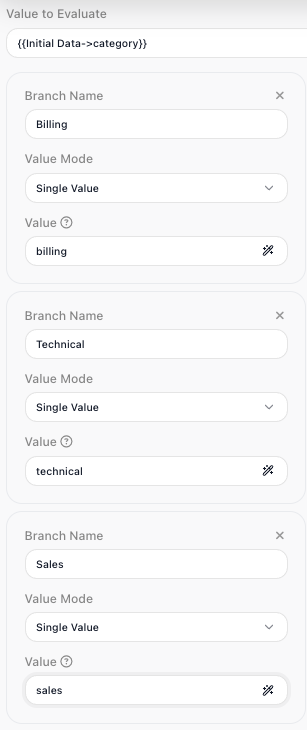
Point the Value to Evaluate at that category so the block routes on it. Then add one branch per team, each in Single Value mode matching one exact category: a branch named Billing matching billing, a branch named Technical matching technical, and a branch named Sales matching sales. Leave Everything Else for a ticket whose category is blank or unrecognized. The block now has four output connectors - the three you named plus Everything Else - and you build each team's steps off its own connector.
For the ticket above, the category is "billing". The block checks the branches from top to bottom: Billing matches - so the flow leaves through the Billing connector and runs the billing steps. A ticket whose category none of the three branches claim, say a blank value or a typo, matches nothing and leaves through Everything Else, where you might drop it into a general triage queue for someone to sort.
If refunds should later be handled by the same team as billing, you do not need a new branch. Switch the Billing branch's Value Mode to Collection of Values and list both billing and refund; the branch then wins when the category is either one.
Configuration
| Field | Description |
|---|---|
| Value to Evaluate | Required. The single value the block routes on - usually an expression pointing at a field from a previous block's result or from Initial Data. |
| Branch Name | The label for a branch. Each name you add becomes a named output connector on the block, and you build the steps for that case off it. |
| Value Mode | How a branch matches the value. Five modes: Single Value matches one exact value; Single List matches if the value equals any item in a list the branch points at (a list from a transformer, a trigger event, or an earlier result); Collection of Values matches if the value equals any of several values you list by hand; Range of Values matches when the value falls between a low and a high bound, both included; Quick Range is that list-or-range in a bracketed shorthand, like [1,2,5,7] or [1-5]. |
| Branch value | What the branch matches against the value - one value in Single Value mode, a reference to a list in Single List mode, several values you enter in Collection of Values mode, a low and high bound in Range of Values mode, or a bracketed shorthand in Quick Range mode. |
| Everything Else | The built-in fallback branch, always present, taken when no other branch matches the value. |
Common settings (available on most blocks):
| Field | Description |
|---|---|
| Name | A label for this block on the canvas. |
| Reference Result Data As | The alias used to reference this block's result in later blocks. |
| Logging | What to log to the Logging panel while the flow is LIVE, both on start and on completion. |
| Notes | Freeform notes for documenting the block; they do not affect execution. |
Things to watch for
- The block checks branches from top to bottom and takes the first one that matches, so if two branches could match the same value, the one higher in the list wins and the lower one is never reached. Order your branches with that in mind, and avoid overlapping matches unless you mean for the first to take priority.
- A Collection of Values branch matches when the value equals any one of the values you listed. A Range of Values branch matches when the value falls between the low and high bounds you set, and both of those bounds count as a match.
- Everything Else is always there and cannot be removed. Build something onto it even if you expect every value to match a named branch, so an unexpected value still has somewhere to go instead of stopping the flow.