Set Variables
This block stores values now under names you choose, so later steps can read them back - the flow's per-run scratch space. You give it a name and a value for each variable, and it writes them for the rest of the run to use.
How it works
Each variable you set lives in a Data Bucket. You pick the bucket and list the variables to write, each as a name and a value, and the block writes them all when the flow reaches it. A value can be a fixed literal you type, or an expression worked out at run time, including one that reads the variable's own current value - so a counter can set itself to its current value plus one. Later steps read what you wrote by referencing the variable from its bucket. A bucket's variables belong to the current run, so a fresh run starts with the bucket empty.
When to use it
Reach for it - it lives in the palette's Utils category - whenever a value you compute or receive in one step is needed by a later step: a flag that records a decision, a counter you raise as you go, or a derived value you work out once and reuse. Holding it in a named variable is cleaner than recomputing it everywhere it is needed, and it gives the value a clear label the rest of the flow can read. If the value has to survive past the current run - a total that carries from one run to the next - a Data Bucket will not keep it; use Shared Memory for that instead.
Example
Suppose a flow processes support tickets, and you want to greet the requester by name and keep a running count of how many tickets this run has handled. When a run starts, the flow receives a ticket as Initial Data:
Add a Set Variables block at the start and write two variables into a bucket named Ticket. The first, greeting, takes an expression that builds a sentence from the requester's name. The second, processedCount, sets the counter to its own current value plus one - on the first ticket it reads as nothing yet, which counts as zero, so processedCount becomes 1:
Bucket: Ticket
  greeting        = "Hi " + Initial Data->requester + ", we are on it."
  processedCount  = Ticket - processedCount + 1
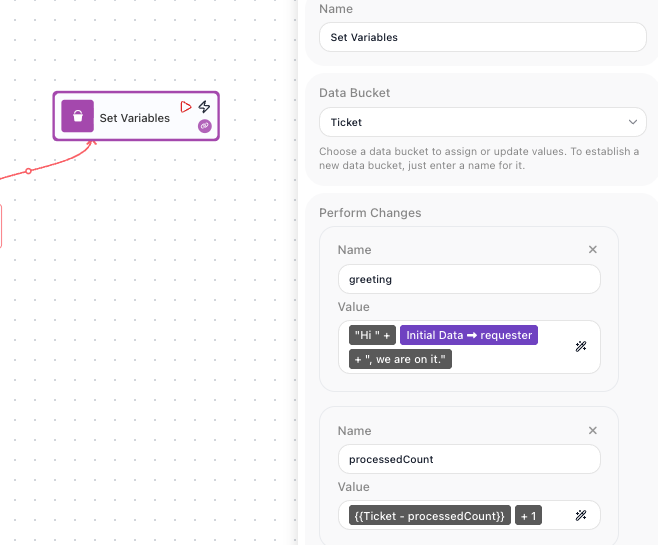
When the flow reaches the block, both variables are written into the Ticket bucket. A later step reads them back from there. In its own Expression Editor, a downstream block picks the greeting variable out of the Ticket bucket, which renders as the Ticket - greeting pill - the read-back reference that pairs with the greeting you wrote here. A message block built on that pill sends "Hi Dana Okafor, we are on it.", and a logging step reading the Ticket - processedCount pill records that processedCount is now 1. Each new run starts with the Ticket bucket empty, so processedCount begins counting from one again.
Configuration
| Field | Description |
|---|---|
| Data Bucket | The named container the variables are written into. Pick an existing bucket, or type a new name to create one. Defaults to a bucket named Default. |
| Perform Changes | The variables to write, one row each. Every row has a name and a value, where the value is either a fixed literal you type or an expression worked out at run time. |
Common settings (available on most blocks):
| Field | Description |
|---|---|
| Name | A label for this block on the canvas. |
| Notes | Freeform notes for documenting the block; they do not affect execution. |
Things to watch for
- This block does not produce a block result, so there is no Reference Result Data As alias for it. What it leaves behind is the variables themselves, which later steps read by name from the bucket.
- A Data Bucket's variables belong to the current run and are gone when the run ends. If a value has to carry over to a future run - a running total, for example - Set Variables will not hold it; use Shared Memory, which keeps its values between runs.
- Variables are referenced by their bucket and name together, shown as a 'Bucket - name' pill when you pick one in the Expression Editor.