API
An outside system can drive a flow over HTTP: start a run and hand it the data it needs, read back what the flow returned, and let a run that is paused waiting for an external event carry on.
This section covers those calls. Find the one that matches what you are trying to do.
Start a flow from your own code
Your application, a script, a scheduler, or another vendor's webhook makes a request and FlowRunner creates a run of the flow you named. You choose whether the call waits for the flow's result or returns as soon as the run has started. See Call Flow.
Let an outside system call into a flow
An External Callback block gives a point in your flow its own web address, so an outside system can start the flow there or let a paused run continue. See Activating an External Callback.
Read what the blocks of a run produced
Fetching each step's input and output over the API is not released yet. See Retrieving Block Results for what to use in the meantime.
What every call carries
All of these calls share the same two opening segments:
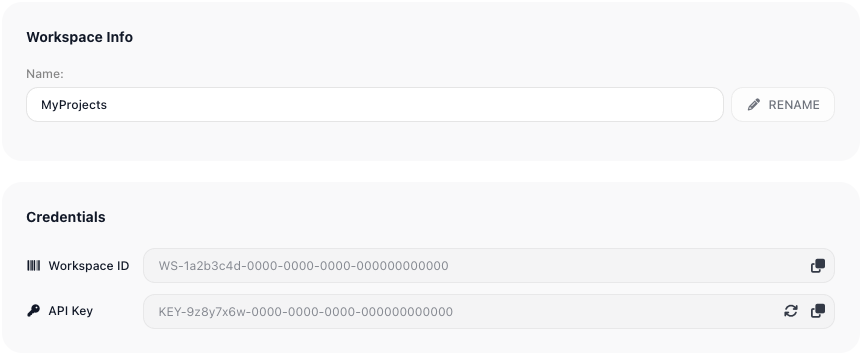
- Workspace ID - names the workspace the call is for.
- API Key - authorizes the caller.
Both live in Workspace settings ▸ General, in the Credentials section, each read-only with a copy button. Anyone holding the API key can make these calls, so if it leaks, regenerate it there - calls using the old key stop working.
FlowRunner builds the full URL for you, both segments already filled in: the Launch Flow Instance dialog for starting a flow, and the External Callback block's Callback URL field for calling into one.
Real traffic needs a LIVE version
A call against a flow with nothing published is refused. While you are building, a Callback URL still answers without a LIVE version - see Get the address. Publishing is covered in Flows.
Errors any call can return
Errors come back as HTTP 400 with a JSON code. Each page lists the errors particular to its own call;
these are the ones that can answer any of them.
Credentials
| Code | What it means | What to do |
|---|---|---|
2002 |
The workspace id or key is wrong, or the version is disabled | Re-copy both from Workspace settings ▸ General |
The request itself
| Code | What it means | What to do |
|---|---|---|
8048 |
The Content-Type header is missing or wrong |
Send Content-Type: application/json |
8058 |
The request body is not valid | Check the JSON you are sending |
8007 |
A required parameter is missing | The message names the parameter |
8008 |
A parameter's value is not valid | The message names the parameter |
Rate limits - too many calls, too fast
| Code | What it means |
|---|---|
999 |
The per-second request allowance is exhausted |
997 |
The workspace's per-minute limit has been reached |
995 |
The per-day request allowance is exhausted |
998 |
Too many requests are in flight at once |
These are about the volume of HTTP calls. Back off and retry.
Plan limits - too much work in flight
| Code | What it means |
|---|---|
28083 |
The workspace's action allowance is exhausted |
28087 |
Too many runs are executing at once |
28132 |
The maximum number of flow executions has been exceeded |
28086 |
The maximum number of active flows has been exceeded |
These are about how much work your flows have in flight rather than how often you call. Wait for capacity to free up, or move to a plan with more room. See Billing.
Related
- Workspace Settings - the Credentials section, and regenerating the key
- Flows - versions, and setting one LIVE so it can be called
- Returning a Result - deciding what a caller receives back
- Waiting on an External System - building a flow that pauses and resumes