Repeat
This block runs the same set of steps over and over for as long as a condition you set stays true. You build the steps inside it, and it keeps running them until the condition turns false.
How it works
It is a block container that repeats the steps inside it for as long as your condition stays true - what other tools call a while loop. Before each pass it checks your condition; while the condition is true it runs the steps inside once more, then checks again. The moment the check comes back false, the loop stops and the flow moves on. Because the same steps run each pass, something inside the loop has to change a value the condition depends on - otherwise the check would stay true forever. So the loop also carries a failsafe, the Maximum Iteration Count: a cap on how many passes it will ever make, which stops it even if the condition never turns false. The loop also exposes its pass count, which you read through the Expression Editor as Current Iteration Number - a Flow Context value you can use in the Repeat condition or in any block inside the loop. It counts up from 0 on the first pass. (Do not confuse it with the block's Current Iteration field, which only matters while you test blocks one by one in the editor.)
When to use it
Reach for it when you need to repeat work an unknown number of times until something becomes true - polling a status until it is finished, retrying a call until it succeeds, or building a value up until it is large enough. The deciding factor is that you do not have a list to walk: when you do have a list and want to touch every entry, List Iterator is the cleaner fit. Repeat is for the case where the number of passes depends on what happens at run time, not on a count you know in advance.
Example
Suppose a flow places an order with a fulfilment service, and that order takes a little while to process. You want to wait for it to finish, but you do not know how long that will take. The plan is to keep checking the order's status until it reads "shipped", pausing between checks so you are not hammering the service.
First, drag in the Repeat block from the palette's Utils category. Outside the loop, a Set Variables block reads the order's starting status into a Data Bucket variable named Order Status, seeded with its initial value of "processing". The Repeat block's Condition then checks that variable: keep looping while Order Status is not "shipped".
Inside the loop you build a pause followed by a fetch-and-store. A Wait block pauses for 30 seconds so the service has time to make progress, and then an HTTP Request block re-fetches the order and a Set Variables block writes the fresh status back into Order Status. Each pass the loop re-checks the condition against that updated value.
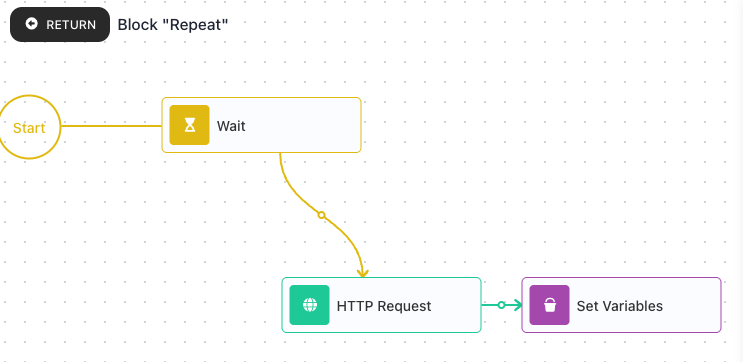
Here is how it plays out for an order that ships on the third check:
- Pass 0 - Order Status is "processing", so the condition is true; the loop waits, re-fetches, and the status is still "processing".
- Pass 1 - still "processing", condition true again; waits, re-fetches, now "in transit".
- Pass 2 - "in transit" still is not "shipped", condition true; waits, re-fetches, and this time the status comes back "shipped".
- Next check - Order Status is "shipped", so the condition is false and the loop stops.
The flow carries on with Order Status holding "shipped". Had the service stalled and never shipped, the failsafe of 20 would have stopped the loop after 20 passes rather than letting it run forever, and the flow could then handle the timeout however you choose.
Configuration
| Field | Description |
|---|---|
| Condition | Required. The loop keeps running while this is true and stops the moment it is false. It is re-checked before every pass, so a step inside the loop must change something the condition looks at, or the loop would never stop on its own. |
| Maximum Iteration Count | A hard cap on the number of passes, defaulting to 10000. The loop stops when it reaches this many passes even if the condition is still true - a safety net against a loop that never ends. Set it to a sensible number for your case while you are building the flow. |
| Current Iteration | The pass number the loop reports while you test blocks one by one in the editor, normally 0. Expressions that read Current Iteration Number get this value during such a test, so you can try a block as if it were on a later pass. |
Common settings (available on most blocks):
| Field | Description |
|---|---|
| Name | A label for this block on the canvas. |
| Notes | Freeform notes for documenting the block; they do not affect execution. |
Things to watch for
- The pass count you read as Current Iteration Number starts at 0 on the first pass, not 1.
- Repeat does not hand back a useful result of its own - you do not read a Repeat result downstream. Its effect is whatever its body wrote: in the example the loop leaves Order Status holding "shipped", and the flow reads that variable, not the loop.
- A step inside the loop has to change something the condition checks. If nothing inside ever makes the condition false, the loop runs until it hits the failsafe.
- Always set the failsafe to a sensible number while you build the flow, so a mistake in the condition cannot leave the loop running far longer than you intended.
- The loop needs steps inside it to do anything; step into it (hover the loop and choose Expand) to build the loop body, and use Return at the top-left to come back out.