Handling Errors
A step that fails leaves a flow with one of two outcomes:
- Unhandled - the run stops there, and nothing after it runs.
- Handled - the failure sends the run down a recovery path you build, and the run carries on.
This page is about designing for the second outcome - catching a failure (an AI model that comes back too busy, a service that is briefly down) and recovering from it, by logging what went wrong, falling back to a default, alerting someone, or waiting and trying the step again. The Error Handling concept guide covers the model behind it.
A flow stops at the first failure
By default, the moment a block fails the run ends - nothing after it runs. A step that only moves data around rarely fails, but a step that calls an outside service can fail for reasons that have nothing to do with your flow, and then the whole run gives up on the first hiccup.
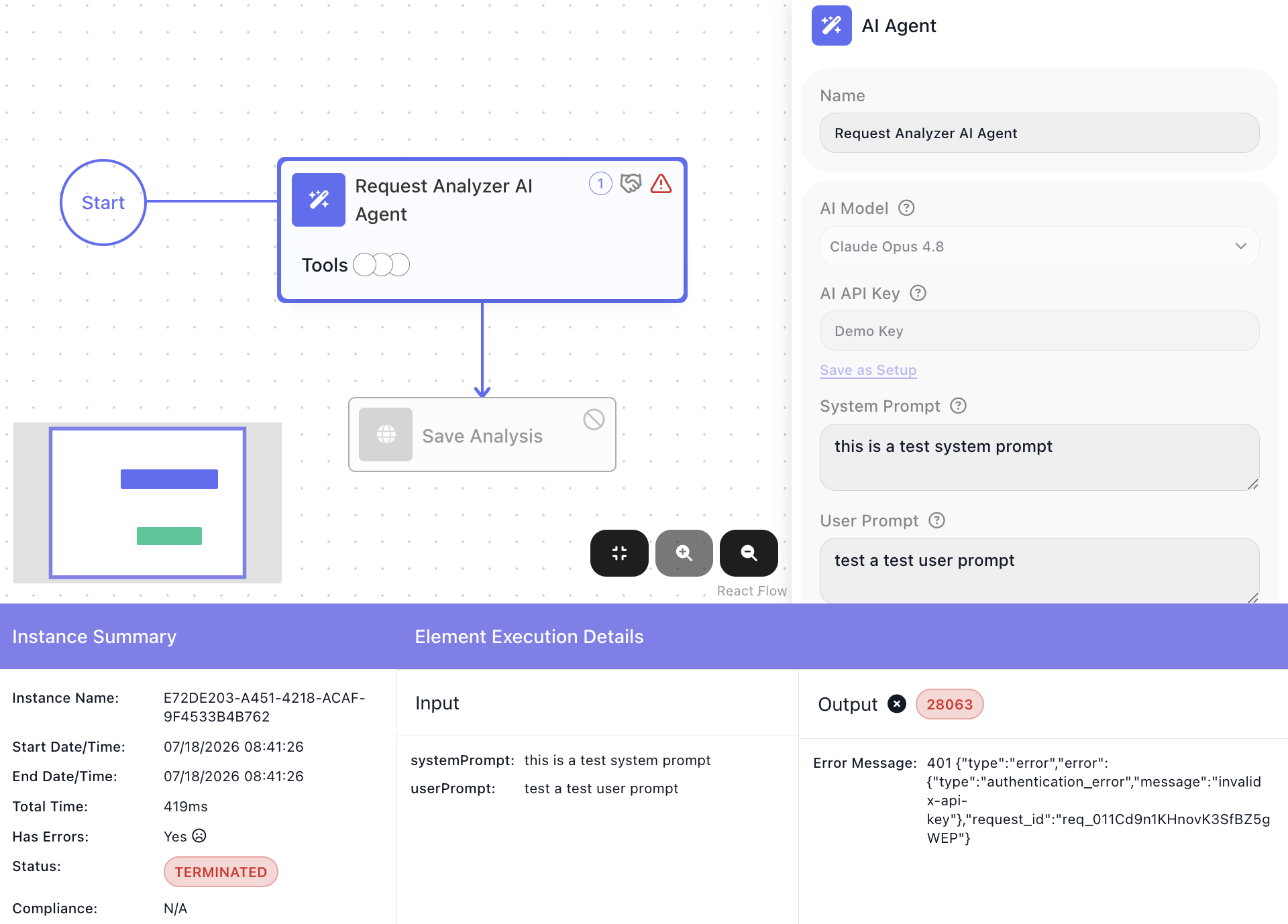
Handling errors is how you keep the run going instead - by catching the failure before it stops the run.
Catch the failure and keep going
To catch a block's failure, wire a Handle Error - from the UTILS palette group, under SYSTEM - to the block you want to guard. The connection runs from the guarded block to the Handle Error and becomes that block's failure path. The block keeps its normal success path too, so it leads two ways: onward when it succeeds, to the Handle Error when it fails.
On a failure the run diverts down the Handle Error's own steps - the recovery path you build after it - instead of ending. The steps after the Handle Error are where you recover: log the error, set a fallback value, send an alert, or retry.
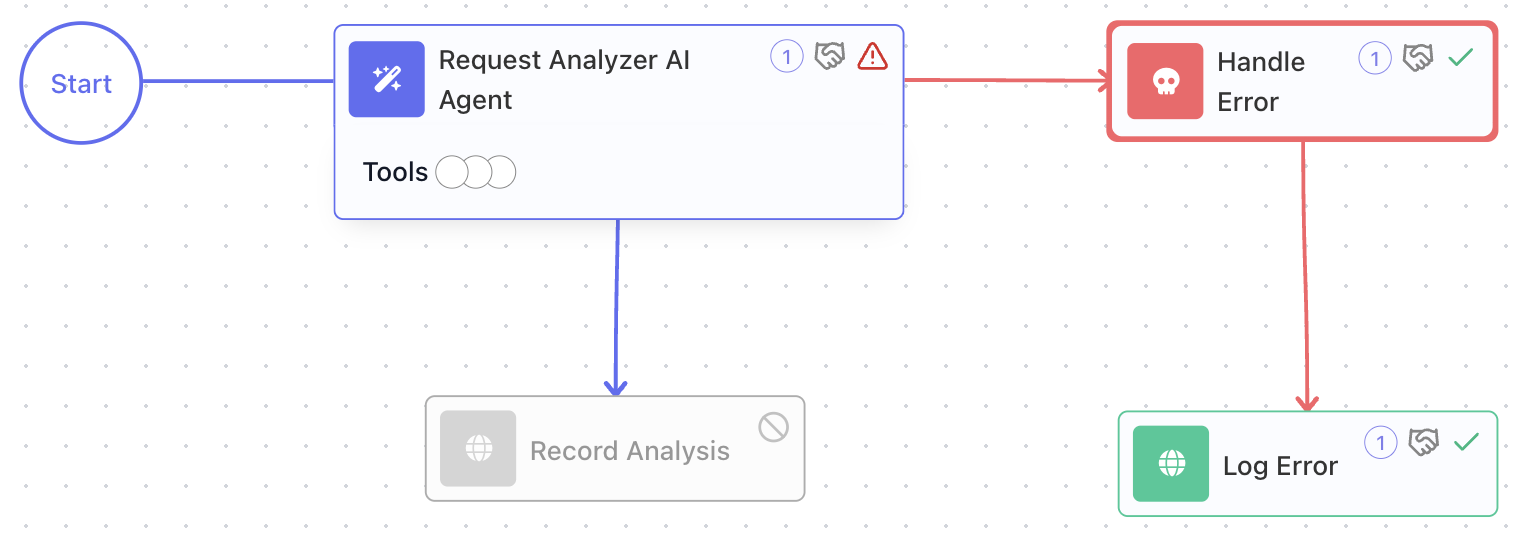
The run then carries on down the recovery path and finishes normally; a failure caught this way is a handled failure, and the instance completes instead of terminating.
Read what went wrong
A caught error carries a message and a source, both always present:
- message - a description of what went wrong, as the failing service reported it.
- source - the name of the block that failed. Because one Handle Error can guard several blocks at once, source tells you which one broke.
You read a field by opening the Expression Editor in a step after
the Handle Error, finding Handle Error Result (the handler's result alias), and picking the field you
want - which inserts a reference like Handle Error Result → message. A recovery step can then use it: put
the message in a log, or in the body of an alert.
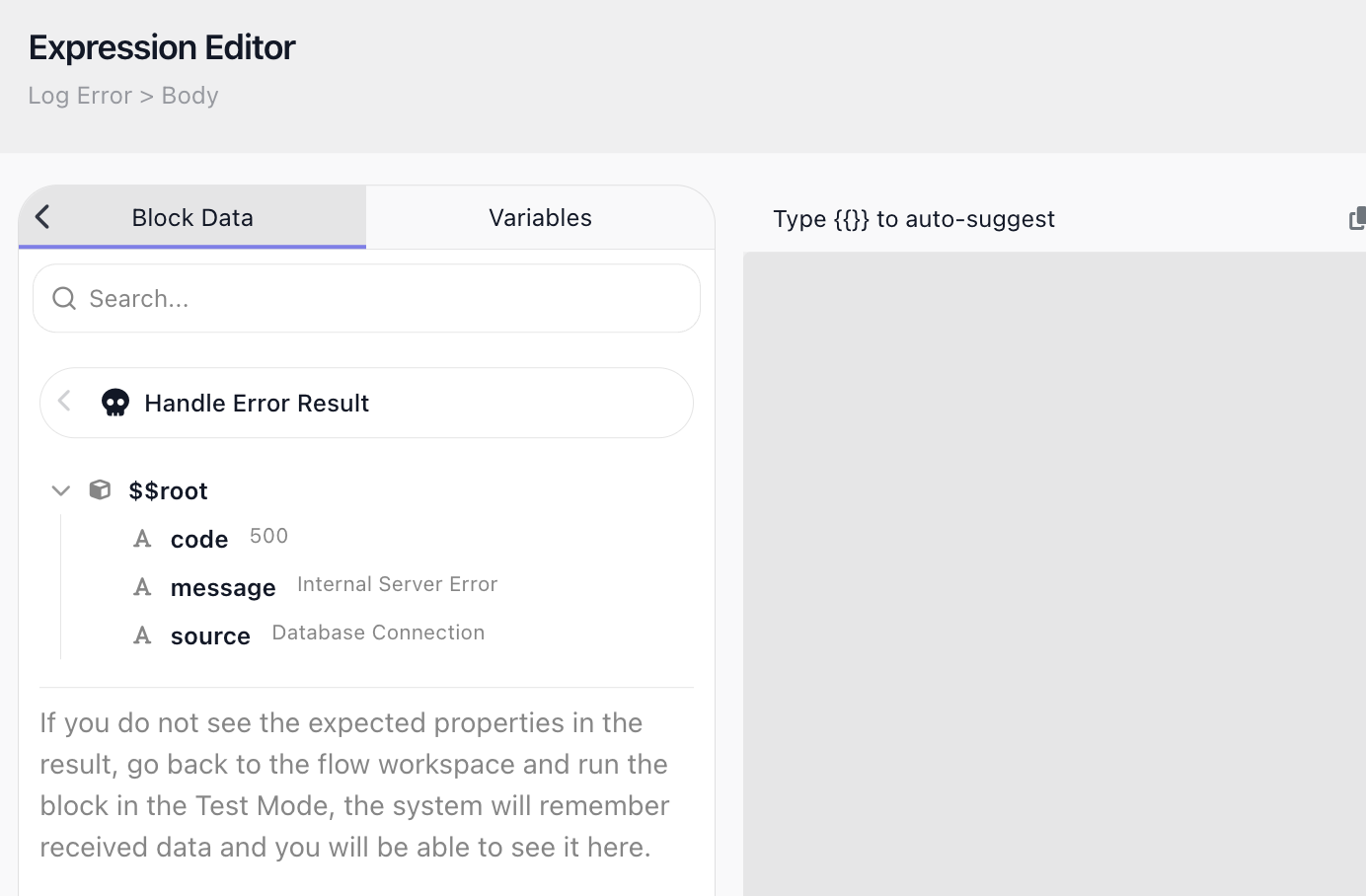
An error may also carry a code - a numeric identifier - but not every failure has one, and it is a FlowRunner code, not an HTTP status. Because of that, build recovery on message and source, which are always there; see Things to watch for for what an HTTP Request failure carries.
Retry after a back-off
Catching a failure runs your recovery once - it is not the same as trying the step again. Retry suits a transient failure: a service that comes back too busy, then recovers. A permanent failure (a bad key, invalid input) fails the same way every time, so a retry only burns through the attempts.
The HTTP Request block has a built-in retry of its own: turn on its Retry Policy and it reattempts the call for you - on the error codes or network failures you pick, a set number of times, with a back-off between tries.
One caution: retrying a request that is not idempotent - a POST that creates a record or charges a card - can repeat that side effect, so retry those only when a repeat is safe.
Retry with your own logic
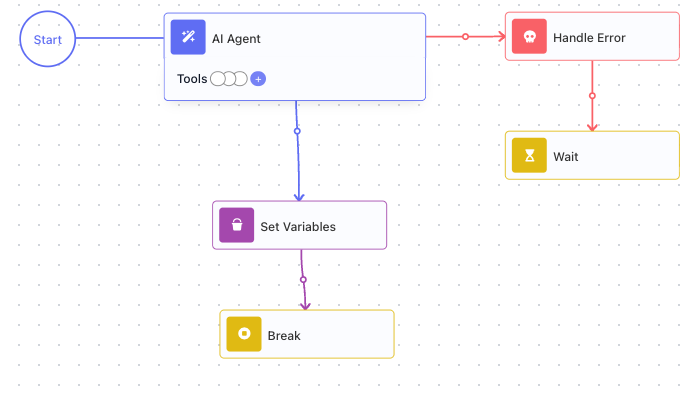
The built-in policy retries one block on a service error. When you need more - retrying a longer stretch of the flow, or deciding from the error itself whether to try again - build the retry by hand, wrapped around the step. A Repeat can hand a value outward only through a variable created outside it, so a Set Variables before the loop creates the result variable, empty. Then the loop does four things:
- Loop the step. The Repeat wraps the step; its Maximum Iteration Count caps how many attempts it gets.
- Back off on failure. The step's Handle Error path leads to a Wait. The pass ends after the pause, so the loop comes around and tries again after a delay instead of hammering a service that is already struggling.
- Capture and break on success. The success path writes the result into that variable, then a Break ends the loop - once you have an answer there is no reason to keep trying.
- Read the result after the loop. The variable now holds the answer, or is still empty if every attempt failed, so the next step can tell whether it got one.
Things to watch for
- An unhandled failure ends the run. Guard the steps that can fail - a call to an outside service most of all, since that is where failures you cannot control come from.
-
codeis a FlowRunner numeric code, not an HTTP status, and not every failure has one. What a failed HTTP Request carries depends on how it failed:- The address does not exist or cannot be reached: a FlowRunner code, such as
28082, and its message. - The service answers with an error status and a body: the body's
messagefield becomes the message, or the whole body when it has no such field. If the body has acodefield, its value becomes the code; otherwise there is none. - The service answers with an error status and an empty body: no code, a message such as
Request failed with HTTP status 500., and the status indetails.httpCode, which you read as Handle Error Result → details.httpCode.
A Custom Cloud Code block that throws carries no code at all. Branch on
codeonly when it is present; rely on message and source, which always are. - The address does not exist or cannot be reached: a FlowRunner code, such as
-
Retry helps a transient failure, not a permanent one. Retrying a bad key or invalid input just exhausts every attempt - the failure will not fix itself.