Working Through a List
Flows are full of collections. A database query comes back as rows, an uploaded file parses into records, an AI step or an HTTP Request returns a list, and sometimes you assemble one yourself earlier in the run. Whenever you are holding an array like that and need to run the same steps on every entry in it, a List Iterator is the block for the job: you point it at the array, build the steps to run on a single entry, and it runs them for every entry in turn.
Point the loop at an array
A List Iterator takes one input, its List: an expression that resolves to an array. Where the array comes from does not matter to the loop - a previous block's result, a field of the run's Initial Data, or a value you built along the way all work the same. If the array turns out empty, the inner steps do not run at all.
To keep the rest of this page concrete, one flow runs alongside it. That flow has fetched a shopping
cart from a store's API with an HTTP Request. The cart
comes back as an object with its line items in a products array (a few per-item fields are trimmed
here for readability):
{
  "id": 28,
  "products": [
    { "id": 182, "title": "Green Crystal Earring", "price": 29.99, "quantity": 5, "total": 149.95 },
    { "id": 64, "title": "Knife", "price": 14.99, "quantity": 2, "total": 29.98 },
    { "id": 46, "title": "Plant Pot", "price": 14.99, "quantity": 3, "total": 44.97 },
    { "id": 185, "title": "Black & Brown Slipper", "price": 19.99, "quantity": 5, "total": 99.94999999999999 },
    { "id": 175, "title": "White Faux Leather Backpack", "price": 39.99, "quantity": 3, "total": 119.97 },
    { "id": 81, "title": "Lenovo Yoga 920", "price": 1099.99, "quantity": 5, "total": 5499.95 }
  ],
  "total": 5944.77,
  "totalProducts": 6,
  "totalQuantity": 23
}
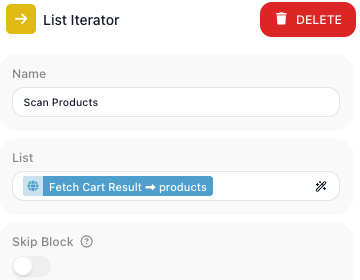
The List Iterator's List points at that products array.
Run the same steps on every element
Step into the List Iterator block to build what runs on each element: hover it and choose Expand.
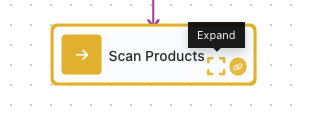
The loop opens empty; you build its body the way you build the rest of the flow, and Return at the top-left takes you back out when you are done.
Whatever you build there runs once for every element of the list. You might hand each element to another service, check it against a rule, reshape it, or read the one part of it you need.
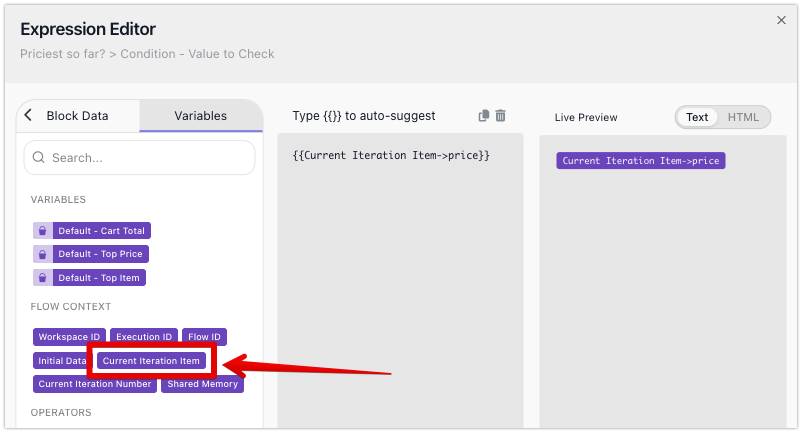
To access the current element, your steps use Current Iteration Item. You pick it in the
Expression Editor, in the Variables tab under
Flow Context, alongside the flow's own variables. It holds the whole entry, whatever its shape - a
number, a piece of text, or an object - so when the entry is an object you reach into it for the parts
you need: here each entry is a product, and Current Iteration Item gives you its price, title,
total, and the rest.
Carry a result out of the loop
Sometimes one pass is not the end of it: you want a single answer once the whole list has been walked. Each pass runs with a clean slate - a value a step produces on one pass is not there on the next, and it is gone for good when the loop ends. The one thing that carries across passes, and survives the loop, is a Data Bucket variable. So whenever you need a result out of the walk, the shape is the same: set a variable before the loop, update it on each pass, and read it after. What you build up in that variable is whatever the job calls for - a running total, a growing list, a count, or a single entry you have picked out.
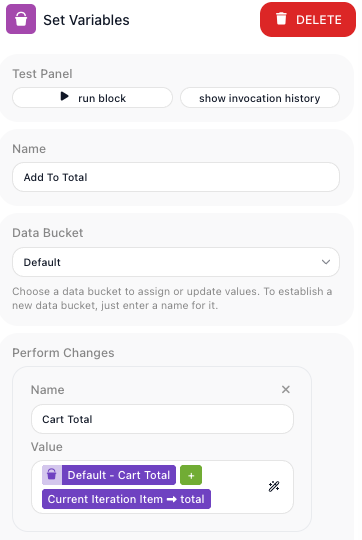
Take a running total. Before the loop, a
Set Variables sets Cart Total to 0; inside, a
Set Variables adds each entry's amount to it -
Cart Total plus Current Iteration Item's total, written back every pass. (One catch: the +
has to be the editor's green plus operator, picked from its Operators list, not a typed +, which
joins the two values as text instead of adding them.)
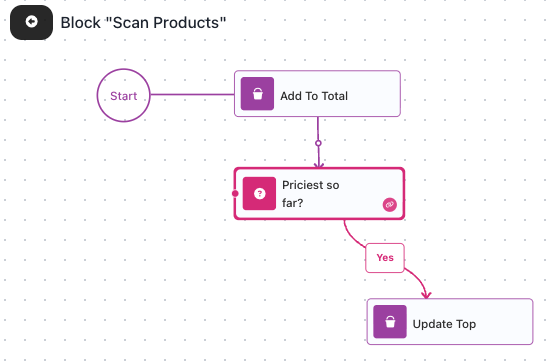
Picking one entry out follows the same shape. To find the most expensive product, hold the best price
so far in a variable and test each entry against it: a Condition checks
whether Current Iteration Item's price is GREATER THAN Top Price, and on its Yes path a
Set Variables records the new best, setting Top Price
and Top Item to this entry's price and title. Each pass keeps the highest, so by the end
Top Item names the priciest product.
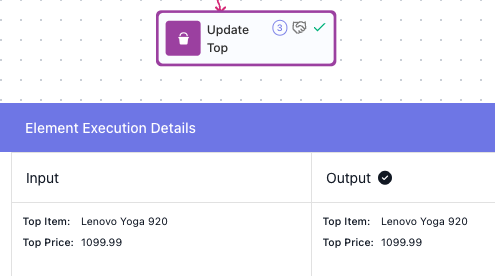
Run the flow over the cart's products and both variables come out filled: Top Item holds
Lenovo Yoga 920 at 1099.99.
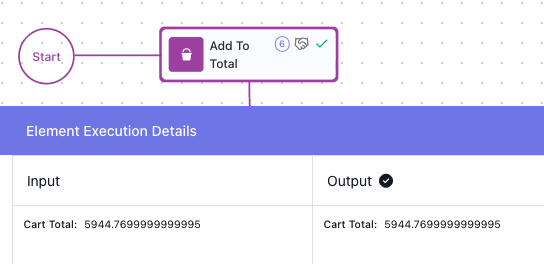
Cart Total holds the summed line totals - 5944.7699999999995
(adding amounts that carry decimals leaves a small floating-point tail, which you would round to
5944.77 before showing it to anyone).
Stop before you reach the end
You do not always need to walk the whole collection. When a pass finds what you came for, or hits a case that makes the rest pointless, a Break inside the loop ends it at once and the flow carries on after the loop, leaving the remaining entries untouched. Reach for it to:
- stop at the first entry that matches what you are searching for;
- give up when an entry disqualifies the rest;
- stop once you have collected enough.
You usually put a Break on a Condition's exit path, so it fires only when your test passes. It behaves the same in a List Iterator as in a Repeat - the Break reference has the details.
A List Iterator is the tool when you already hold the collection and want to touch every entry. When there is no collection to walk and the loop should run until a condition turns false, reach for a Repeat instead, covered in Repeating Steps.