SLA Goals
An SLA goal is how FlowRunner™ holds a flow run to a deadline - resolve this support issue within two working days, say - and escalates when a run is about to miss it. It is a per-flow setting, on the flow's SLA Goals tab, and is available on the Business or Enterprise plan.
An SLA goal works with an SLA Calendar. The goal sets the target - how long a run is allowed - and the SLA Calendar it points at defines which hours count toward it, so "two working days" is measured in business hours, not wall-clock time that might span a weekend.
A flow can hold several goals; each has a name, an on/off switch, and three parts.
The target
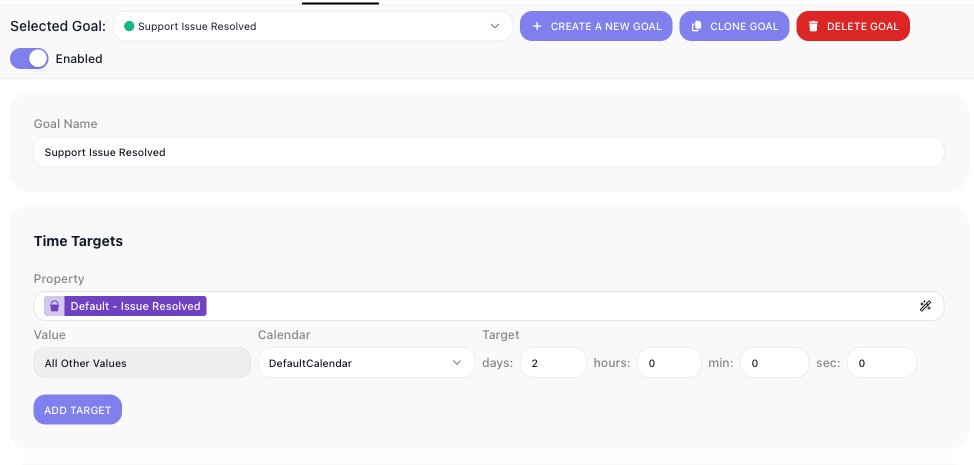
Pick a goal from Selected Goal, name it under Goal Name, and switch it on with Enabled. A goal's first part is its Time Targets - the deadline. You give a Target - a span in days, hours, minutes, and seconds - and pick the Calendar it is measured against, so the target counts only working hours.
A target can depend on a value in the run. Point Property at a flow property and give a Value; the target then applies to runs where that property holds that value. Add a target per value - a tight deadline for urgent cases, a looser one otherwise - and let All Other Values catch the rest. In the screenshot, a single target of two days covers "All Other Values" of the Issue Resolved property.
When the clock runs
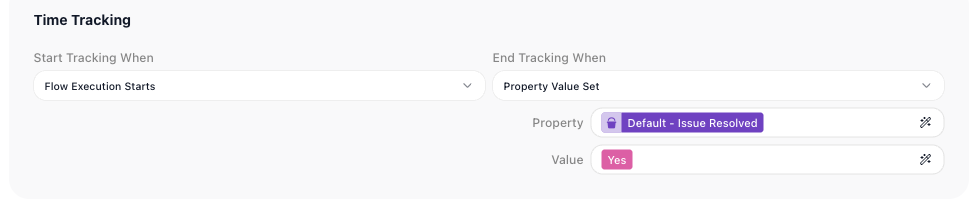
Time Tracking sets when the goal's clock starts and stops. Start Tracking When chooses what starts it - here, Flow Execution Starts - and End Tracking When what stops it - here Property Value Set, when the flow sets the Issue Resolved property to Yes. The working time between the two is what the target is checked against.
Escalating a late run
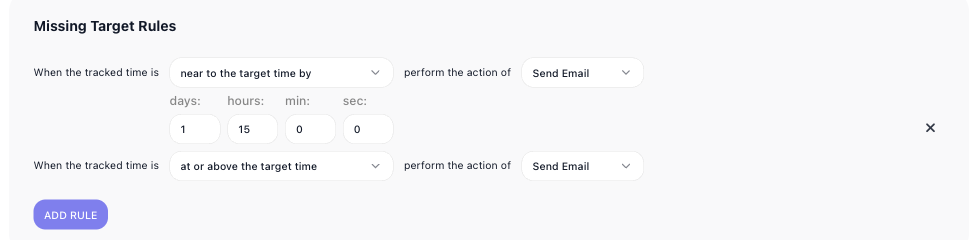
Missing Target Rules decide what happens as a run approaches or passes its target. Each rule fires an action - such as Send Email - on a condition: when the tracked time is near to the target time by a span you set, or at or above the target time. The goal in the screenshot sends an email 1 day 15 hours before the target, and another once the target is reached. Add as many rules as you need.
Related
- Compliance & Security - where SLA Calendars, the working-hours calendars a goal measures against, are set up
- Flow Scheduling - running flows on a schedule, the kind of timed activity a goal measures against a deadline