Knowledge Base: Delete by Filter
This block removes documents from a Knowledge Base in bulk. You describe the documents to remove by their metadata labels, and every document whose metadata matches is deleted in one step.
How it works
The block lives in the Actions palette. You do not name the documents to delete one by one. Instead you give it a Filter - a set of metadata labels - and it removes every document in the Knowledge Base whose metadata carries all of those labels. Matching is exact and combines with AND: if your filter sets two labels, a document has to match both to be removed, and one label is enough to spare a document only if it does not match. The labels you can match on are the metadata that was attached when each document was added, so this block reaches back to the tags you set at Add time and uses them to select what goes. One run can remove many documents at once, or none if nothing matches. Either way the block hands back a result you can read downstream - it carries how many documents were removed, so a following step can confirm the delete did what you expected.
When to use it
Reach for it when you want to clear out a whole group of documents at once and you have tagged them so they can be found together - everything from one source, one import run, or one category. It saves you from listing and removing documents individually, which is the job of Knowledge Base: Delete Document when you already hold a single document's reference. The trade-off is that the filter, not a hand-picked list, decides what goes, so a filter that is broader than you intended will take more documents with it than you meant to remove.
Example
Suppose every night a flow imports fresh product descriptions into a Knowledge Base, and each import tags its documents with the source and the date it ran. A document added on the 14th was stored with metadata like this:
The next night's import is about to load the current descriptions, so you want to clear out the previous night's batch first - and only that batch, not the documents from any other source. Point the block's Knowledge Base ID at your product Knowledge Base, then build the Filter from the two labels that single out that batch:
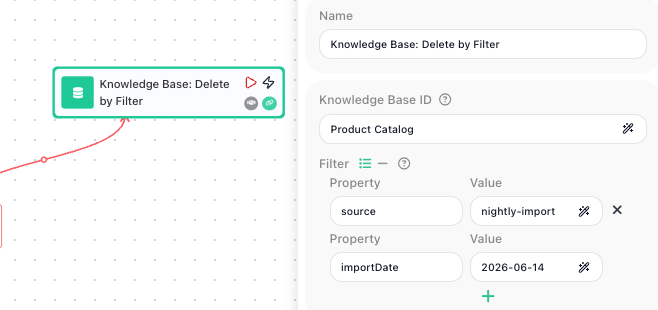
When the flow runs, the block looks at every document in the Product Catalog Knowledge Base and removes the ones whose metadata has both source equal to nightly-import and importDate equal to 2026-06-14. A description tagged with a different importDate stays, and so does anything from a different source, because it fails the source match.
The block exposes its result under the alias in Reference Result Data As - here the default Knowledge Base: Delete by Filter Result. A later step reads how many documents went by referencing that alias in the Expression Editor, for example Knowledge Base: Delete by Filter Result → count, so a Condition can confirm the batch was cleared before the new import begins. The block always hands back this result, so the reference resolves even when the filter matched nothing - the count is simply zero.
Configuration
| Field | Description |
|---|---|
| Knowledge Base ID | Required. The Knowledge Base to delete documents from, set by its name or an expression. |
| Filter | Required. The metadata labels a document has to match to be deleted, as key/value pairs. Matching is exact and combines with AND, so a document is removed only when it carries every label in the filter. You can enter the labels as separate Property/Value rows, or switch to passing a single object instead. Only flat key/value pairs are allowed - a value cannot be a nested object. |
Common settings (available on most blocks):
| Field | Description |
|---|---|
| Name | A label for this block on the canvas. |
| Reference Result Data As | The alias used to reference this block's result in later blocks. |
| Assign to a Variable | Optionally store the result in a Data Bucket variable too; you choose the bucket and the variable name. |
| Logging | What to log to the Logging panel while the flow is LIVE, both on start and on completion. |
| Notes | Freeform notes for documenting the block; they do not affect execution. |
Behavior
- A filter that matches nothing is not an error - the block removes zero documents and the flow carries on to the next step.
Things to watch for
- You can only filter on metadata that was attached when the document was added. If a document was stored without the label you are filtering on, this block has no way to select it - plan your tagging when you add documents so the groups you will want to clear out later can be matched.
- The filter decides what goes, so a filter that is broader than you intended deletes more than you meant to. A single label that many documents share will remove all of them - narrow the filter with enough labels to pick out only the group you want, and consider checking with a Knowledge Base: List Documents step using the same filter first to see exactly what it matches.
- Deletion is permanent. There is no undo, and a removed document is gone from the Knowledge Base for good - you would have to add it again to bring it back.