Custom Cloud Code
This block runs a snippet of JavaScript as a step in your flow. You pass values in as named arguments, write your logic, and the value you return becomes the block's result.
How it works
Each time the flow reaches this block, your code runs once, on the server, as a single step.
Data flows in through the Arguments list on the block's configuration panel. Each
argument is a name plus a value -
typically an expression that reads a previous step's result. Press Open Code Editor to
write the code; inside the Code Editor, each argument name is a ready-to-use top-level
variable. The values arrive already typed, so an array stays an array you can call
.filter() on. Whatever your code returns
becomes the block's result, which later blocks read in the Expression Editor under the
block's result alias - by default, Custom Cloud Code Result.
Each run starts clean - nothing your code sets persists from one run to the next.
When to use it
Reach for it when a few lines of code would be cleaner than wiring up several blocks to do the same thing. Reshaping an API response, computing a value, or combining two blocks' outputs is often a short snippet, where the no-code equivalent might be a chain of Transform Data blocks that clutters the flow. It is also how you do something genuinely custom that no built-in block offers. The code can even reach the web itself with fetch, but save that for the occasional call a snippet genuinely needs: a dedicated block like HTTP Request shows its call on the canvas, records it in run history, and can retry on failure, none of which a fetch buried in code gets you. You will find the block in the Actions group of the block palette.
Example
Suppose an upstream Fetch Orders block (an HTTP Request) fetched a list of orders, and the rest of the flow needs one question answered: how many orders are still open, and which ones - a count to branch on, and the ids to save for the follow-up. Say the fetched list looks like this:
[
  { "id": 1002, "status": "open" },
  { "id": 1003, "status": "shipped" },
  { "id": 1005, "status": "open" }
]
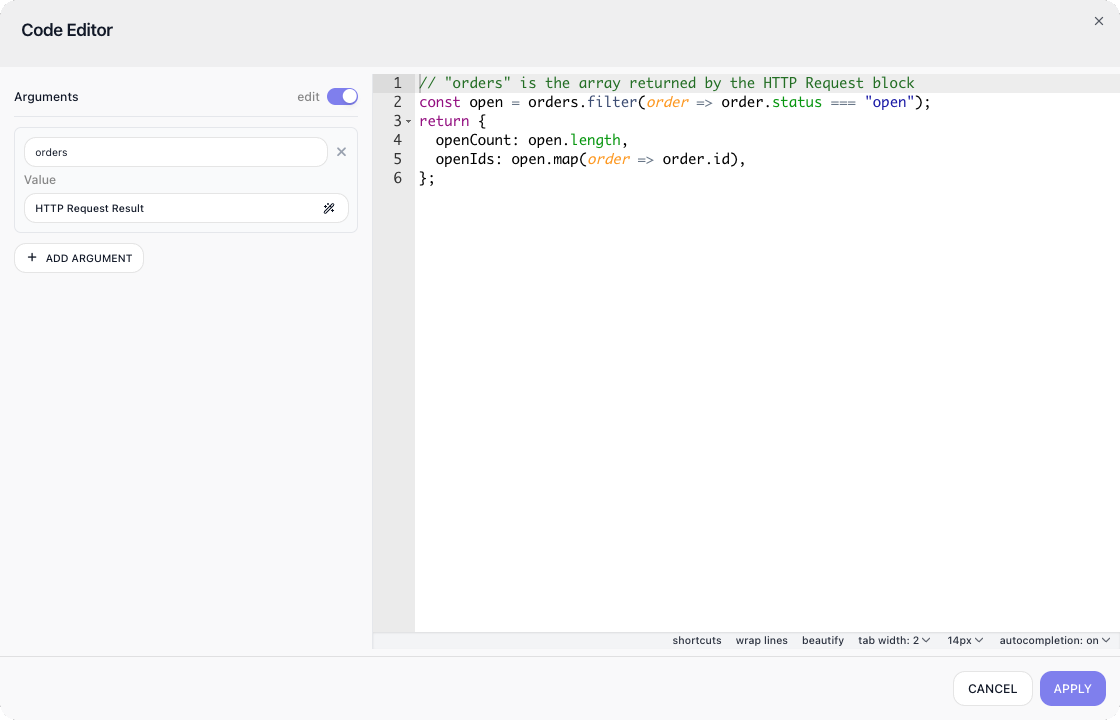
This block - named Count Open Orders here - answers that question. In its Arguments list, add one argument named orders, and for its value pick the Fetch Orders block's result in the Expression Editor. Then write the code in the Code Editor, opened with Open Code Editor:
// "orders" is the array returned by the HTTP Request block
const open = orders.filter(order => order.status === "open");
return {
  openCount: open.length,
  openIds: open.map(order => order.id),
};
The screenshot below shows the editor with orders bound beside this code:
Against the sample list above, the code returns this - the block's result:
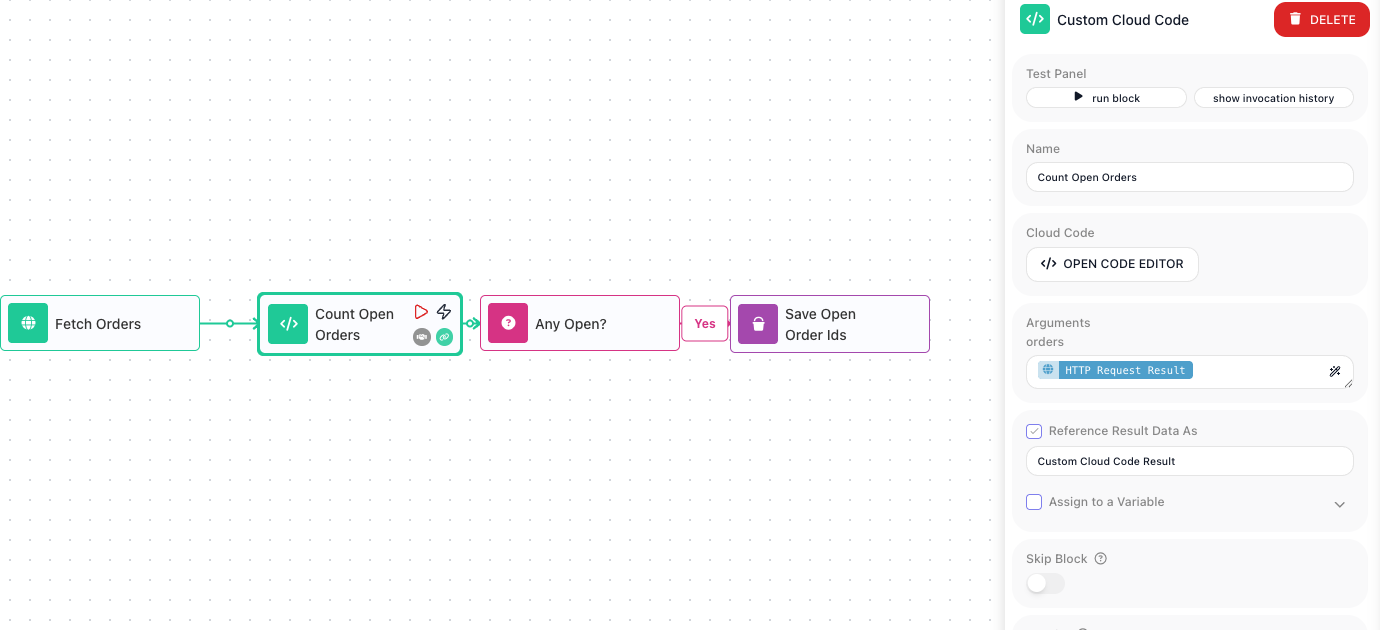
Downstream blocks read the result through its alias - left at its default, Custom Cloud Code Result. In this flow, an Any Open? block (a Condition) checks whether Custom Cloud Code Result → openCount is greater than 0, and its Yes branch leads to Save Open Order Ids (a Set Variables block), which stores Custom Cloud Code Result → openIds in an Open Order Ids variable - ready for whatever notification or reporting step the flow adds next. The count and ids the code computed drive the rest of the flow. On the canvas, the chain reads left to right:
What the code can use
The runtime is the isolated JavaScript environment described above. Modern language features are all there, and a set of familiar globals comes with them:
fetch- real network access. It works as it does in a browser: pass headers as a plain object and the body as a string, and read the response with.json()or.text(). There are noHeaders,FormData, orBlobconstructors, so stick to plain objects and strings.crypto-randomUUID(),getRandomValues(), and the WebCryptosubtleAPI.Buffer- base64 and hex conversions, and binary data generally.- Timers -
setTimeoutandsetIntervalreally wait. To pause your code, wrap one in a Promise and await it:await new Promise(r => setTimeout(r, 300)). - Text and URLs -
TextEncoderandTextDecoder,atobandbtoa,structuredClone,URLandURLSearchParams, andAbortController.
These globals are everything the runtime provides - anything they do not cover still comes into the flow through blocks. What is deliberately not here is Node.js itself; the exact list is under Limitations below.
As an AI Agent tool
Custom Cloud Code can also be given to an AI Agent as a tool, so the agent runs a snippet on its own when it decides it needs to - to do a calculation or reshape some data mid-task. You attach it from the agent's Manage Capabilities window, where it is listed under Utils. The tool then appears in the Tools row on the agent block, and selecting it there opens the tool's own configuration.
A tool turns the block's usual data flow around: instead of the flow handing every value in, the agent supplies what you leave open. Leave the code or an argument value empty and the agent provides it at runtime; a filled value is locked - the agent cannot see or override it.
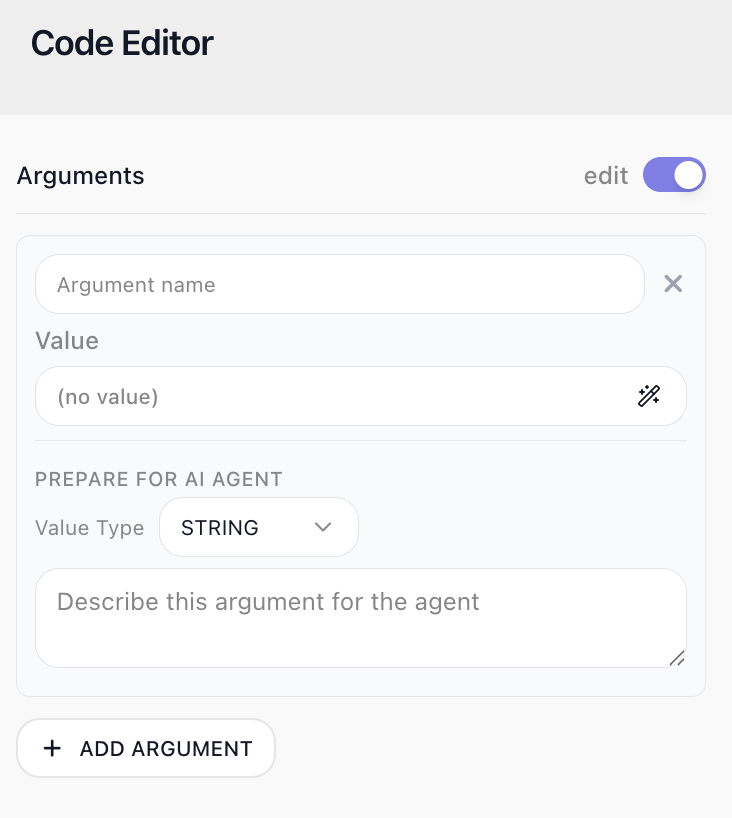
In the tool's Code Editor, each argument gains two extra fields under Prepare for AI Agent:
- Value Type - the data type the agent must supply, such as a string or a number.
- Description - what the argument is for, written for the agent. Together with the type, this is how the agent knows what to pass, and when to reach for the tool.
As an ordinary block step, none of this appears: an argument is just a name and a value.
Configuration
| Field | Description |
|---|---|
| Arguments | The values your code can use. Each argument has a name and a value, where the value is either static or an expression that references a previous block's result. Inside the code, each argument is available as a top-level variable of the same name. |
| Code | The JavaScript to run. Press Open Code Editor to write it in the full-screen Code Editor, where the Arguments panel sits beside the editor. Return the value that becomes this block's result. |
Common settings (available on most blocks):
| Field | Description |
|---|---|
| Name | A label for this block on the canvas. |
| Reference Result Data As | The alias used to reference this block's result in later blocks. |
| Assign to a Variable | Optionally store the result in a Data Bucket variable too; you choose the bucket and the variable name. |
| Skip Block | When on, the block is skipped during execution and the value in Simulated Result is used as its output. |
| Logging | What to log to the Logging panel while the flow is LIVE, both on start and on completion. |
| Notes | Freeform notes for documenting the block; they do not affect execution. |
Behavior
- async/await and Promises are supported; a returned Promise is awaited and unwrapped automatically before the result is captured.
- fetch makes real calls; await it and read the reply from the Response.
- Throwing an Error sets the block's status to Error; the message keeps the error's name as a prefix.
- A thrown bare string also fails the block, with that string as the message - though a real Error object remains better style.
- Even null passes through as-is; nothing is converted to text on the way in.
- Any JSON-serializable return value works, scalars included.
Limitations
- You cannot load external libraries or packages - the globals listed under What the code can use are everything available. There is no require, no import, no process, and none of the Node modules (fs, http, zlib, and the rest).
- The server runs in UTC with the en-US locale. Date and number formatting for other locales still works - Intl carries the full locale data.
- The result is serialized as JSON. Map, Set, and RegExp become empty objects; NaN and Infinity become null; and undefined, functions, and Symbols are dropped.
- Code runs in non-strict (sloppy) mode - assigning to an undeclared variable does not throw, so a typo in a variable name can fail silently.
- Time is not the tight limit - runs that compute or wait for over a minute complete fine. Memory is. Every Custom Cloud Code block, Custom Cloud Code tool on an AI Agent and custom extension action in a workspace runs in the same environment, so everything running at the same moment shares one memory ceiling, and that ceiling depends on the workspace billing plan. Code that goes over it is stopped, and the block fails with "Cloud Code execution was interrupted: the execution environment stopped responding while running your code. This usually means the code crashed the process or exceeded the environment's memory limit. Please review your code and run it again." A crash for any other reason gives the same message, so check both how much data the code holds at once and what else was running at the same time.
- The value the code returns can be at most 5 MB. A larger value fails the block after the code has run, so anything the code did before returning has already happened, with "The Cloud Code result is too large to return. It exceeded the maximum allowed response size (5 MB). Reduce the size of the value your code returns and try again." A Handle Error catches it like any other failure, but a retry returns the same value and fails again: return less instead, such as a summary or a link to where the full data is stored.
- A value that cannot be JSON-serialized - a BigInt, or an object with a circular reference - fails the block with "Return value is not JSON-serializable", naming what could not be converted.
- An un-awaited promise rejection crashes the execution environment and fails the block the same way. Await every promise, or attach a .catch().