Calling an External Service
Most flows have to reach something outside FlowRunner - look up a customer in your CRM, charge a card, post a message to a channel, pull records from an internal API. There are two ways to do it, and picking the right one saves a lot of work.
Look for a dedicated block first
Many services already have a block of their own. Type the service name into the Search box at the top of the block palette in the Flow Editor: a match means the work is done for you. A large library of Extensions ships with FlowRunner - Airtable, Stripe, Slack, and many more - with nothing to install, and a connected MCP server adds its tools as blocks the same way.
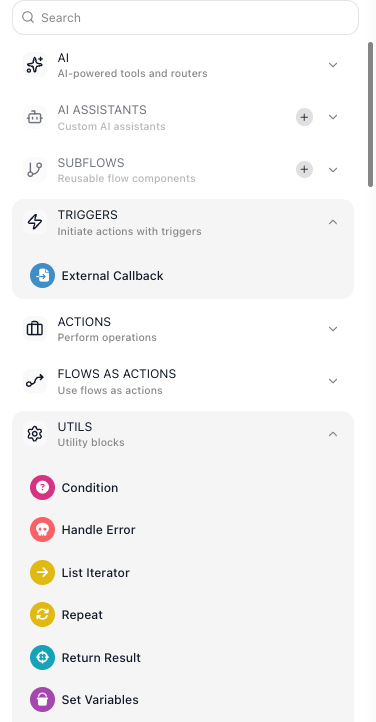
A dedicated block already knows the service's address and handles its authentication, so you fill in only the parts that are about your request. Build the call by hand when the search comes back empty.
Call anything else with HTTP Request
An HTTP Request block reaches any service with a web API. You are describing a call rather than writing networking code, and four fields describe it: the URL it goes to, the HTTP Method that says what you mean to do there, the Body it carries, and the Headers that travel with it.
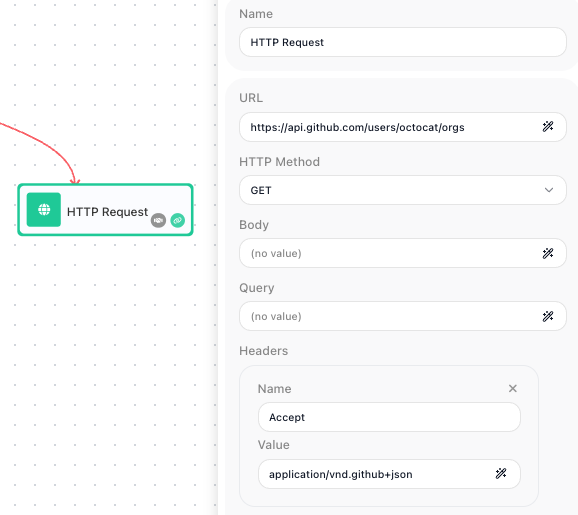
The address can be built from an expression, so a run can call
/customers/{{Get Order Result->customerId}} rather than a fixed URL.
Headers carry information about the request rather than the data it sends - the content type, what you will accept back, and the credentials. The block has no separate credentials field, so an API key, a Bearer token, or Basic credentials go in a Header as a Name and Value pair. When a call comes back rejected, that is the first thing to check.
This is the reason to prefer a dedicated block or an MCP server where one exists: both use a connection you authorize once, so no secret lives in the flow itself. See OAuth Connections.
Read the response
The block's result is the response body, published under the block's alias - so name the block for what it fetches and a later field reads Look Up Customer Result → email. The fields will not be listed until the block has actually run once; see Passing Data Between Blocks.
One thing to know before you write your success check: the result is the body alone, with no status code or response headers wrapped around it. You cannot test the numeric status to tell success from failure. Check for something the body itself contains - an id on a created record, or the error field the service returns.
When a call fails
An outside service will eventually be slow, overloaded, or briefly unreachable, and by default a failed call ends the run. Two settings cover it:
- Retry the call itself. Turn on the block's Retry Policy and it reattempts before reporting failure - you choose which status codes and network errors are worth retrying, how many attempts to make, and how long to wait between them. Retry only what is safe to repeat: a GET can be retried freely, while a POST that charges a card repeats that charge on every attempt.
- Catch the failure that remains. When the call has genuinely failed, a Handle Error block gives the run somewhere to go instead of stopping - fall back to a default, alert someone, or record it and carry on. See Handling Errors.
If the work on the other end takes minutes or days rather than seconds, do not hold the call open. Have the service call you back when it is done. See Waiting on an External System.
Related
- HTTP Request - every field, the retry policy, and a worked example
- MCP Servers - registering a server so its tools become blocks
- Custom & Marketplace Actions - adding blocks that are not built in
- Handling Errors - recovery paths when a call fails
- Returning a Result - the other direction: answering a caller of your flow