External Callback
This trigger lets an outside system start - or resume - your flow when an event happens out there: a payment confirms, a webhook fires, another service posts an update. FlowRunner gives the flow its own web address, the Callback URL, and whatever the caller sends becomes data your flow can read.
How it works
This trigger lives in the Triggers palette category. Think of the Callback URL as a private
doorbell for this flow. The trigger hands you one unique address that points only here, and the
flow waits at it. When an outside system makes an HTTP request to that address, the trigger
answers: it takes whatever came in, hands it to the rest of the flow under an alias you name in
Reference Trigger Data As (External Callback Data by default), and the run proceeds. The
door is only open while the flow is in the LIVE state, so a request that arrives when no version is
LIVE gets error 28010 and starts nothing (while you build, a test run of the block and
Learning Mode, below, answer it instead).
A trigger has no result of its own to compute; the data it exposes is the request that came in. To
list that request's fields in the Expression Editor, the trigger needs one example of it: a real call
to the LIVE flow, a test run of the block, or a sample captured with Learning Mode. Once the flow
has received a real call, its latest one supplies the fields with nothing turned on. Learning Mode
is not a field in the block's settings panel - you turn it on from the block's hover toolbar on the
canvas, then send one real sample request to the Callback URL, and the trigger records the
structure of what arrived. When more than one example exists, the Expression Editor uses the block's
latest test run first, then a structure Learning Mode captured, then the latest real call; a newer
real call never replaces a captured structure. Whichever example it uses, a downstream step reads a field
through the Expression Editor: the alias appears there as a reference you pick, and you walk into
a field with ->, so the email address arrives as External Callback Data → customer.email.
Learning Mode works while you are still building, before the flow is ever LIVE.
When to use it
Reach for it when something outside FlowRunner needs to kick off your flow - a payment provider announcing a charge, a form submission, another service posting an event. You give that system the Callback URL and it calls you, rather than you polling it. ADD A CONDITION lets you gate the trigger so it fires only for the requests you care about, which keeps unrelated calls from starting runs. The same trigger can also pick up where a paused run left off, covered below.
Resuming a paused run
Most triggers only ever begin something. This one can also finish something. Placed at the start of a flow, an External Callback begins a new run for every call that comes in. But placed mid-flow, it does not start anything new at all - it wakes a specific run that paused earlier, waiting for exactly this callback.
That difference is what makes a hand-off possible. Your flow can reach out to an outside system, ask it for something that takes time, and then stop and wait rather than guessing how long to sleep. When that system finishes and calls the Callback URL back, the waiting run picks up right where it left off and carries on with the answer in hand, so the right run wakes for the right call.
Example
Suppose a payment provider should kick off your flow every time a customer pays. In the provider's dashboard you paste this trigger's Callback URL as the webhook target. When a payment clears, the provider sends a POST to that URL with a JSON body like this:
{
  "event": "payment.succeeded",
  "orderId": "ORD-4417",
  "amount": 4999,
  "currency": "USD",
  "customer": { "email": "dana@example.com" }
}
Before wiring anything up, you turn on Learning Mode and have the provider send one test payment to the Callback URL. The trigger records the structure above, so later steps can reference fields by name instead of guessing. The whole body is now available under the alias External Callback Data. To read the order number, a later step opens the Expression Editor, picks that alias, and walks into the field with ->, giving External Callback Data → orderId.
The provider also sends other events to the same URL - refunds, disputes - that you do not want to act on here. ADD A CONDITION that checks External Callback Data → event equals "payment.succeeded", so a refund or dispute notification arrives but does not start a run.
Set the flow LIVE. Now each successful payment posts to the Callback URL, the condition passes, a new run begins with that payment under the External Callback Data alias, and the steps after the trigger can read External Callback Data → orderId and External Callback Data → amount to record the sale.
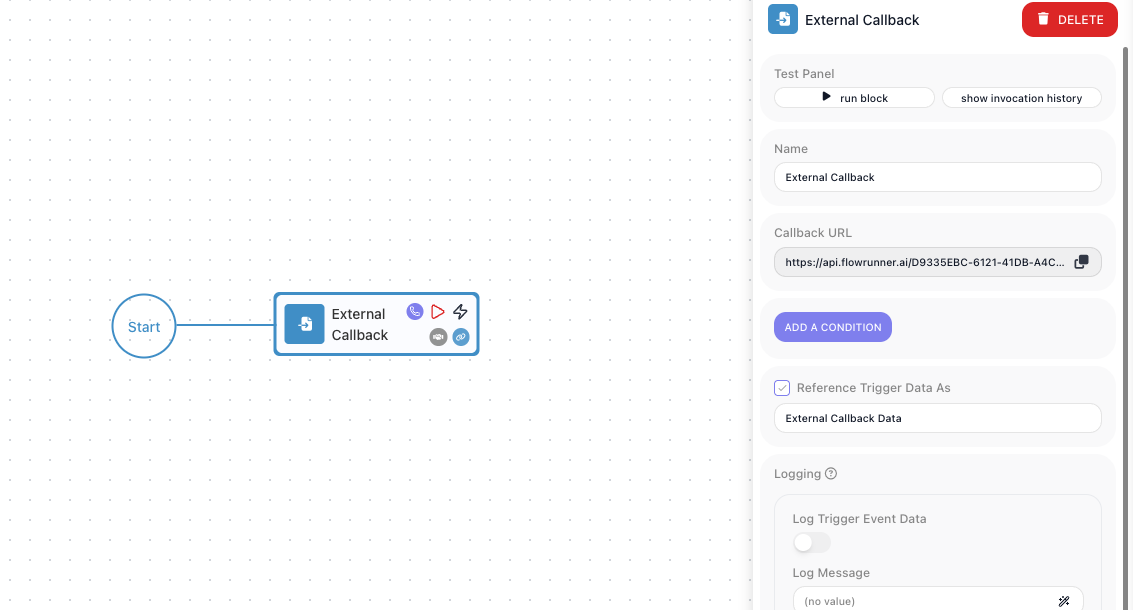
Configuration
| Field | Description |
|---|---|
| Callback URL | The flow's unique web address, generated for you with a copy button. Give this to the outside system so it can call your flow; the URL identifies the workspace and flow it belongs to. |
| Add a Condition | An optional gate on whether the trigger fires for a given request. If the condition is false for an incoming call, the trigger does not start a run for it. |
| Reference Trigger Data As | The name you use to read the incoming request elsewhere in the flow. A trigger has no computed result, so this alias points at the request that came in. |
Common settings (available on most blocks):
| Field | Description |
|---|---|
| Name | A label for this block on the canvas. |
| Logging | What to log to the Logging panel while the flow is LIVE, both on start and on completion. |
| Notes | Freeform notes for documenting the block; they do not affect execution. |
Things to watch for
- The trigger listens only while the flow is in the LIVE state. A request that arrives when the flow is not LIVE is not handled and starts no run.
- Used at the start of a flow, the trigger begins a new run for each call. Used to continue a run that paused waiting on a callback, it resumes that existing run instead of starting a new one.
- The Expression Editor lists the request's fields only once the trigger has seen one example: a real call to the LIVE flow, a test run of the block, or a sample sent with Learning Mode on. Learning Mode does not need the flow to be LIVE; it listens for one sample request while you build, and what it captures is not replaced by later real calls (a test run of the block does take precedence over it).
- When you turn Learning Mode on, the trigger waits for a real request to the Callback URL. Send that sample yourself with a test tool such as Postman, or have the integrating system send one; FlowRunner does not generate it for you.