Activating an External Callback
An External Callback block gives one point in a flow its own
URL. Calling that URL either starts a new run of the flow, when the block is the first step, or lets a run
that is paused at the block continue. The call accepts GET or POST, carries whatever data the flow
needs, and answers with the id of the run it started or continued.
Endpoint
https://api.flowrunner.ai/{workspace-id}/{api-key}/automation/flow/{flow-id}/trigger/{block-id}/activate
| Placeholder | Value | Where it comes from |
|---|---|---|
{workspace-id} |
The workspace the flow belongs to | Workspace Settings ▸ General, Credentials section |
{api-key} |
The workspace's API key | Same section, beside the Workspace ID |
{flow-id} |
The flow that contains the block | Filled in for you - see below |
{block-id} |
This particular External Callback block | Filled in for you - see below |
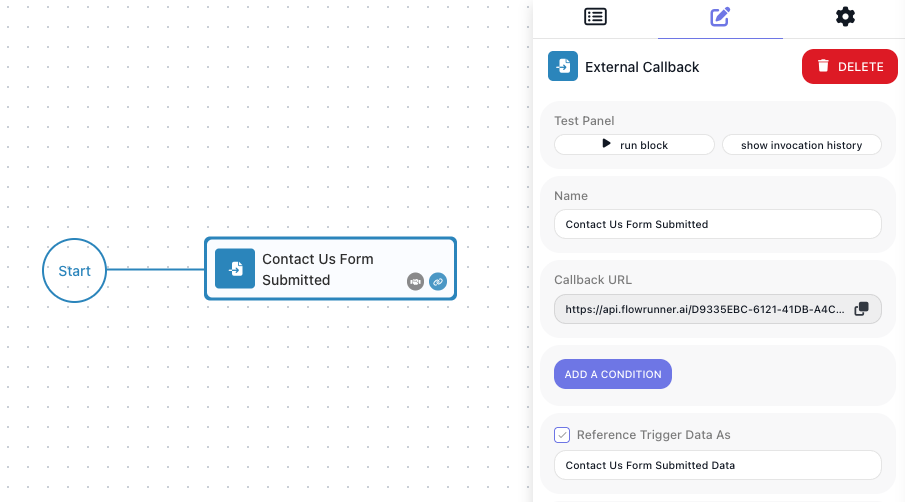
You never assemble this address yourself. Every External Callback block shows its complete URL, all four segments filled in, in its Callback URL field - see Get the address. Every block has its own URL; they are not interchangeable.
Calling with POST
The data you send becomes the block's data, read by later steps under the alias set on the block. With
POST it goes in the body, sent with Content-Type: application/json:
curl --request POST \
  --url "<Callback URL>" \
  --header "Content-Type: application/json" \
  --data '{
    "event": "payment.succeeded",
    "orderId": "ORD-9001",
    "amount": 4999
  }'
The body becomes the block's data, whole. A call with no data at all - the bare address - is valid. On a
POST, query parameters are ignored, with one exception: execution picks which waiting run to continue
(executionId is accepted as an alias). It is required when the block sits after the first step, and
ignored when the block is the first step - see
When more than one run is waiting:
curl --request POST \
  --url "<Callback URL>?execution=4CE29875-0BD4-4AE4-B75C-60FCC55F4436" \
  --header "Content-Type: application/json" \
  --data '{
    "event": "payment.succeeded",
    "orderId": "ORD-9001",
    "amount": 4999
  }'
Calling with GET
With GET, the same data goes in the query string, and no headers are needed:
Every query parameter except execution becomes one field of the block's data, under its own name. The
execution parameter works exactly as on a POST. Any fetch of the URL is a real call - a chat
link preview or an uptime monitor included - so share a Callback URL as text, never a clickable link.
Sending the key in a header
The Callback URL carries the API key in its path, so anyone who has it can activate the block. The same
call is also accepted at a second address that keeps the key out of the URL, in an FR-Access-Key header:
Take the ids from the block's Callback URL: {flow-id} is the segment after /flow/, and {block-id} the
segment after /trigger/. The POST example, sent this way:
curl --request POST \
  --url "https://api.flowrunner.ai/api/v1/{workspace-id}/flows/{flow-id}/triggers/{block-id}/activate" \
  --header "FR-Access-Key: {api-key}" \
  --header "Content-Type: application/json" \
  --data '{
    "event": "payment.succeeded",
    "orderId": "ORD-9001",
    "amount": 4999
  }'
Everything else works as on the Callback URL: GET or POST, the execution parameter, and the response.
Without the header (or the frAccessKey parameter below) the call is refused with 2029. Use this address in code that can send headers. A
system that can only be given a URL - most webhook senders - cannot send a header, so give it the Callback
URL itself, or this address with the key in a frAccessKey query parameter:
https://api.flowrunner.ai/api/v1/{workspace-id}/flows/{flow-id}/triggers/{block-id}/activate?frAccessKey={api-key}
Either URL carries the key, so treat it as a credential. When a header and frAccessKey are both sent,
the header is used. The Callback URL, with the key in the path, is deprecated for code that can send
headers: it keeps working, and no date has been set for removing it.
Response
An accepted call returns HTTP 200 with the id of the run it started or continued:
With execution=all, executionId lists every run that continued, comma-separated. With execution=all
and nothing waiting, the call still succeeds and the id is null:
Two calls you make while building get a placeholder instead of a run id: a call caught by
Learning Mode is answered {"executionId": "learning"}, and a call to a callback started with
Run Block is answered {"executionId": "test"}. Both are described under Get the address.
Neither value is a run id, so there is nothing to look up with it.
A call can also be accepted and still do nothing. A callback block can carry a condition deciding whether an incoming call counts; when the condition is false the call returns HTTP 200 and no run starts or continues. If a call appears to succeed but the flow does not move, check that condition first.
Errors
A refused call comes back as HTTP 400 with an error code and a message - HTTP 401 when the API key is
missing or wrong:
{
  "code": 28056,
  "message": "Your trigger activation request format can be used only for a flow that starts with a trigger. Consider adding \"execution\" parameter to activate a \"middle of the flow\" trigger."
}
The call did not identify a waiting run
| Code | What FlowRunner tells you | What to do |
|---|---|---|
28056 |
The request format can be used only for a flow that starts with a trigger; consider adding the execution parameter to activate a middle-of-the-flow trigger |
You called a callback that sits later in a flow. Add execution |
28059 |
Pending trigger was not found. Ensure that passed execution ID is valid and flow execution is waiting on this trigger | The id is wrong, or that run is not sitting at this block |
28060 |
Pending trigger was not found. Ensure that flow execution is waiting on this trigger | You used execution=any and nothing was waiting |
28100 |
Execution with that ID already exists | This run has already been let through this callback. A run passes a given block once; a later callback in the same flow is a separate wait with its own activation |
The flow or the block cannot be reached
| Code | What FlowRunner tells you | What to do |
|---|---|---|
28010 |
Trigger with that flow element ID is not found in that flow; ensure the flow and trigger names are correct and that the flow has a live version (or a paused one, when the trigger sits mid-flow) | Re-copy the Callback URL - the block's Callback URL field carries the trigger's own id, which is not the id shown elsewhere for the block - and start the version so it is LIVE |
28011 |
Trigger with that name is not found in that flow; same advice | As above |
28042 |
The flow version is not enabled, so its trigger cannot be executed | Set the version LIVE |
28093 |
Available only when the flow is in the LIVE state | Start the version you are calling so it is LIVE - see Running Flows |
The run is no longer there
| Code | What FlowRunner tells you | What to do |
|---|---|---|
28068 |
Execution context with that id not found | The id is wrong, or the run finished and was cleared |
28136 |
That execution is already terminated | The run ended before your call arrived |
The caller is not allowed
| Code | What FlowRunner tells you | What to do |
|---|---|---|
28025 |
Unable to execute the callback. User is missing required security role(s) | Call with a user token carrying the required role |
28061 |
The user token is invalid | Obtain a fresh token |
2027 |
API key is invalid (HTTP 401) - the key in the URL is not this workspace's key, or an FR-Access-Key header or frAccessKey query parameter is empty or wrong |
Re-copy the Callback URL; if you send the key in the FR-Access-Key header, re-copy the API Key from Workspace Settings > General > Credentials. Regenerating the workspace's API key invalidates every Callback URL built on the old one |
2029 |
Access Key is missing (HTTP 401) - the /api/v1/ address was called without an FR-Access-Key header or a frAccessKey query parameter |
Send the API key in that header, or in frAccessKey - see Sending the key in a header |
The request itself, or too many calls
| Code | What it means |
|---|---|
9000 |
No workspace with that id - re-copy the Callback URL |
999 / 997 / 995 / 998 |
A rate limit (per second / minute / day / in-flight) - back off and retry |
28083 / 28087 / 28132 / 28086 |
A plan limit (actions, concurrent runs, executions, active flows) - wait for capacity or raise the plan (see Billing) |
When to use it
An external callback is useful in two scenarios:
- Your flow may need to start in response to an external event - a payment provider announcing a charge, a form posting a submission, your own application saying the work it was given is finished.
- Your flow may need to wait for something outside it to finish before it resumes - a user approves a transaction, confirms email copy, and so on.
The External Callback block is the way to enable these types of behavior. Place it at the beginning of your flow or in the middle, depending on the use case. This page is about making the call. Building the flow around it is covered in Waiting on an External System.
This is the callback block, not every trigger
Other triggers in FlowRunner come from the services they belong to, and are activated by those services in their own way. This page applies to the External Callback block, which is FlowRunner's own.
Get the address
Select the External Callback block. Its Callback URL field holds the whole address, with a copy button beside it. Copy it and give it to whichever system needs to activate the trigger in the flow.
For real traffic, a version of the flow has to be LIVE. Call the address when no version is LIVE and
you get error 28010 - not because your request was malformed, but because there is nothing live to
receive it. Starting a version is covered in Running Flows.
While you are building, two things make the URL answer without the flow being LIVE:
- Learning Mode captures one sample request and records its shape, so the fields become pickable in later steps.
- Run Block on the callback starts a debug execution that waits for your call.
Starting a run, or continuing one
Both scenarios make the same call. What differs is what the call finds.
If the callback is the first step, there is no run yet. Your call creates one, and it begins with the data you sent.
If the callback sits further along, the run was already under way - started by whatever starts that flow - and it has arrived at the block and stopped, waiting for you. Your call lets it carry on, with the data you sent now available to the steps that follow.
Only the second case asks more of you: a waiting run has to be identified.
When more than one run is waiting
Picture an order-processing flow. It runs every few minutes, and each run reaches a callback and waits for its own payment to clear. By mid-morning three runs are sitting at that same block, each waiting for a different order.
Now a payment clears and the provider calls your address. Which of those three should continue?
The address cannot answer that on its own - it names the flow and the block, not the run. So the call says
which one, using the execution query parameter:
Which value you use depends on whether the waiting runs are worth telling apart:
| Value | Continues | Use it when |
|---|---|---|
execution={execution-id} |
that one run | The runs are distinct - each waits for its own order, its own customer, its own document |
execution=any |
one waiting run, FlowRunner's choice | The runs are interchangeable and it does not matter which continues |
execution=all |
every run waiting at this block | One event releases all of them at once |
Where the execution id comes from
A run's id exists only once the run is under way, so it cannot be written into anything in advance. It reaches the caller one of three ways.
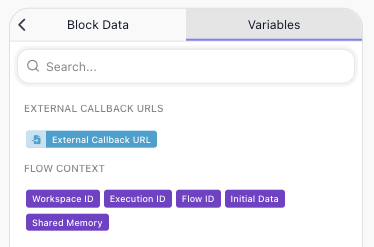
The flow hands out its own address. This works however the run began - a schedule, an API call, another flow. Every run knows its own Execution ID in the Expression Editor under Flow Context, so the step that calls the outside system composes the return address from the Callback URL and that id, and sends it. Whatever comes back points at this run.
The caller started the run and was told. A system that started the run through the
Call Flow (Non-Blocking) API received executionId in the response, and can quote it back.
Nobody can carry a per-run address. A webhook configured once in a vendor's dashboard posts to one
fixed URL and cannot append anything. Use execution=any on it.
Waiting on an External System works all three through with diagrams.
Related
- Call Flow (Non-Blocking) - starting a run over the API, and the executionId it returns
- External Callback - the block itself, its Callback URL, conditions, and Learning Mode
- Waiting on an External System - building the flow that pauses and continues
- Workspace Settings - the credentials every call carries