Error Handling
Error handling is how a flow copes with a step that fails instead of dying on the first thing that goes wrong. A service is down, a database write is rejected, a piece of input makes no sense - with error handling in place, the flow catches that failure and follows a recovery path you built, so it keeps going on its own terms rather than stopping where it broke.
How it works
By default, a flow stops the moment any block fails. Nothing after the failing block runs. For steps that only move data around that is fine, but a step that calls an outside service can fail for reasons that have nothing to do with your flow - and then the whole run gives up on the first hiccup.
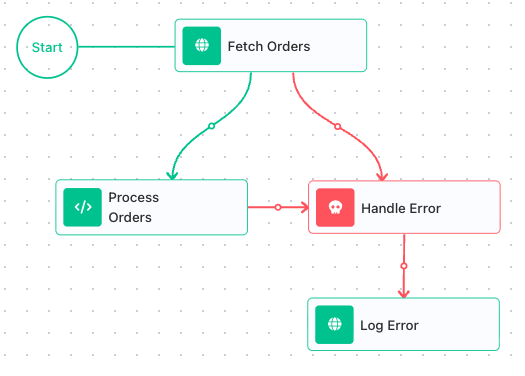
A Handle Error block changes that, one block at a time. You wire the block that might fail to a Handle Error - the failing block points to the handler. From then on that block has two exits: its normal path when it succeeds, and the Handle Error when it fails. On failure the flow does not stop; it takes the Handle Error path and runs the recovery steps you built there.
- A block wired to a Handle Error is a handled failure - the flow recovers and keeps going.
- A block with no Handle Error is an unhandled failure - it stops the run.
Once a failure is caught, the recovery steps can read the error. It comes back through the Handle Error's result alias - Handle Error Result by default - which you open in the Expression Editor, under Block Data:
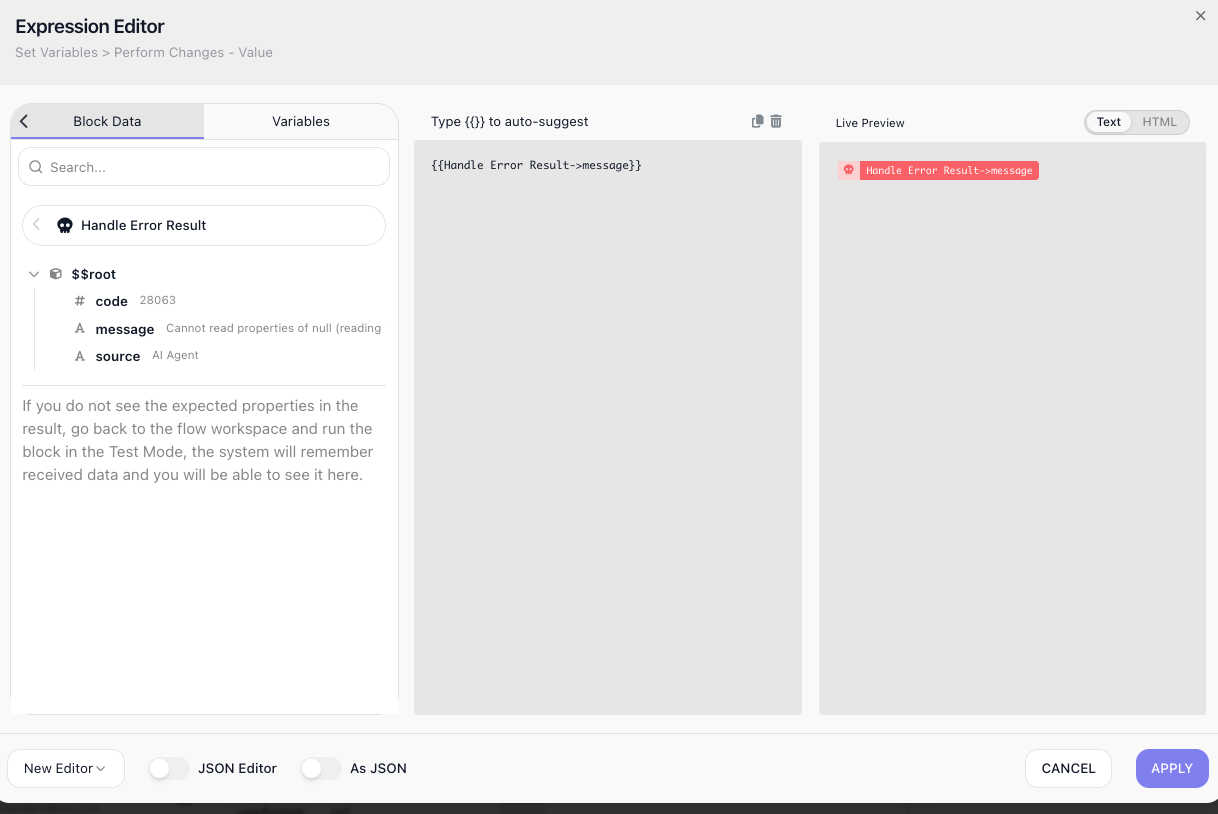
A caught error has up to three fields:
- message - a description of what went wrong. Always present.
- source - the name of the block that failed. Always present.
- code - a numeric error code. There for some failures, absent for others (a Custom Cloud Code block that throws carries none).
Build your recovery on message and source, since they are always there; use code when the failure has one. Note that message is the raw failure text - sometimes an internal string rather than a sentence written for a user - so pair it with source when you show it to a person.
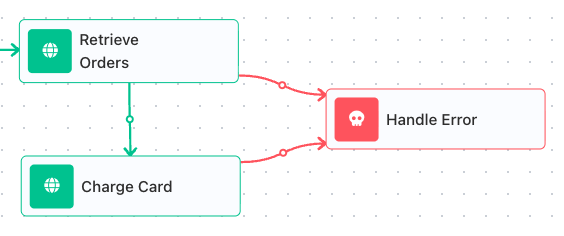
You read a field with an expression like Handle Error Result → message. And because source names the block that failed, one Handle Error can guard several blocks at once and still tell you which one broke:
When to use it
Design error handling around any step that can fail for reasons outside your control - not the steps you fully control, but the ones that depend on something else behaving. An HTTP Request to a service that might be down, a database write that might be rejected, an AI Agent that might choke on its input, a file upload that a network blip might interrupt. Each of those is a place where, on a bad day, the step fails through no fault of your flow. Ask of every such step: if this fails, do I want the whole run to stop, or do I want to recover. Wherever the answer is recover, connect that step to a Handle Error. The steps that only move data around, on the other hand, rarely need one.
Reacting to different errors
Different failures deserve different responses, and the code is what lets you tell them apart. Inside the recovery path, send the flow through a Condition that branches on the code:
- A temporary failure - a timeout, a service briefly down - is worth another try. Wait a moment and run the step again.
- A permanent failure - malformed or invalid input - will fail the same way every time, so retrying is pointless. Route it to a person instead.
The caught error also carries source and message, so the path that hands a case to a person can name which block failed and why.
Two things to remember about code:
- It is a FlowRunner™ numeric code, not an HTTP status. An HTTP Request that cannot reach its
address reports a FlowRunner code, such as
28082. - Not every failure has one. A service that answers with an error status (a 404, a 500) gives no
code unless its response body has a
codefield; the message comes from the body, and an empty body leaves the status indetails.httpCode. Branch on code only for failures that provide it, and fall back on source and message, which are always there.
Retrying a failing step
A Handle Error catches a failure and runs your recovery path once - but catching a failure is not the same as trying the step again. To actually retry, you wrap the step in a loop and let the Handle Error feed the next pass. A flow built to retry an AI Agent shows the shape:
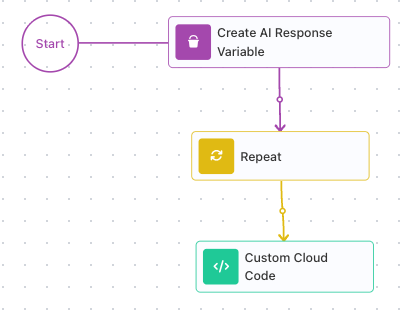
Two pieces sit outside the loop. A Set Variables block (titled Create AI Response Variable on the canvas above) creates the variable that will hold the answer, starting empty. It sits outside the loop on purpose: the loop writes to it, and it has to outlive the loop so a later step can still read it. A Repeat block then wraps the risky step; its Maximum Iteration Count caps how many attempts it gets - five here. The block after the loop reads the answer.
Inside the loop is where the retry happens:
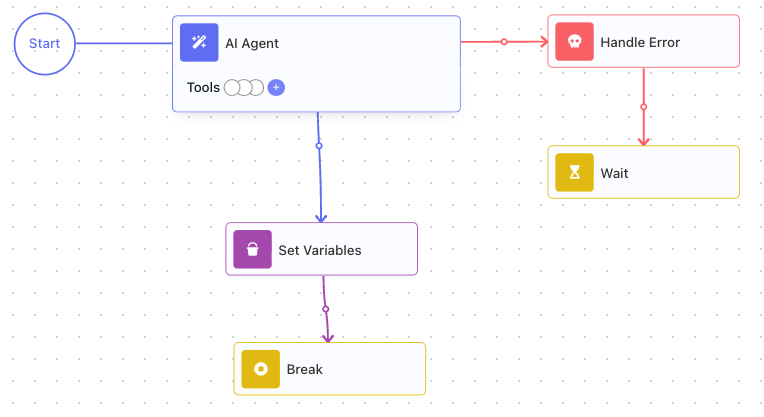
The AI Agent is connected to a Handle Error, so a failure diverts instead of ending the run. On a good pass, the agent's success exit runs a Set Variables that writes its output into the answer variable, then a Break ends the loop - once you have an answer, there is no reason to keep trying. On a bad pass, the Handle Error catches the error and a Wait pauses before the pass ends. Because the failure is handled, it ends only that pass of the loop, not the whole run - so the loop comes around and runs the agent again, after a delay rather than hammering a service that is already struggling. (An unhandled failure here would stop the run, loop and all.)
The loop stops the moment the agent succeeds, and otherwise keeps retrying until it runs out of attempts. When it ends, the answer variable holds the successful output, or is still empty if all five attempts failed - so the step after the loop can tell whether it got an answer and respond accordingly. That Break on the success exit is what makes this a real retry rather than a fixed five runs: without it, the loop would keep calling the agent even after it succeeded.
Common recovery patterns
The recovery path is yours to build. A handful of patterns cover most of what you will reach for:
Retry after a Wait. For a failure that might pass on its own - a momentary timeout, a service catching its breath - put a Wait block in the recovery path to pause, then run the failing step again. Catching a failure is not the same as retrying it, though; the loop that makes the step run again is shown in Retrying a failing step above.
Fall back to a default. When the step's job is to fetch a value, the recovery path can supply a sensible default instead, so the rest of the flow has something to work with rather than nothing.
Notify someone. Send a message that carries the source and message from the caught error, so a person learns which block failed and why without digging through a run.
Hand off to another flow. For recovery logic you reuse across flows, the recovery path can run another flow built to handle the failure with a Call Flow block, keeping the messy part in one place.