Call Flow (Non-Blocking)
The non-blocking Call Flow endpoint starts an instance of a FlowRunner™ flow with one GET or POST
request and returns at once: the response carries the new run's executionId, and the run continues on its own. Use it when you only need the work started -
a long job, a batch, a flow that pauses at an
External Callback - or when the run may outlast the blocking
call's 300-second maximum wait. When your code needs the flow's result in the same request, use
Call Flow (Blocking) instead.
Endpoint
| Placeholder | Value | Where it comes from |
|---|---|---|
{workspace-id} |
The workspace the flow belongs to | Workspace Settings ▸ General ▸ Credentials - see Workspace Settings |
{api-key} |
The workspace's API key | Same place |
{flow} |
The flow's id, or its name URL-encoded (Order%20Lookup) - either one works |
The id is the segment after /flow/ in the address bar while the flow is open; the name is in the breadcrumb and the flows list - see Flows. Both forms are case-sensitive. An id URL survives a rename; a name URL does not. The Launch Flow Instance dialog writes the id form |
Every query parameter, and every property of a POST body, becomes one value in the run's Initial Data - this
endpoint has no parameters of its own, so leave waitResponseTimeoutSeconds out (here it would land in
Initial Data like any other name). The endpoint answers only while a version of the flow is LIVE;
otherwise the call is refused with error 28053.
Calling with GET
Copy, fill in the placeholders, and run - the flow's values travel in the query string:
curl "https://api.flowrunner.ai/{workspace-id}/{api-key}/automation/flow/{flow}/activate?orderId=1042"
A GET needs no headers. Each query parameter becomes one value in the run's Initial Data, under its own
name. Query values arrive as text: orderId=1042 reaches the flow as "1042". A query string carries text
only, so call with POST when the flow needs numbers, booleans, or structured values to arrive typed. Any fetch of this URL starts a real run - a HEAD request, a
chat link preview, a browser prefetch, or an uptime monitor included - and this call returns at once, so an
accidental run is easy to miss. Share the URL as text, never a clickable link.
Calling with POST
The same call with the flow's values as a JSON body:
curl --request POST \
  --url "https://api.flowrunner.ai/{workspace-id}/{api-key}/automation/flow/{flow}/activate" \
  --header "Content-Type: application/json" \
  --data '{
    "orderId": 1042
  }'
A POST body is a JSON object, sent with Content-Type: application/json (a charset parameter is
fine; any other media type is refused with HTTP 415). Each top-level property becomes one value in the
run's Initial Data, with its JSON type kept: {"orderId": 1042} reaches the flow as the number 1042. An
empty object {} is valid, and so is a POST with no body at all.
When a POST carries both a body and query parameters, FlowRunner merges the query parameters into the
body object. Two rules follow from that, and both are refusals rather than silent surprises: a key sent
both ways is refused with 28064, and a body that is valid JSON but not an object - an array, a bare
string - is refused with 28064 too, because there is no object to merge into. A non-object body on its
own, with no query parameters, is still accepted: the run starts with nothing for Initial Data to pick up
by name.
Response
The call returns HTTP 200 as soon as the run exists. The body carries the run's identity and nothing else, because the run has not finished:
The id finds the run on the flow's Instances tab (see
Running Flows), and names the run when you continue it at an
External Callback. It is also how your code asks what became of the run: hand it to
Checking a Run's Status to learn whether the run is still going and how it ended,
or to Retrieving Block Results to read what an individual block produced. Neither
returns the flow's own answer - a Return Result block has no
result alias - so when you need that value, either use
Call Flow (Blocking) and let it wait, or have the flow deliver the answer itself:
an HTTP Request from the flow to your endpoint, carrying the
result and the run's Execution ID. Every step can read that id under Flow Context -
Waiting on an External System shows how. Match it to the
executionId this call gave you.
Errors
Most refusals come back as HTTP 400 with a JSON code, message, and details; a wrong media type or
method is refused at the HTTP level (415 / 405) with no code. This is what the endpoint returns when it is
given the flow's name, because it expects the id:
{
  "code": 28053,
  "details": {},
  "message": "Flow with ID 'Order Lookup' and status 'LIVE' is not found."
}
| Code | What it means | What to do |
|---|---|---|
28053 |
No LIVE flow with that id or name | Check the identifier is cased exactly as FlowRunner shows it - a name also has to be URL-encoded (Order%20Lookup), and a + is not read as a space - and that a version is LIVE. A paused version (On hold) answers this too, so put it back with Resume flow in the flow's toolbar (see Running Flows). Renaming the flow breaks a name URL but leaves an id URL working |
2027 |
The API key is not this workspace's key | Re-copy the API Key from Workspace Settings ▸ General ▸ Credentials. Regenerating the key invalidates every URL built on the old one |
9000 |
No workspace with that id | Re-copy the Workspace ID from Workspace Settings ▸ General ▸ Credentials |
28064 |
Query parameters could not be merged into the body: either the same key was sent both ways, or the body is valid JSON but not an object | Read the message - it names the duplicated key, or says the body is not an object. Send each value once, and make the body an object whenever you also send query parameters |
28045 |
The flow can be called only by its schedule | Turn off Allow only scheduled flow instances in the version's Flow Execution Policy - see Flow Scheduling |
| HTTP 415 | A POST body sent without Content-Type: application/json |
Send that header |
| HTTP 405 | PUT and DELETE are refused |
Use GET or POST. HEAD is not refused - it is answered like GET and starts a run |
Rate and plan limits
| Code | What it means |
|---|---|
999 / 997 / 995 |
A request-rate limit was exceeded - back off |
998 |
Too many requests are in flight at once - back off |
28083 |
The workspace's monthly execution allowance is exhausted - wait for the month to reset, or raise the plan (see Billing) |
28087 / 28132 |
Too many runs are executing at once / the execution maximum is reached - retry once some finish |
28086 |
The maximum number of active flows has been exceeded - stop a LIVE flow you no longer need, or raise the plan |
Starting a flow that waits for a callback
A flow that contains an External Callback trigger does not run start to finish. The run stops at that block and waits for an outside call before it continues. This endpoint is the right way to start such a flow: a blocking call would sit waiting at the trigger until its timeout ran out, leaving you no id for the waiting run (see Call Flow (Blocking) ▸ Timeout).
Keep the executionId this call returns. Several runs can wait at the same block, and the block's URL names
the flow and the block, not the run - so when the outside system calls back, the executionId is what tells
FlowRunner which run to continue. See Activating an External Callback for that
call, including the cases where you do not need the id.
Let FlowRunner write the call for you
For a flow with no Return Result block, the Launch Flow Instance dialog writes this page's URL, with the flow's id and your credentials already filled in, on its GET URL and cURL tabs. Open it with Run Instance in the toolbar at the top of the flow - the dialog is pictured in full on Call Flow (Blocking). Here it is for Order Poller, which reads nothing from Initial Data, so no form is shown:
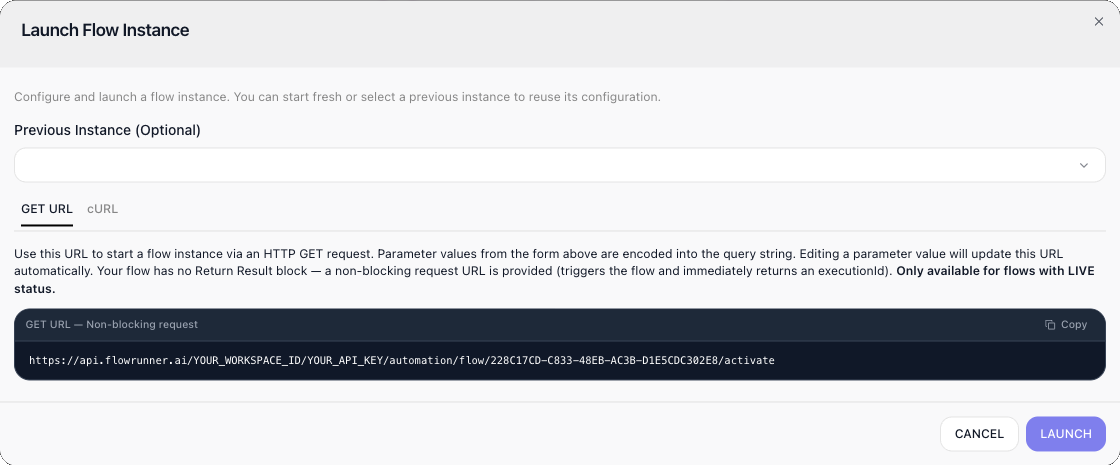
For a flow that has a Return Result, the dialog writes the blocking URL instead - to start such a flow without waiting, build this page's URL yourself from the Endpoint template, with the id from the flow's address bar.
Related
- Call Flow (Blocking) - starting a run and waiting for its answer
- Activating an External Callback - letting a specific waiting run continue
- Checking a Run's Status - asking what became of a run, by its
executionId - Retrieving Block Results - reading what an individual block of the run produced
- Workspace Settings - where the Workspace ID and API Key live
- Call Flow - the block that does the same job from inside another flow