Triggers
A trigger waits for something to happen outside FlowRunner and hands over what arrives. Where a flow builder places it decides what that means: first in a flow, it starts an instance for each thing it finds; in the middle, the flow runs up to it and waits there until the event comes.
You write the part that knows the API. FlowRunner owns the loop, the stored position and the delivery.
There are two kinds, and the API decides which you write:
| Polling | Realtime | |
|---|---|---|
| How events arrive | you ask the API on a timer | the provider calls a URL you registered |
| You write | a query | a subscription, plus how to read the delivery |
| Needs from the API | any endpoint that lists recent things | outgoing webhooks |
| Latency | the polling interval | seconds |
If the API has webhooks, prefer realtime. If it does not, polling is the only option.
Polling triggers
Register with ext.addPollingTrigger(). You supply a fetch that returns the most recent items, and
declare exactly one mechanism that decides which of them are new:
ext.addPollingTrigger({
  category   : 'TMDB',
  id         : 'onMovieReleased',
  label      : 'On Movie Released',
  description: 'Fires for each movie that reaches its release date in the chosen genre.',
  params     : z.object({
    genreId: z.string().optional().label('Genre').dictionary(getGenresDictionary),
  }),
  result: {
    id          : 693134,
    title       : 'Dune: Part Two',
    release_date: '2024-02-27',
    vote_average: 8.133,
  },
  fetch: async ({ params, helpers }) => {
    if (!params.genreId) {
      return []
    }

    const response = await helpers.discover({
      genreId       : params.genreId,
      sortBy        : 'primary_release_date.desc',
      releasedBefore: today(),
    })

    return response.results ?? []
  },
  watermark: { by: 'release_date', sortedDesc: true },
})

function today() {
  return new Date().toISOString().slice(0, 10)
}
helpers.discover is the helper from Service Structure;
releasedBefore becomes TMDB's primary_release_date.lte filter.
| Property | Type | Required | What it does |
|---|---|---|---|
category/id/label/description |
string | yes | As for an action. id is frozen once deployed. |
params |
z.object |
no | The fields on the trigger block. Plain fields only - a trigger's form is flat. |
result |
sample | yes | The shape of one emitted item. |
fetch |
function | no | Returns recent items, for dedupe and watermark. |
dedupe | watermark | poll |
yes | Exactly one. |
Choosing the mechanism
| Mechanism | You declare | What the runtime does |
|---|---|---|
dedupe |
a function, a field path, or { by, stateKey, max } |
Keeps a bounded set of the ids it has seen and emits items whose id is new. Right when items have a stable id but no reliable ordering. stateKey defaults to seen and max to 500 ids, oldest discarded first. An id that comes back in a later poll counts as just seen, so an item that stays in the feed is never the one discarded. |
watermark |
{ by, sortedDesc, stateKey } where by is a field path or (item, { params }) => value |
Stores the highest value it has seen and emits everything past it. Right when items carry a timestamp or an increasing key. stateKey defaults to watermark. |
poll |
a function returning { events, state } |
Full control, and you own the shape of state and the learning-mode behaviour. For overlap windows, held cursors and consuming feeds. |
What the runtime stores between polls
| Phase | dedupe |
watermark |
poll |
|---|---|---|---|
| First poll | records the ids it saw, emits nothing | records the highest value, emits nothing | you seed state and emit nothing |
| Setup preview | shows everything fetch returned, stores nothing |
same | yours - the runtime returns what you return |
| Every later poll | emits ids not in the set | emits items past the mark, advances it | your delta |
The first poll emits nothing on purpose. It records where the feed stands, so configuring a trigger does not fire a run for every historical item.
The setup preview is your job to limit. While a flow builder configures the trigger, the runtime calls
your handler with isLearningMode: true. With fetch, everything you return is shown, so check the flag
and return one item. With poll the runtime does nothing at all - it hands the flag straight to you and
returns your result verbatim, so read it and return a single event with state: null yourself.
The watermark trap
The stored mark is whatever the chosen field held on the first poll, so a field the API can hand back out of order stops the trigger firing with no error anywhere.
TMDB is a live example: it lists announced films with placeholder release dates years in the future, and
sorting by release date descending puts those first. A seeding poll can store a date such as 2047-05-11,
and nothing will ever be newer than that. The fix is in the query, not the mechanism - ask only for titles that
have actually been released:
const response = await helpers.discover({
  genreId       : params.genreId,
  sortBy        : 'primary_release_date.desc',
  releasedBefore: today(),                       // clamps the feed to today
})
Before shipping a watermark trigger, look at what the API returns at the top of the feed and ask what the stored value would be after the first poll.
sortedDesc: true is the second trap on the same mechanism. It tells the runtime to stop scanning at the
first item that is not past the mark, which is a shortcut that assumes the API really did sort the way you
asked. On a feed that is only mostly sorted, every new item sitting behind one old item is dropped, silently
and permanently. Leave it off unless the ordering is guaranteed.
What your handlers receive
Both take one object: the handler bag every action gets, plus their own arguments.
| Handler | Receives | Returns |
|---|---|---|
fetch |
params, isLearningMode, and the usual context, config, apiRequest, helpers, logger |
the recent items, as an array |
poll |
the same, plus state |
{ events, state } |
poll is the escape hatch, for a feed the two stored-state mechanisms cannot express - an overlap window, a
cursor you hold back, a queue that consumes what it reads:
poll: async ({ params, state, isLearningMode, apiRequest }) => {
  const since    = state?.cursor ?? null
  const response = await apiRequest({ url: '/events', query: { since } })
  const events   = response.events ?? []

  if (isLearningMode) {
    return { events: events.slice(0, 1), state: null }   // preview one, store nothing
  }

  if (!state) {
    return { events: [], state: { cursor: response.next_cursor } }   // first poll: seed, emit nothing
  }

  return { events, state: { cursor: response.next_cursor } }
},
A half-configured trigger
Each poll validates the saved trigger against params. A required field it lacks, or a value that breaks a
rule, fails that poll with invalid triggerData, and it fails again on every poll until someone fixes the
block. Declare filters .optional() and guard instead:
What the flow builder sees
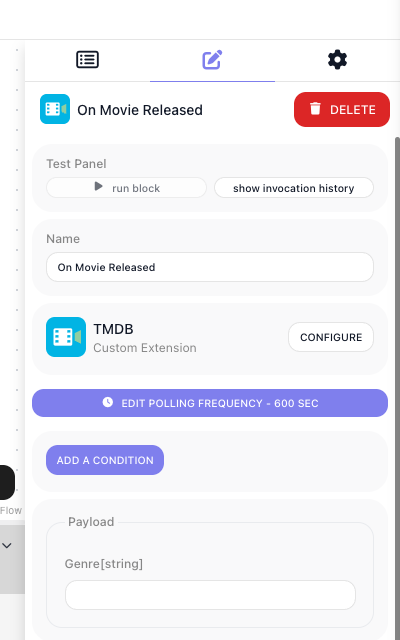
The trigger's params appear under Payload, and the block carries two controls of its own:
EDIT POLLING FREQUENCY, which starts at 600 seconds, and ADD A CONDITION for narrowing what it passes
on. The frequency can also be daily, weekly, monthly or once; an interval below 30 seconds is refused with
Billing limits require frequency of 30 seconds or more. Your description is shown in the block palette as
you wrote it.
Realtime triggers
Realtime triggers are driven by SYSTEM methods the runtime owns. You never write those; you declare the pieces they call.
ext.setupRealtimeTriggers() is declared once for the extension and owns the webhook:
| Property | What it does |
|---|---|
scope |
'SINGLE_APP' for a webhook per workspace, 'ALL_APPS' for one callback shared by every workspace. |
scopeAt |
With ALL_APPS, the path in the payload holding the routing key. A delivery goes to the workspace whose eventScopeId it matches. |
subscribe |
Registers the webhook. Receives callbackUrl, the full set of triggers, and the previous webhookData. |
unsubscribe |
Tears it down when the flow stops. |
extractProviderEventName |
A path or function giving the event's name, which routes it to triggers. |
extractProviderEventData |
A path or function giving the payload. Defaults to the whole body. |
verify |
A declarative signature check. |
refresh |
For providers whose registrations expire. Return a new refreshIntervalInSeconds to set when it runs again. |
verifyRequest |
Replaces verify when the provider signs something other than the raw body. Returns true or false. |
resolveEvents |
Replaces the extract* pair for payloads too irregular to describe declaratively. May also set the answer to the provider - see Answering the provider. |
handshake |
Answers a provider's endpoint-verification challenge - see Answering the provider. |
Then one ext.addRealtimeTrigger() per event, each claiming a providerEventName:
ext.setupRealtimeTriggers({
  scope                   : 'SINGLE_APP',
  extractProviderEventName: 'event',
  extractProviderEventData: 'data',
  verify: {
    header  : 'X-Vendor-Signature',
    algo    : 'sha256',
    encoding: 'hex',
    secret  : (config) => config.webhookSecret,
  },
  subscribe: async ({ callbackUrl, triggers, webhookData, apiRequest }) => {
    if (webhookData?.id) {
      await apiRequest({ url: `/hooks/${ webhookData.id }`, method: 'delete' })
    }

    const events = [...new Set(triggers.map(trigger => trigger.providerEventName))]
    const hook   = await apiRequest({ url: '/hooks', method: 'post', body: { url: callbackUrl, events } })

    return { webhookData: { id: hook.id } }
  },
  unsubscribe: async ({ webhookData, apiRequest }) => {
    if (webhookData?.id) {
      await apiRequest({ url: `/hooks/${ webhookData.id }`, method: 'delete' })
    }

    return { webhookData: {} }
  },
})

ext.addRealtimeTrigger({
  category         : 'Notes',
  id               : 'onNoteUpdated',
  label            : 'On Note Updated',
  description      : 'Fires when a note changes.',
  providerEventName: 'note.updated',
  params           : z.object({ boardId: z.string().optional().label('Board') }),
  match            : { boardId: 'boardId' },
  result           : { id: 'note_1', body: 'Ship it', boardId: 'brd_1' },
})
| Property | What it does |
|---|---|
category/id/label/description |
As for an action. id is frozen once deployed. |
providerEventName |
The provider event this trigger claims. Also takes an array, or ({ params }) => string[]. |
params |
The fields on the trigger block. |
match |
Which configured instances a delivery belongs to. |
result |
The shape of one emitted event. |
extendEventData |
Adds to the payload before matching. Pure, no API calls. |
extendResult |
Enriches the payload after matching, once, and may call the API. |
oauth2Scopes |
Extra OAuth scopes. |
Matching a delivery to the right instances
providerEventName decides which triggers a delivery reaches. match decides which configured
instances of that trigger it belongs to, and without it a filter param filters nothing - every instance
fires on every delivery.
The declarative form maps a param to a path in the payload:
An empty param matches everything, so a blank Board still fires on all boards. For ranges, contains, or anything derived, use the function form instead:
A delivery is handled in this order:
handshake, if the provider needs its endpoint verifiedverifyorverifyRequestchecks the signatureextractProviderEventNamepicks the event name, routing it to every trigger claiming itextractProviderEventData, thenextendEventData, build the payloadmatchruns per configured instanceextendResultruns once, if anything matched- the matched instances fire
subscribe is an upsert: it re-runs with the full desired set of triggers and the previous webhookData,
so either delete the old registration and create a new one, or reconcile the difference. Alongside
webhookData it may return eventScopeId - the value an ALL_APPS delivery is matched against to find
this workspace - and refreshIntervalInSeconds.
What subscribe returns as webhookData is stored with the webhook and handed to every method that handles
a delivery: verify's secret, verifyRequest, handshake, resolveEvents, and the function forms of
match and extendResult. Those methods can read it but not change it; only subscribe, refresh and
unsubscribe store a new value. Keep there what a delivery has to be checked or recognized against, such as
the signing secret the provider issued when the webhook was registered.
The callbackUrl that subscribe receives contains the workspace's API key. When the key is regenerated,
the address you registered stops working until each flow that uses the trigger is stopped and started,
which runs subscribe again with a new callbackUrl - see
Workspace Settings.
One shared webhook serves every trigger you declare. An inbound delivery is verified, its event name is read, and it is routed to every trigger claiming that name.
One trigger per event
Never write one trigger with an event-type parameter: its result then describes none of the shapes it
emits, and a flow builder has to configure which event they meant instead of choosing it by name. Splitting
costs nothing, because all of them share the one webhook registration.
Use params for filters - which board, which status - never for choosing the event.
Verifying a delivery
verify HMACs the raw body with your secret and compares it to a header in constant time. It covers the
common case where the provider signs the body alone. Its secret is a function that receives the
configuration and, as a second argument, { webhookData }, so a secret the provider issued at subscribe time
works too: secret: (config, { webhookData }) => webhookData.signingSecret. A delivery that fails the check is answered 401 with
an empty body, and the trigger does not fire.
It also takes timestampHeader and freshness, for rejecting a replayed delivery. freshness does
nothing on its own: without timestampHeader it is silently inert, and a declared header that the
provider did not send passes.
A provider that signs a composed string, such as {timestamp}.{body}, cannot be expressed declaratively.
Write verifyRequest instead, using Flowrunner.crypto, which offers hmac(algo, key, data, encoding),
timingSafeEqual(a, b) and ageSeconds(timestamp). It receives rawBody, headers and webhookData
alongside the usual handler bag, and returns true to accept the delivery or false to turn it away with
the same 401. Headers reach verifyRequest in whatever casing the provider sent, so look them up
case-insensitively.
rawBody is the request exactly as it arrived, as text - the bytes a signature is computed over. It is
absent, not empty, when there is nothing to verify: a GET, a request with no body or no
Content-Length, or a body over 5 MB. Treat absent as "cannot verify" and return false, so such a
delivery is answered 401; hashing an empty
string gives a digest that never matches, which looks like a wrong secret:
verifyRequest: ({ rawBody, headers, config }) => {
  if (typeof rawBody !== 'string') {
    return false
  }
  …
},
Answering the provider
Some providers check what your endpoint answers. A challenge-response handshake expects its token back in
the response. Return responseToWebhook from handshake or resolveEvents to say exactly what the provider
receives:
handshake: async ({ requestBody }) => {
  if (!requestBody?.challenge) {
    return undefined                                      // not a handshake - carry on
  }

  return { responseToWebhook: { rawBody: requestBody.challenge } }
},
Without responseToWebhook, a delivery that passes verification is answered 200 with an empty body. A rejection needs no
code of its own: verify, or verifyRequest returning false, already answers a bad signature with 401,
which is what a provider's signature check expects. Xero's Intent to Receive check, for example, sends one
correctly and one wrongly signed delivery and switches the webhook on only when they are answered 200 and
401.
| Field | What it sets |
|---|---|
httpStatus |
The status code. Optional, 200 by default. Allowed: 200, 201, 202, 204, 400, 401, 403, 404, 409, 410, 422, 429 |
headers |
Extra response headers. Set-Cookie, Content-Length, Transfer-Encoding and the other hop-by-hop headers are dropped |
body |
A value sent as JSON, with Content-Type: application/json |
rawBody |
A string sent exactly as written, with Content-Type: text/plain. Wins over body. Unrelated to the request's rawBody that verifyRequest receives |
Every field is optional, and a Content-Type in headers overrides the default.
An httpStatus outside the allowed list is answered 200. That includes a redirect and every 5xx, so returning 503 to ask
for a retry tells the provider the delivery arrived. Return 429 instead where the provider retries on it.
A string belongs in rawBody. In body it is sent as JSON, so tok-123 arrives as "tok-123",
quotes included, and a provider comparing it with the token it sent sees a mismatch.
A challenge in the query string cannot be answered. A bare GET or an empty POST is answered 200
with an empty body, and handshake does not receive the query string, so a provider that sends its
challenge there - hub.challenge, validationToken - cannot get it echoed back.
Reject by returning, never by throwing. A handshake or resolveEvents that throws answers the provider with an
error, and that error's body carries your error message. FlowRunner does not process the delivery again -
whether the provider re-sends it is up to the provider - and the workspace gets a Realtime trigger "Resolve
event" failed notification. To turn a delivery away in resolveEvents, return the same answer verify
gives a bad signature:
resolveEvents: async ({ body }) => {
  if (!body?.event) {
    return { events: [], responseToWebhook: { httpStatus: 401, rawBody: '' } }
  }
  …
},
Older extensions return responseToExternalService and responseHeaders instead. Both still work, but
write responseToWebhook in new code, and never return the old and new fields together.
What you cannot change after shipping
These are persisted or read by live flows, so changing one breaks running automations:
- a trigger's
id - the keys in its
params - the shape of
webhookData eventScopeId
Shaped events, matched ids and handshake responses are transient, and free to change.
Related
- Actions - blocks that run when the flow reaches them
- Parameters & Types - the fields on a trigger block
- Dictionaries - backing a trigger's filter with a picker
- Testing - driving a trigger through the SYSTEM method the platform calls