Let AI Build It
An extension is a JavaScript module in a defined format. You can learn that format and write it, or you can install the FlowRunner™ agents into your AI assistant, describe the service you want, and review what comes back. This page is the second route.
What it changes is the order of the work. Instead of learning the format before you can start, you start at a working service and read it. What it does not change is that the module is yours: you own it, you review it, and the decisions inside it are still decisions somebody has to check.
Install the agents
From the project the CLI created, one command:
Agents in .claude/agents:

  + flowrunner-service-code-engineer.md
  + flowrunner-service-test-engineer.md

  Created the FlowRunner instructions block in CLAUDE.md.

Next steps:
  1. open CLAUDE.md and check the FlowRunner block reads the way you want
  2. ask Claude Code to build a service - it will pick up the 2 FlowRunner agents
  3. the authoring reference lives in node_modules/flowrunner-cli/ai-docs/instructions/service-code-format/
Nothing here calls a model. The command copies two agent definitions into the project and writes a block
into CLAUDE.md between its own markers, leaving the rest of that file untouched. Your assistant picks them
up the next time it works in the project.
Two agents, because one would mark its own homework
The block installs a division of labour rather than a single helper:
flowrunner-service-code-engineerowns everything inside a service - creating one, reviewing, fixing, extending, and keeping its README in step with its actions.flowrunner-service-test-engineerowns everything underservices/{id}/tests/- writing a suite, widening one, fixing a red one.
A new service is both, in order: write it, then test it. The instructions are blunt about why that split exists: "the second one's job is to disagree with the first." A test engineer that also owned the source would fix the service to make its test pass, which is the one outcome a test suite exists to prevent.
Why this beats asking an assistant cold
The authoring reference ships inside the CLI, at
node_modules/flowrunner-cli/ai-docs/instructions/service-code-format/ - eighteen documents covering the
service structure, the type system, dictionaries, triggers, the runtime contracts and a full worked
reference service.
Because it ships with the package, it is versioned with the package. The agent reads the format the
installed CLI actually deploys, rather than whatever a model remembers about it. Update the CLI and rerun
init-claude and the agents move with it - which is also why the flowrunner-* files are overwritten on
every run, while agents under your own names are left alone.
The instructions also tell the agent to stop rather than improvise: if that reference directory is missing, it is to ask you to install or update the CLI instead of proceeding from memory.
Asking for a service
Describe the integration in your own words, the way you would to a colleague. The request that produced the example below was one sentence:
I need a service for the Open-Meteo weather API that can get the current weather for a latitude and longitude, and look up a place by name so I can pick it from a dropdown.
The default is the complete service in one pass, not a skeleton: the API's commonly-used actions, a dictionary on parameters that can be listed rather than typed, and triggers wherever the API supports them. Ask for less and you get less; ask for a whole integration and it will attempt the whole integration.
That request produced a 277-line module with two actions, a dictionary behind the place lookup, a shared request helper handling both of the API's base URLs, and its own README. The agent read eleven of the eighteen reference documents to write it, checked the built definition, and ran each handler once against the live API before reporting back.
Deployed, it is a block like any other. The parameters on its configuration panel are the ones the request implied and the agent decided on, including the three unit fields it chose to offer as fixed choices rather than free text:
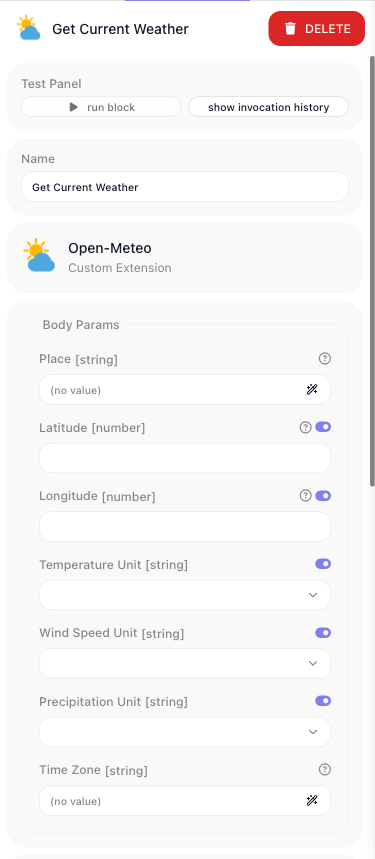
Open-Meteo needs no API key, so this is one example you can run yourself end to end without signing up for anything.
Follow-ups work the same way, and are where most of the time goes:
The projectId field on my Asana service should be a dropdown.
Reviewing what comes back
This is the part that decides whether the route worked, and it is worth more of your attention than the asking. A service can build cleanly, publish the right actions, and still carry decisions you would not have made. Four things are worth checking every time:
-
Conventions the agent invented. Where the format offers no way to express something, the agent will design something. In the weather example, a dictionary supplies one value per parameter but a location is two numbers, so it stored
"52.52437,13.41053"in one field and split it at run time. That works, and it is a permanent contract every flow binding that field inherits - and nothing on screen hints at it. The picker below is the agent's dictionary querying the live geocoding service, and it looks like any other picker: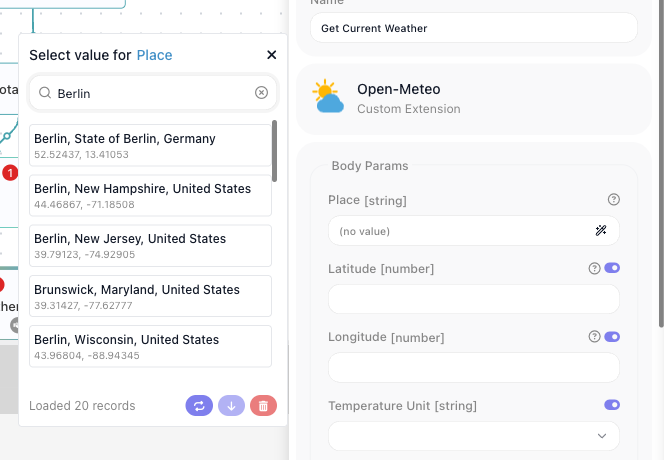 - What it chose not to expose. The same example fixed a list of eleven weather variables in the code
rather than offering them as a parameter. Reasonable, and not something the action's field list reveals.
- What it normalised. Returning
- What it chose not to expose. The same example fixed a list of eleven weather variables in the code
rather than offering them as a parameter. Reasonable, and not something the action's field list reveals.
- What it normalised. Returning []where the API omits a key entirely is a judgment call about whether you are smoothing the provider's response or hiding it. - The rules it broke on purpose. A good agent reports these. In the example it hand-wrote a validation the reference tells it not to write, because the alternative was not expressible.
Ask for the reasoning behind anything you are unsure of. The agents are instructed to hand unresolved API questions back rather than guess, so a thin answer is itself a signal.
Getting it deployed
There are two ways, and neither is more official than the other:
- Ask the assistant.
flowrunner deployis a command like any other, and the assistant is already working in your project. You can go from a description to a deployed block without leaving the conversation. - Run it yourself, if you would rather drive it:
flowrunner loginthenflowrunner deploy.
One step needs a person either way. flowrunner login prints an authorization link, opens your browser,
and waits while you approve the CLI and pick the workspace to deploy to. Do it promptly - the command gives
up after a while and has to be run again. Deploying is what the token is for, so the workspace you pick is
the workspace your services land in.
The deploy itself names what it is sending, and sends only that:
  Connecting to Flowrunner Dev cluster (https://dev.flowrunner.ai)
  Workspace "Documentation Flows" ({workspace-id})
  Found 2 services under services/.

  Deploying 1 service:
    - new service: openmeteo (Open-Meteo) - [6777b98dd8c3] - packaged 7.5 KB

  Deployed 1 service to workspace "Documentation Flows" ({workspace-id}) - you can use it in a flow.
A project can hold several services and a deploy does not have to carry all of them - deploy -s <id>
sends one by name, which is what kept the scaffolded placeholder above out of this workspace. From here the
blocks are available to your flows under Local Extensions, and
Deploying & Managing covers versions, caches and removing an extension again.
Which assistants
Claude Code is what init-claude wires up today, and the command is named for it. The CLI carries a
provider registry rather than a single hard-coded assistant - each entry naming an instructions file and an
agents directory - so support for other assistants, Codex among them, will arrive through the same command
without changing how any of this works.
Where the route hands back to you
Honest limits, so none of them is a surprise later:
- There is no single command that does this. It is your assistant working in a project the CLI set up, not a hosted service you hand a sentence to. What the assistant can do is carry it the whole way, deploy included - the work is a conversation, not a form.
- The output is source code you own. You can read it, change it, and take it over at any point - see Write It Yourself for the format it is written in.
- A service id is frozen once deployed. It is the persisted execution key, so the naming decision at scaffold time is the one decision that cannot be revised later.
- Tests never reach the real API. Suites mock HTTP at the socket, so a service is only truly validated by deploying it and running it in a flow.
- A clean build is not a correct service. The build check proves the module declares what you think it declares; it says nothing about whether the integration is right.
Related
- Custom Extensions - what an extension is, and the two ways to build one
- Write It Yourself - the same loop, with the module written by hand
- The FlowRunner CLI -
init-claudeamong every other command - Testing - the harness the test engineer agent writes against
- Service Structure - the format the agents are reading