Deploying & Managing
flowrunner deploy is one command, but what it leaves behind is a versioned extension in a workspace that
other people's flows depend on. The command and its flags are on The FlowRunner CLI; this page is
what happens around it.
What a deploy sends
Most of the behaviour below follows from two properties:
The definition is built on your machine. The CLI loads your module, models it, and uploads the model
with the package. The server never executes your code to work out what it offers, so a service that throws
on load fails at deploy time rather than silently in the workspace afterwards.
The unit is one service. A deploy carries the services you named and leaves every other extension on the version it was already running.
Versions and the source hash
Every deploy produces a twelve-character hash. It covers services/<id>/ and nothing outside it, which is
what lets it answer two questions at once: which version is this, and is this the same code as what is
already deployed.
That is why deploying twice without an edit reports same service and uploads nothing, and why the same
code produces the same version in anybody's checkout.
Each service keeps its history on its own Versions tab, with the active one marked and an Activate button on every other:
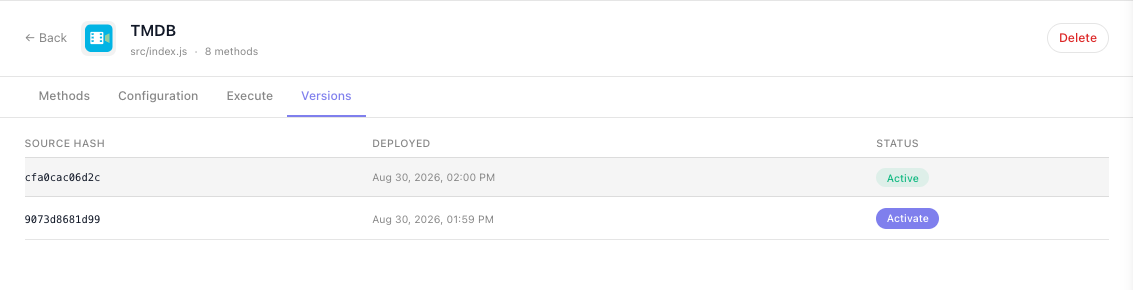
Rollback is per service and immediate. Activating an earlier version switches that service over and leaves every other extension alone. Nothing is uploaded, because the archive is already stored.
Configuration outlives deploys
Config values live separately from the code, keyed per service, so they survive redeploys and rollbacks:
- Adding a config item leaves the existing values alone. The new field is empty until someone fills it in, so a required one added mid-life will break runs until they do.
- Renaming one is a new field. The old value is not carried across.
- Rolling back restores the code only. If someone changed a config value after the version you roll back to, the newer value is what the older code reads.
The caches between a deploy and a run
Three caches sit between a deploy and a running flow:
| Cache | What it holds | When it clears |
|---|---|---|
| Definitions | the model the flow editor draws from | on deploy, activate and delete |
| Pod package | the extracted package, keyed by source hash | never invalidated, only added to |
| Editor bundle | the block list in an open editor | on reload |
The pod cache being keyed by hash is why the first execution after a deploy is slower: that hash has
never been extracted before. It is also why --force exists, for the rare case where the stored archive is
wrong while its hash still matches.
If a change does not appear in an editor that was already open, reload the page.
Removing an extension
Deleting services/<id>/ from your project and deploying again does not remove it. The deploy only
touches what it carries, so the service stays live in the workspace on its last deployed version.
Removal is explicit: open the service under Custom Extensions and use Delete. It confirms first, and it removes the service and every version of it. There is no undo, and no rollback afterwards.

Remove the blocks from your flows first
Nothing checks which flows use an extension before deleting it, and nothing warns you. Any flow still holding one of its blocks is left referring to something that no longer exists. Take its blocks out of every flow that uses them before you delete it.
Several projects, one workspace
A workspace accumulates extensions from any number of separate repositories and checkouts.
The risk is naming. Service ids are unique per workspace, and nothing records which project a
version came from, so two projects that both define tmdb overwrite each other's versions silently. Agree
ids across teams before two repositories deploy into one workspace.
flowrunner pull is the other half of this. It downloads the workspace's services into services/, so a
fresh checkout can pick up whatever is live, including an extension somebody else deployed:
Deploying from CI
A CI job has no terminal, so it must name what it wants - a bare deploy has nothing to prompt with and
stops rather than guessing:
The token lives in .flowrunner/token, which is gitignored, so a pipeline supplies it from a secret. Only
changed services are uploaded, so running the job on every commit is cheap.
Two things to design for:
- There is no all-or-nothing rollback. Services deploy one after another. If the third fails, the first two stay deployed. Re-running is safe, because unchanged services produce the same version and are skipped.
- A token expires after 30 days, and renewing it is a browser round trip, so a pipeline needs someone to refresh it every 30 days.
Separate environments
One project directory is bound to one workspace. For a staging workspace and a production one, use two
checkouts, each with its own flowrunner.json and token, and deploy the same code into both.
To move a single project somewhere else, run flowrunner login and pick a different workspace on the
authorize page - see The FlowRunner CLI.
Before you ship a new version
- The unit suite passes, including the failure branches.
- Ids are unchanged -
idon the extension, on every action, trigger and dictionary, and every key in aparamsschema. Changing one breaks the flows already using it. - Any new config item is either optional or communicated to whoever administers the workspace.
resultsamples match what the API actually returns now, since flow builders bind against them.- The service README describes what changed.
Related
- The FlowRunner CLI -
deploy,pulland their flags - Troubleshooting - what to do when a deploy or an execution fails
- Testing - the suite that runs before you deploy