Parameters & Types
The fields a flow builder fills in on your block - a Movie ID to type, a Release Year that only takes a
number, a Genre picked from a list - and the checking that stops bad input before it reaches your code all
come from one declaration: params, a zod object. Pick a type and the editor draws the matching control
under the block's Body Params section; chain a plugin and the field gets its label, hint and default.
params: z.object({
  movieId: z.string().label('Movie ID').describe('TMDB numeric id, e.g. 693134'),
  year   : z.number().optional().label('Release Year'),
}),
execute receives exactly what you declared, parsed and typed:
- values converted to the declared type, so a number arrives as a number
- undeclared fields stripped
- a blank field resolved the way you declared it - see Leaving a field blank
The container is always a z.object. Leave params out for an action that takes no input. A bare
shape, a single field, or a z.object().optional() fails the deploy with FR_EXT_INVALID_SCHEMA; mark the
fields optional, never the container.
What each type renders as
| zod type | The flow builder gets |
|---|---|
z.string() |
a single-line field |
z.text() |
a multi-line box |
z.number() |
a numeric field |
z.boolean() |
a toggle |
z.date() |
a date picker |
z.enum([...]) |
a dropdown of the values |
z.array(inner) |
a list. Entries that are groups, dropdowns or dictionary fields open as rows with add and remove controls; a list of plain strings or numbers opens as one expression box, and the view toggle beside the label switches it to rows |
z.object({...}) |
a nested group holding its own fields |
All eight, on one block:
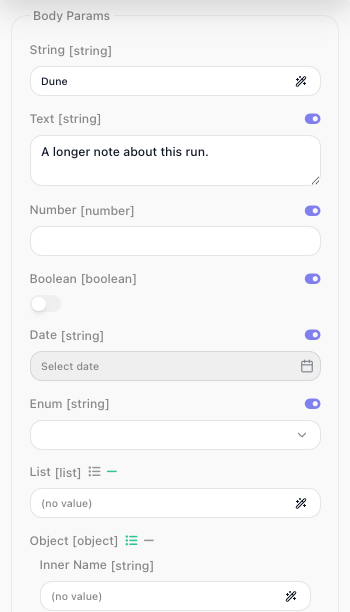
The editor prints the published param type beside each label, which is why Date and Enum read as
[string]: the type is string, the widget is what differs. What a date field actually hands your handler is
under What a date field hands your handler.
The switch beside a label flips that control to an expression input, so a flow builder can bind the value
from an earlier block. A z.string() field has no switch because it already is one - which is why the
String row above shows a wand and no toggle.
Other zod types. z.union(), z.tuple(), z.record() and the rest deploy, but they render as a plain
text field and are validated at run time, inside an instance. A list inside a list has no row editor and
renders as one input. Keep to the eight above, with the one exception under
Leaving a field blank.
Giving a field its label, hint and default
Chain these onto any field:
| Plugin | Applies to | Effect |
|---|---|---|
.label(text) |
any field | The name shown on the block. Without one the key is humanized - releaseYear shows as Release Year. |
.describe(text) |
any field | The help text behind the ? icon beside the label. A typed field supplies one of its own when you write none. |
.optional() / .nullable() |
any field | Marks the field not required. What a blank arrives as is under Leaving a field blank. |
.default(v) |
any field | The value used when the field is left blank. Takes a value, never a label. |
.example(v) |
field or result | Publishes v as the sample a flow builder binds against. |
.dictionary(ref) |
a param | Fills the field from a dictionary, as a picker. See Dictionaries. |
.labels({ value: 'Label' }) |
z.enum |
Shows the label in the dropdown, stores and hands your handler the value. |
.secret() |
a z.string() config field |
Masks the input on the configuration form. On a param it does nothing, on purpose: a param's value is saved in the flow and readable over the API, so a credential belongs in config, never in a block field. See Service Structure. |
Sharing a param across actions. Declare it once, name it with a Param suffix, and put each plugin
call on its own line so a change touches one line:
const genreIdParam = z.string()
  .label('Genre')
  .dictionary(getGenresDictionary)
  .describe('Only include movies in this genre')
Leaving a field blank
Every field is required unless you say otherwise. The editor sends an untouched field as an explicit null,
and the modifier on the declaration decides what your handler receives:
| Declared | A blank field arrives as |
|---|---|
| nothing | the block fails with «Release Year» is required |
.optional() |
undefined |
.nullable() |
null |
.nullish() |
null - the editor sends null for an untouched field |
.default(v) |
v |
So .optional() is the ordinary way to mark a field the flow builder may leave alone, and a .default() is
honoured whether the field was never touched or was cleared. Discover Movies declares one required field and
three the flow builder can skip:
params: z.object({
  genreId  : genreIdParam,                                       // required
  year     : z.number().optional().label('Release Year'),
  minRating: z.number().min(0).max(10).optional().label('Minimum Rating').describe('TMDB score out of 10'),
  sortBy   : z.enum(['popularity.desc', 'primary_release_date.desc', 'vote_average.desc'])
    .default('popularity.desc')
    .label('Sort By'),
}),
On the block, the required Genre is flagged until it is filled, the two numbers are empty numeric fields, and Sort By is an empty dropdown:
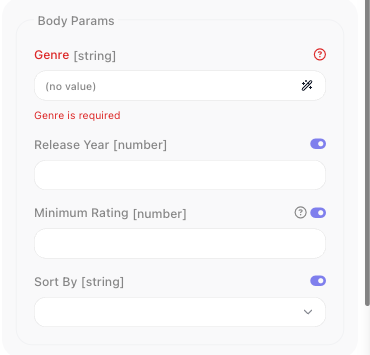
Running it like that succeeds: the handler reads params.sortBy and gets popularity.desc. The declared
default is published with the block but not pre-filled into the field, so the flow builder cannot see it;
say what it is in the hint, .describe('Defaults to Most popular').
Do not pair .nullable() with .default(): the editor's null is handed over as null and the default
never fires. .optional().default(v) behaves as plain .default(v).
One exception is deliberate: on a z.string() field an empty string is a value, so a required text field
accepts ''. Add .min(1) to a string that must not be empty. The same '' reaches a format check, so an
optional z.email() or z.url() that a flow builder cleared is reported as invalid. Where blank must mean
not set on a format field, declare z.union([z.url(), z.literal('')]).optional() - the one place a union
earns its keep.
What is checked before your handler runs
For an action's params and a dictionary's criteria, everything you declare on a field is enforced before
execute runs: .min() and .max(), .int(), .regex(), the string formats such as z.email() and
z.url(), enum membership, and your own message on any of them. A violation fails the block, and the
message names the field by its label:
[flow-extension:tmdb] invalid params for method "discoverMovies" — minRating: «Minimum Rating» must be at most 10
That line is what the Test Monitor's Block Results tab shows after Run Block, and what the block's error exit carries in a run:
![The Test Monitor's Block Results tab for Discover Movies after a run with Minimum Rating set to 11: Input lists genreId 878, year null, minRating 11 and sortBy null, and Output is marked Error with the line beginning [flow-extension:tmdb] invalid params for method "discoverMovies", then minRating: «Minimum Rating» must be at most 10, cut off at the panel's edge](../images/extend/discover-run-invalid.png)
Every offending field is reported in that one line. A failure inside a group or a list names the property,
not the container - «Person» is required, «Genres item 2» must be a string - and a message you wrote
yourself, such as z.string().min(3, 'Too short'), is shown as written.
Rules written as code - .refine(), .transform(), .trim() - run only at run time, so they are never
reflected in the editor.
Showing a label, sending a value
An API's own vocabulary is rarely what you want on a block. .labels() keeps the two apart: the dropdown
shows the label, the flow stores the value, and execute receives the value.
sortBy: z.enum(['popularity.desc', 'primary_release_date.desc', 'vote_average.desc'])
  .labels({
    'popularity.desc'          : 'Most popular',
    'primary_release_date.desc': 'Newest first',
    'vote_average.desc'        : 'Highest rated',
  })
  .default('popularity.desc')
  .label('Sort By'),
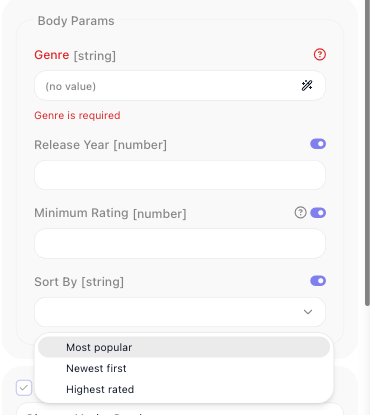
The flow builder picks Highest rated; your handler gets vote_average.desc. Because the flow stores the
value, renaming a label later changes nothing that was saved. This holds at every depth - inside a
z.object(), inside a z.array(), inside a row of a list of groups.
.labels() is for a list you know when you write the service. When the options come from the API - genres,
projects, folders - use a dictionary.
.map() no longer exists
Earlier versions offered .map({ Label: value }), which took its argument the other way round. A service
still calling it fails to load, with a message naming .labels(). Move the API values into the z.enum
list and the display names into .labels().
What a date field hands your handler
Declare z.coerce.date() and your handler gets a Date whether the value was picked, typed or bound. Plain
z.date() hands over what was sent - an ISO string when the value was typed or bound, epoch milliseconds
from the picker - so its inferred type is the one that lies. Both are validated as a date: not-a-date fails
with «Released After» must be a date, and .min() / .max() bounds are enforced.
The ISO formats reshape the input to the declared form: z.iso.date() given a full datetime hands over the
date part, z.iso.time() the time part. They render as plain text fields, with no picker.
Nested fields and lists
z.object() nests fields, and z.array() makes a list of them. Staying with TMDB:
params: z.object({
  genres       : z.array(genreIdParam).label('Genres'),
  releaseWindow: z.object({
    from: z.coerce.date().label('From'),
    to  : z.coerce.date().label('To'),
  }).label('Release Window'),
}),
Because each genres entry is a dictionary field, the list opens as rows with add and remove controls; a
list of plain strings opens as one expression box, as the table above describes. A failure inside either
names the entry - «Genres item 2» is required, «From» must be a date.
A list of groups is the common shape - line items, recipients, filters:
params: z.object({
  castFilters: z.array(z.object({
    personId: z.string().label('Person').dictionary(getPeopleDictionary),
    role    : z.enum(['cast', 'crew']).label('Role'),
  })).label('Cast Filters'),
}),
Keep nesting to two levels: give an entry plain fields, never another list. A list inside a list has no row editor and renders as one input.
Designing fields a flow builder can use
The person configuring your block is not the person who wrote it, and often does not know the API at all.
- Label anything whose key would read badly. A humanized key covers
releaseYear; it does not covertvIdorpg. - Back id-like fields with a dictionary.
Science Fictionin a dropdown beats knowing that the genre id is878. - Describe the format when there is one.
.describe('TMDB numeric id, e.g. 693134')costs a line and saves a support question. - Declare optionality honestly. A field marked required that the API treats as optional makes the block unusable for the case the API supports.
- Put limits in the declaration.
z.number().min(0).max(10)is checked before the request goes out, with a message that names the field; a check insideexecuteis not. - Order fields the way they are filled in. The identifier first, then filters, then anything rarely touched.
On a trigger. A trigger's params render under Payload on the trigger block, as plain fields with no expression switch, and a group or a list declared there renders as a single text field. Keep trigger params to the primitive types. See Triggers.
Fields that depend on a choice
When the fields themselves are not known until a resource is picked, dynamicParams generates them at
runtime:
| Property | Type | What it does |
|---|---|---|
criteria |
z.object |
The inputs the generated fields depend on. |
resolve |
function | ({ criteria, context, apiRequest }) => z.object({ … }), merged into params. |
The declared criteria become the dependency set: change one of those fields and the generated ones are
resolved again. resolve runs while the form is half-filled, so it has to tolerate partial criteria, and it
must return a z.object - this is the one slot the deploy cannot check, so a bad return fails when the
console first calls it.
Related
- Dictionaries - filling a field from the live API
- Actions - what
executereceives, and what it should return - Service Structure - config fields, which are drawn and checked the same way