Waiting on an External System
An External Callback trigger placed in the middle of a flow pauses the run until an outside system makes an HTTP request to a URL. Reach for it to hand work to something that takes its own time - a payment to clear, a document to finish processing, a person to approve a request - and resume the moment that system reports back, with its data in hand.
The callback endpoint
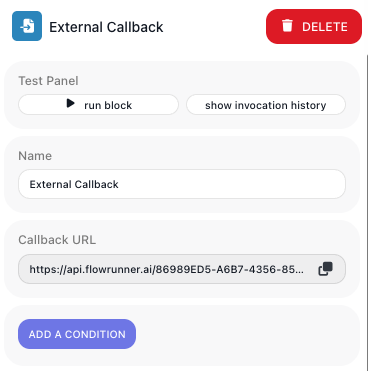
Drop an External Callback from the TRIGGERS palette group, under SYSTEM, into a flow, and FlowRunner generates one activation endpoint for that trigger. To get its address, open the block: the Callback URL field holds the complete URL, with a copy button. You hand that value to the outside system as-is - you never assemble it from ids.
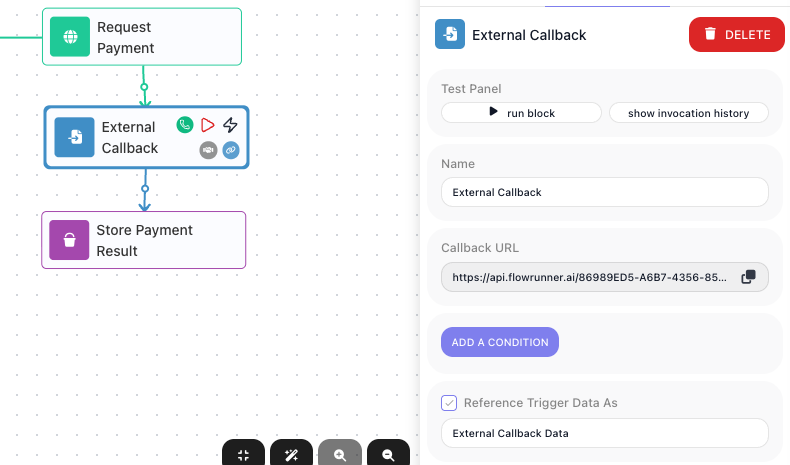
The address ends in the trigger's activation path:
{FLOW-ID} and {TRIGGER-ID} identify this flow and this trigger. Where the trigger sits in the flow
decides what a call does:
- At the start of a flow - each call starts a new instance, and the call's data becomes that instance's trigger data.
- In the middle of a flow - the run pauses when it reaches the trigger, and a call resumes a paused instance. That is the case this page covers.
At a mid-flow trigger the run pauses and stays an active instance - status PENDING on the flow's Instances tab, the steps after the trigger not yet run - until a call arrives. The wait is not unlimited: a run holds at the callback for up to the workspace plan's maximum: 30 days on the Free, Starter, and Growth plans, and one year on Professional, Business, and Enterprise.
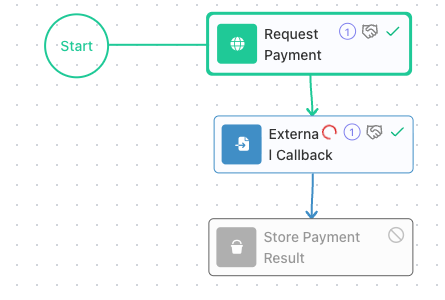
The example on this page is a small payment hand-off: Request Payment asks a payment provider to charge an order, the External Callback waits for the provider's answer, and Store Payment Result records it.
Sending data to the trigger
A caller activates the trigger with an HTTP GET or POST, and whatever it sends becomes the trigger-data
object that later steps read. The method decides where that data goes: a GET carries it as query
parameters, and a POST carries it as a JSON body (a POST's query string is ignored except for
execution, below). Both calls below start a new run of a flow whose first block is the trigger:
POST - the JSON body becomes the trigger data:
curl -X POST '<Callback URL>' \
  -H 'Content-Type: application/json' \
  -d '{"event":"payment.succeeded","orderId":"ORD-9001","amount":4999}'
GET - each query parameter becomes a field of the trigger data:
The payload then lands under the trigger's alias for later steps - see Reading the callback data.
Resuming the right run: the execution parameter
The endpoint names the flow and trigger, not one run - and more than one run can sit paused at the same
trigger at once (a timer might start an order-processing run every few minutes, each waiting for its own
payment). A resume call must say which run to wake, with the execution query parameter on the URL
(executionId works as an alias):
| execution Param Value | Resumes | Response (HTTP 200) |
|---|---|---|
execution={execution-id} |
the one run with that id | {"executionId":"{id}"} |
execution=any |
one waiting run - FlowRunner picks which; use when the waiting runs are interchangeable | {"executionId":"{id}"} |
execution=all |
every run waiting at this trigger - one event wakes them all | {"executionId":"{id1}, {id2}"} |
Errors come back as HTTP 400 with a JSON code:
| Situation | code |
|---|---|
Mid-flow trigger called with no execution |
28056 |
| Flow is not LIVE | 28010 |
execution={id} - no run with that id is waiting |
28059 |
execution=any - nothing is waiting |
28060 |
execution=all with nothing waiting is not an error: it returns {"executionId":null} and resumes
nothing. A resume call carries data the same way a start call does:
curl -X POST '<Callback URL>?execution=838ECE57-3E17-42F5-9721-4B1611522D7C' \
  -H 'Content-Type: application/json' \
  -d '{"event":"payment.succeeded"}'
Getting the execution id to the caller
To resume one specific run, the caller has to send that run's execution id - and the id is assigned at runtime, unique to each run, so it does not exist until the run starts. The flow itself hands it out during the run, before it reaches the callback. There are three ways to do that, depending on what the outside system can accept.
The system accepts a callback address per request
When the flow itself calls the system - the Request Payment step - and that call can include a
return address, the flow sends a ready-made one. In that step, open the
Expression Editor and build the address from two picked
references: the Callback URL (the External Callback URL entry, under External Callback URLs)
and this run's Execution ID (under Flow Context), joined by ?execution=. The result reads
<Callback URL>?execution=<Execution ID>, and each run resolves those references to its own values, so
the system gets an address that points back at this exact run.
sequenceDiagram
    participant F as Your flow
    participant E as External system
    F->>F: Run starts and gets its Execution ID
    F->>E: Request with the full return address (Callback URL and execution id)
    Note over F: Pauses at the External Callback
    E->>E: Does the work, which may take time
    E->>F: Calls the return address back, with its result
    Note over F: Run resumes with the data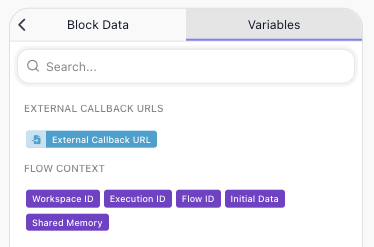
The system posts to one fixed URL
A webhook you configure once in the system's dashboard cannot take a per-run address. The run has to
deliver its execution id another way - for example an email or web page the flow generates with the id
in a link, https://yourapp.example/confirm?executionId=<id> - and whatever handles that link appends
?execution=<id> to the fixed URL. When the waiting runs are interchangeable, the fixed URL can instead
carry ?execution=any.
sequenceDiagram
    participant F as Your flow
    participant R as Recipient (user or app)
    F->>F: Run starts and gets its Execution ID
    F->>R: Sends the execution id out of band (email or link)
    Note over F: Pauses at the External Callback
    R->>R: Acts when ready
    R->>F: Calls the fixed Callback URL, appending the execution id
    Note over F: Run resumes with the data
The caller started the run through the Call Flow API
A system that started the run through the Call Flow API
received {"executionId":"..."} in the response, and reuses that id to call the trigger.
sequenceDiagram
    participant F as Your flow
    participant E as External system
    E->>F: Starts the run via the Call Flow API
    F-->>E: Returns the executionId
    Note over F: Runs, then pauses at the External Callback
    E->>E: Does the work, which may take time
    E->>F: Calls the Callback URL with that execution id
    Note over F: Run resumes with the data
Getting the caller's fields into the Expression Editor
You pick the caller's fields in the Expression Editor instead of typing their names, and for that the trigger needs one example of the request. Any of these gives it one:
- A real call. Once the LIVE flow has received a call, the Expression Editor lists the fields of the
latest one, with their values. Nothing has to be turned on. A LIVE version opens read-only. To edit the
steps after the callback, stop it: the fields are still there, but calls are refused with
28010until you start it again. To keep it answering, edit a new version instead, as the end of this section describes. - Learning Mode. It captures one sample request while you build - see Capturing a sample with Learning Mode.
- A test run of the block. Run the block on its own and send it a call - see Testing.
Here the step after the callback lists the fields of the latest call the trigger received:
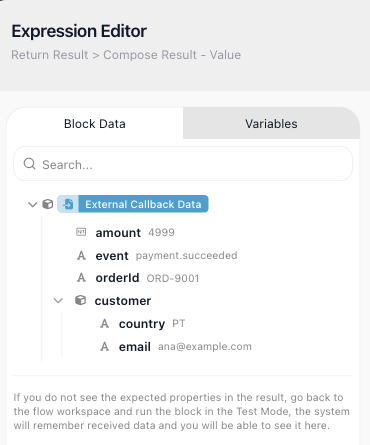
When more than one example exists, the Expression Editor uses the first of these: the block's latest test run, then the structure Learning Mode captured, then the latest real call. Real calls never change a learned structure. That is what you want when one URL receives several kinds of event - payments, refunds, disputes - and the latest call would otherwise change the field list each time. If the caller's payload changes for good, capture a new sample with Learning Mode (see Capturing a sample with Learning Mode).
To change a flow that is already LIVE, work on a new version of it (see Versions). Every version shares one Callback URL, so the LIVE version keeps receiving calls as usual: a call starts its run, or continues the waiting run it names. While Learning Mode or a test run listens on the new version, that version also receives a copy of:
- a call that starts a run. The call still starts a run of the LIVE version, so a sample you send this way starts a real run too.
- a call to a mid-flow callback that names no run. The LIVE version refuses it with
28056, but the new version has captured the sample.
A new version starts with the structure learned by the version it was made from.
Capturing a sample with Learning Mode
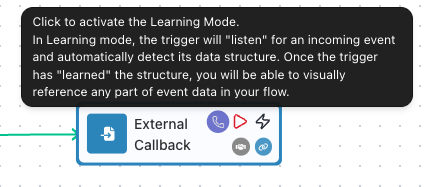
Learning Mode is off by default. Turn it on with the purple callback icon on the block's hover toolbar, then send one sample request to the Callback URL. It listens while you build - the flow need not be LIVE.
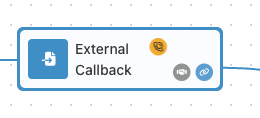
While it listens, the icon turns yellow and stays on the block without a hover:
Send the sample the same way the real caller will - for example:
curl -X POST '<Callback URL>' \
  -H 'Content-Type: application/json' \
  -d '{"event":"payment.succeeded","orderId":"ORD-9001","amount":4999,
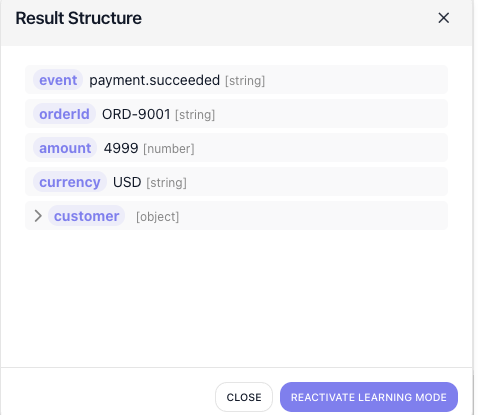
       "currency":"USD","customer":{"email":"dana@example.com"}}'
Once a sample arrives, the trigger records its structure - nested objects included. When no version of
the flow is LIVE, it answers the call with {"executionId": "learning"}; beside a LIVE version, the caller
gets the LIVE version's answer (see
Getting the caller's fields into the Expression Editor). The icon turns green:
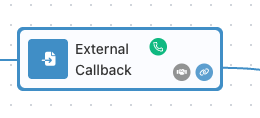
The green icon stays visible until you move the pointer over the block and away again; after that, hover the block to find it. Click it to see what was captured: the Result Structure popup lists every field with its value and type, and those fields are now available to reference in later steps. To capture a new sample, click REACTIVATE LEARNING MODE in the popup.
Reading the callback data
The payload is exposed under the alias set in Reference Trigger Data As - External Callback Data by
default. You never type a field path. To reference a field, open the
Expression Editor in the step that needs it, find
External Callback Data in the data tree, drill down to the field, and double-click or drag it in;
FlowRunner inserts the reference for you. The inserted reference reads like External Callback Data → event
for a top-level field or External Callback Data → customer.email for a nested one - but you build it by
picking, not by typing that text.
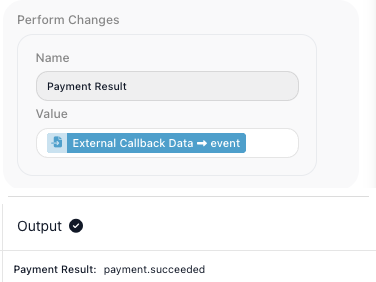
In the running example, the Set Variables step after the
trigger picks External Callback Data → event - the payment outcome the provider sent - and stores it,
here payment.succeeded, a value the flow could not know until the callback arrived:
Filtering which calls activate: conditions
One endpoint often receives events you do not want to act on - a payment provider posts
payment.succeeded to the same URL as its refunds and disputes. ADD A CONDITION gates the trigger:
when a call arrives, the trigger evaluates the condition first and only activates - starts or resumes the
run - if it is true. A false condition is accepted (HTTP 200) but does nothing, so a paused mid-flow run
stays paused for the next matching call.
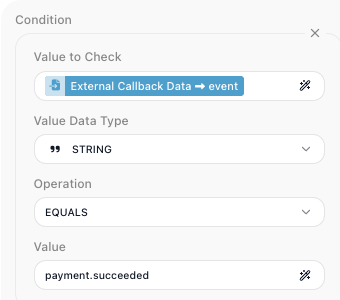
Gate on whatever field of the incoming payload tells the calls apart - a status, a type, an event name,
whatever your caller actually sends. A condition compares a Value to Check - a field you pick from
the callback data in the Expression Editor - against a Value you enter, using an Operation for
its Value Data Type. In this example the webhook carries an event field, so checking
External Callback Data → event EQUALS payment.succeeded lets a completed-payment call through while
a call whose event is refund arrives but leaves the run paused. Your own condition points at your own
payload's field and value.
Things to watch for
- The flow must be LIVE for the trigger to respond to real traffic - whether it starts a run or resumes
one. A call to a stopped flow returns
28010. Two build-time exceptions let you test before the flow is LIVE: Learning Mode, above, listens for one sample request, and running the block on its own waits for your call and shows its data on the Test Monitor - see Testing. - A mid-flow resume always needs
execution. Without it the call returns28056; the endpoint cannot tell which paused run to wake.