Repeating Steps
A flow often needs to keep doing something until it is done - checking an order until it ships, retrying a call until it goes through, collecting results until there are enough. The Repeat block runs a set of steps over and over and stops the moment a condition you set turns false. When you already have a list and want to touch every entry, that is Working Through a List, not Repeat.
Loop while a condition stays true
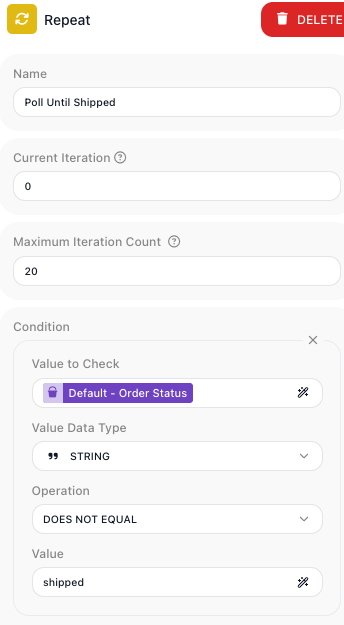
A poll only needs to run until the order ships, so the loop needs a test that tells it to
keep going. Drop a Repeat block from the palette's
Utils group, under System, name it Poll Until Shipped, and give it a test built from the same
Value to Check, Value Data Type, and Operation fields a
Condition block uses. Here the loop watches a Data
Bucket variable named Order Status: STRING, DOES NOT EQUAL, shipped.
The block re-checks this test before every pass. While it is true, the loop runs the steps once more; when it comes back false, that pass never starts - the Repeat is done and the flow moves on. Because the same steps run each pass, a step inside the loop has to change what the test reads - Order Status - or the test stays true and the loop never ends on its own.
Note
A step inside the loop is the usual way that value changes, but not the only one. The test reads a variable any part of the instance can write, so if another branch of the flow is running in parallel and changes Order Status, that is what the next check sees.
Build the steps that run each pass
The loop is only worth running for the work it repeats, so step inside and build that work. Hover the Repeat block and choose Expand to step into it; a banner names the block you are inside, and Return at the top-left brings you back out. The loop opens empty - you build its body the way you build the main flow.
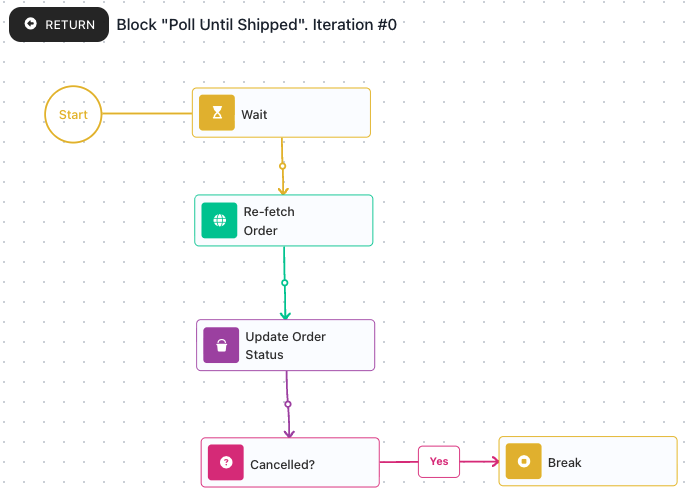
This poll's body runs three steps each pass: a Wait
pauses so the service has time to make progress, an
HTTP Request re-fetches the order, and a
Set Variables writes the fresh status into
Order Status - the step that lets the loop's test eventually turn false. The Cancelled?
check and Break further down the shot are an early exit, built in the next section.
Cap runaway loops with a failsafe
A test that never turns false would loop forever, so every Repeat carries a hard limit.
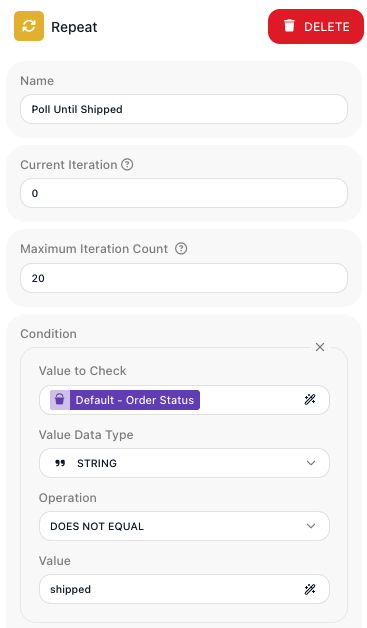
Maximum Iteration Count stops the loop after that many passes even when the test is still
true. It defaults to 10000; set it to a sensible number for the job while you build - the
poll uses 20, so a service that never ships the order stops after twenty checks instead of
running on.
Leave the loop early with Break
The loop's Condition ends the poll on its normal finish - the order ships. Sometimes you
want out the instant something else happens: a cancelled order should stop polling right away,
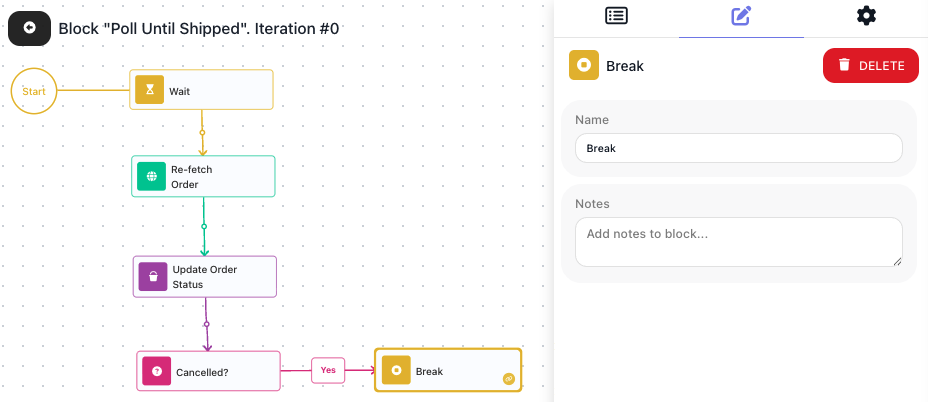
not wait for a shipped that will never come. Inside the loop, after the re-fetch, a
Condition block checks whether Order Status is
cancelled; on its Yes path sits a Break. Reaching
the Break ends the loop at once, and the flow carries on from the step after the loop.
A Break has almost nothing to configure - a Name and Notes - because its whole job is
to end the loop it sits in; it hands back no result. The Cancelled? check has nothing wired
to its No path, and that is deliberate: a Condition branch left unconnected ends the pass there,
so an order that has not been cancelled finishes the pass and the loop re-checks its condition
at the top. FlowRunner also lets you nest one Repeat within another; the
Break reference covers how a Break behaves inside nested
loops.
Accessing flow data inside the loop
The steps inside the loop need real data to work on. A block inside the loop can read any variable declared at the top level of the flow and the result of a block that ran before the loop. That is how Order Status, declared outside the loop, is there for the steps inside to read and rewrite each pass.
Returning data from the loop
A block's result inside the loop belongs to that one pass. The next pass cannot see it, and
neither can the flow after the loop; the Repeat itself hands back no result you can read
downstream either. Only what a step writes to a top-level variable carries from one pass to the
next and on past the loop. That is why the poll keeps its status in Order Status: each pass
reads the value the pass before it wrote, and after the loop the flow reads that same variable,
now holding shipped.
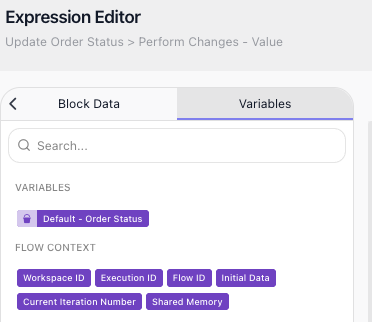
Read which pass you are on with Current Iteration Number
Sometimes a step needs to know which pass it is on - to number a log line, or to act
differently on the first pass than on later ones. Inside a Repeat, the
Expression Editor offers a Current Iteration Number
value in the Variables tab, under Flow Context; pick it like any other reference. It
counts the passes, starting at 0 on the first one. It appears only for blocks inside a loop -
a block out in the main flow has no iteration to report.
Repeat is the tool when the number of passes depends on what happens at run time - when you do not have a list to walk, but a "keep going until."