Routing on a Value
A flow often needs to send each case down its own path - a new order gets a welcome, a paid order goes to fulfillment, a shipped order gets its tracking. The Value Router reads one value and sends the run out the path that matches it. (A simple two-way check is Yes/No Branching; a path that turns on judgment about free text is an AI Router.)
Give each path a branch and a match rule
Every path hangs off one decision, so the router needs the value that decides it. Drop a
Value Router from the palette's Utils
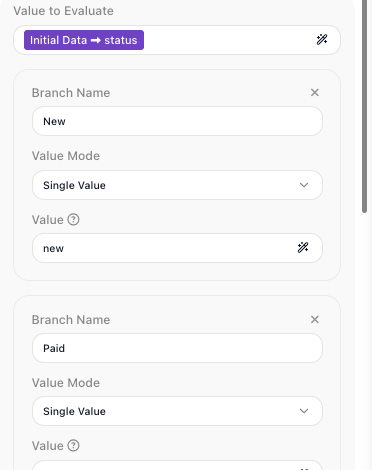
group, under System, and set Value to Evaluate to the order's status: open the
Expression Editor, pick Initial Data from the
Variables tab, and walk into the status field. A router you just dropped shows no
named connectors yet; they appear as you add branches.
Now add a path for each status. Click Add Branch and fill three things:
- Branch Name - the label for this path; it becomes a named output connector on the
block. Build one for each status:
New,Paid,Shipped. - Value Mode - how the branch matches. Single Value matches one exact value.
- Value - what it matches:
new,paid,shipped.
The block checks the branches from top to bottom and leaves by the first one that matches, so branch order matters - if two branches could match the same value, the higher one wins. There is always a built-in Everything Else branch at the end that catches any value none of your branches claimed; it can't be removed or moved above your branches.
Match several values with a Collection
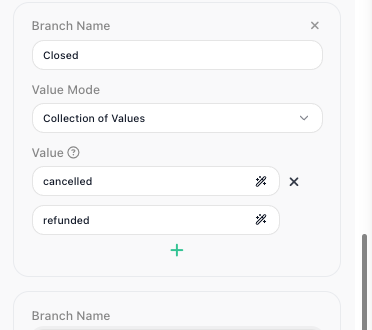
Some statuses share one path. To send more than one value down the same branch, set its
Value Mode to Collection of Values and list the values: a Closed branch that
matches cancelled or refunded takes either terminal status down the same path. The
Value Mode dropdown has two more modes, Single List and Quick Range - see
the Value Router reference.
Match a numeric band with a Range
Sometimes the value that decides is a number, not a label. A separate flow routes credit
applications on their score: a Value Router
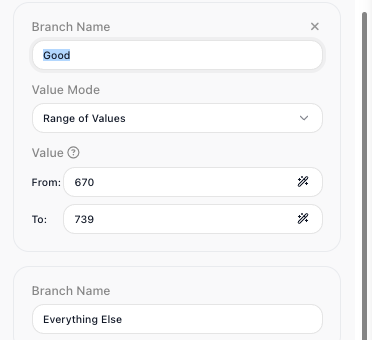
evaluates creditScore, and a branch in Range of Values mode matches a band with a
From: and a To: bound - a Good branch from 670 to 739. Both bounds count as
a match, so a score of exactly 739 still takes the Good path.
Build a path off each connector
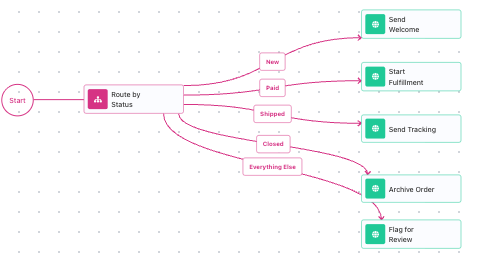
The router has decided; now each path does its work. Each branch name is an output
connector on the block, so wire each one to its step - Paid to a
Call Flow that starts fulfillment, Shipped
to an HTTP Request that sends tracking, and
so on. Always build something onto Everything Else so an unexpected status has
somewhere to go instead of stopping the flow. The connector the run leaves by is the
decision - a paid order takes the Paid path and nothing else.
Value Router, Condition, or AI Router?
Three blocks send a flow different ways, and the value you are routing on tells you which to reach for:
| Block | Reach for it when | Example |
|---|---|---|
| Condition | one yes/no check picks between two paths | "did the payment succeed?" |
| Value Router | one known value picks among several exact paths | "route by order status" |
| AI Router | the path turns on judgment about free text | "route by what the message is asking for" |