Adding a Delay
Not every step should fire the instant the one before it finishes. You might want to give a service a moment to recover before calling it again, space out a burst of calls so you stay under a provider's rate limit, or hold before a follow-up. A Wait block does exactly that: the flow reaches it, pauses for as long as you set, and then carries on.
Pause for a set time
To hold a step for a set stretch, reach for a Wait from the palette's UTILS group, under SYSTEM. With Expression Mode off, you fill in how long to pause across four fields - Days, Hours, Minutes, and Seconds - and the branch holds for that total before moving on. In the flow below, a Wait of three seconds sits between two calls:
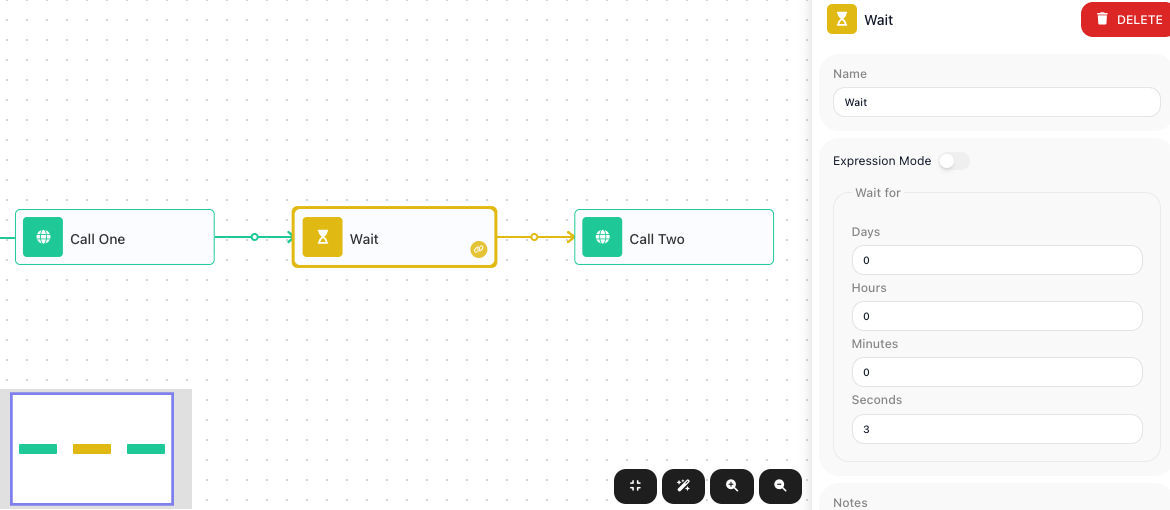
When the flow reaches the Wait, it holds for three seconds, and only then runs Call Two. In a test run the two calls - each near-instant on its own - took three seconds end to end, the length of the Wait.
A Wait holds only its own branch
A Wait pauses the branch it sits on, not the whole flow. Any other branch running at the same time keeps going. In the flow below, one branch waits five seconds before its step, while a second branch runs straight away:
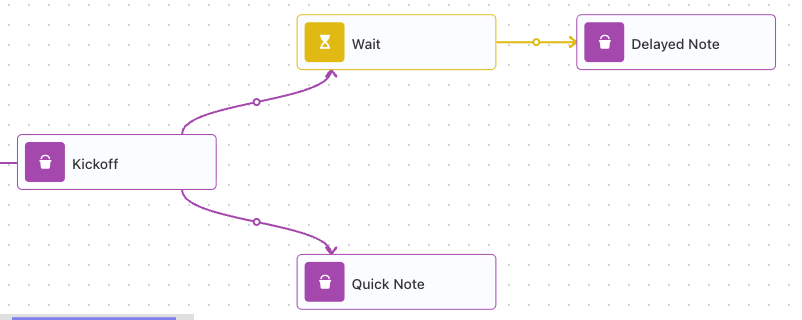
A test run bears that out: Quick Note finished the instant the flow reached it, while the Wait held its own branch for the full five seconds before Delayed Note ran. The run took five seconds overall - the length of the waiting branch - because the flow does not finish until every branch is done.
Set the wait from flow data
A fixed duration is not always what you want. Turn on Expression Mode and the four fields collapse
into a single Seconds field that takes an expression, worked out at run time from the flow's own
data. The expression must resolve to a number of seconds - 300 for five minutes. In the flow below,
an earlier step put the pause length in a Wait Seconds variable, and the Wait's Seconds reads
it:
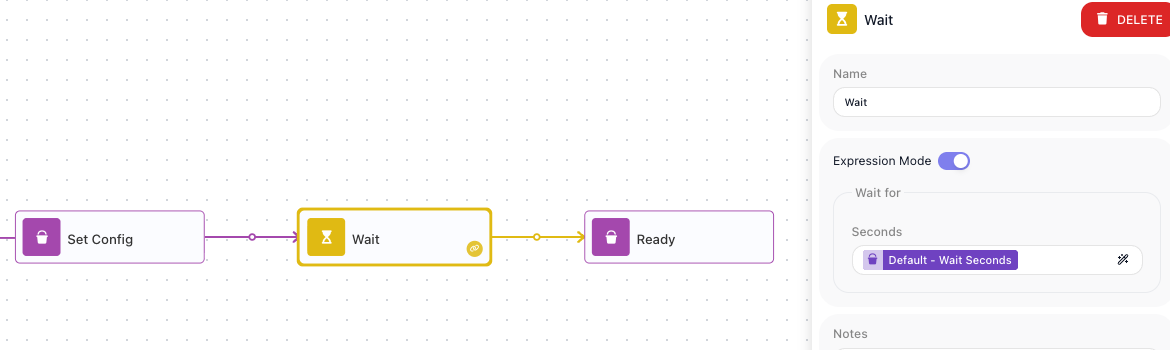
Because the length comes from the run's data, the same flow can pause for different lengths on different runs - however long the value it reads works out to.
When to reach for a Wait
A Wait is the single block for "not yet." The common reasons:
- Pace work so it does not run too fast. Put a Wait between repeated calls to space them out and stay under a service's rate limit - the cap on how often it will accept calls before it starts rejecting them.
- Hold before a follow-up. Give something time to settle before the next step acts on it.
- Back off before a retry. When a call fails and you want to try it again, a Wait pauses first, so you are not hammering a service that is already struggling. Retrying a failed step is part of Handling Errors.
A waiting run is still an active instance: it has not finished until the pause ends, so a long wait - hours or days - keeps that run open for the whole time.