Actions
An action runs your execute handler when the flow reaches it, and hands what the handler returns to the
rest of the flow. Register one with ext.addAction() and it appears in the palette under the category you
name.
ext.addAction({
  category   : 'TMDB',
  id         : 'getMovieDetails',
  label      : 'Get Movie Details',
  description: 'Returns everything TMDB holds about one movie.',
  params     : z.object({
    movieId: z.string().label('Movie ID').describe('TMDB numeric id, e.g. 693134'),
  }),
  result : { id: 693134, title: 'Dune: Part Two', runtime: 167, vote_average: 8.133 },
  execute: async ({ params, apiRequest }) => {
    return apiRequest({ url: `/movie/${ params.movieId }` })
  },
})
What you declare
| Property | Type | Required | What it does |
|---|---|---|---|
category |
string | yes | The palette group the block sits in. |
id |
string | yes | Persisted into every flow that places this block. Frozen once deployed. |
label |
string | yes | The name on the block. |
description |
string | yes | Shown under the label in the palette and the console. |
params |
z.object |
no | The fields on the block. Leave it out for an action with no input. See Parameters & Types. |
result |
sample | yes | A sample of what execute returns. |
execute |
function | yes | Called when the flow reaches the block. What it returns becomes the block's result. |
logo / appearanceColors |
string / [string, string] |
no | Override the extension's, for this block only. |
oauth2Scopes |
string[] | no | Extra scopes, unioned with those in ext.setupOauth2(). See OAuth2. |
dynamicParams |
object | no | Extra fields loaded from the flow builder's earlier choices. See Fields that depend on a choice. |
Every action you register shows up on the extension's Methods tab with its kind and category:
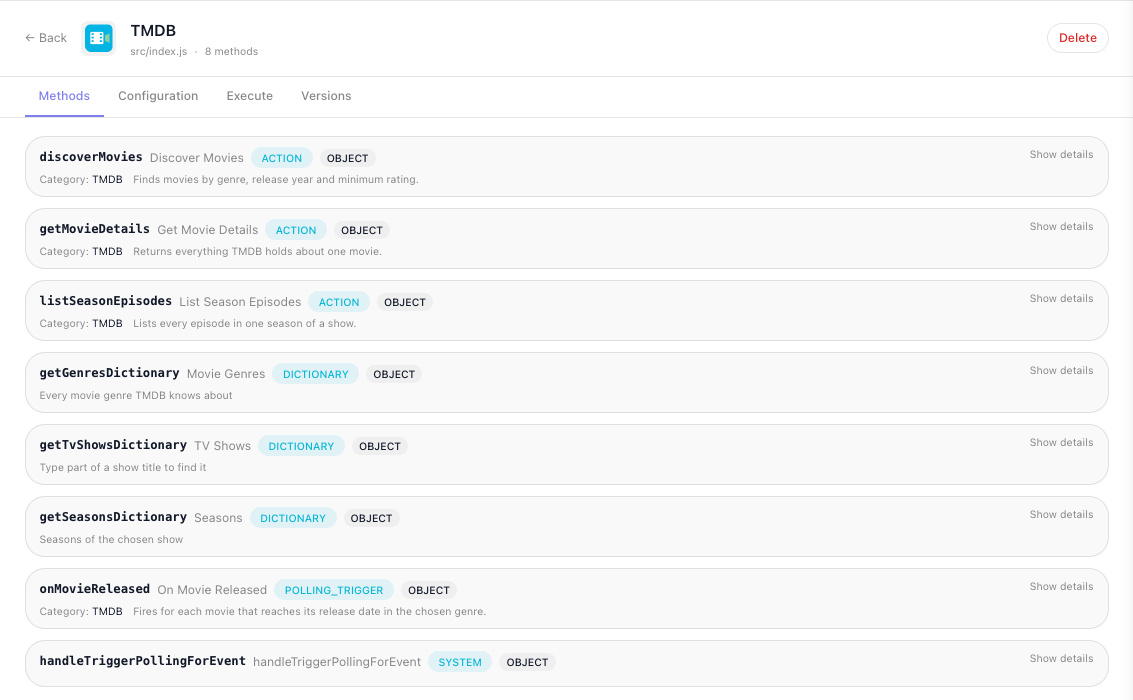
Show details on an entry lists its parameters, each with its type, whether it is required and its description, and the sample result you declared. That is how you check what the deployed version actually publishes.
What the handler receives
execute is called with one object. Take what you need from it by name:
| Key | What it is |
|---|---|
params |
The parsed input for this action, typed from its own params schema. |
context |
Whatever initContext returned. |
config |
The values the workspace filled in. |
apiRequest |
Your shared HTTP helper, with context and logger already supplied. |
helpers |
The bound helpers your extension declared. |
logger |
debug, info, warn, error. Use it instead of console.log. |
oauth |
{ accessToken, token } when the extension declares setupOauth2. See OAuth2. |
files |
The file client, when the extension declares usesFileStorage. See Storing Files. |
filesScope |
The three storage layers as named constants: filesScope.WORKSPACE, .FLOW, .EXECUTION. |
Input is already validated
The runtime checks the incoming values against params before execute runs. Values are converted to
the declared type, unknown fields are dropped, a blank field is resolved by its modifier, a .default() is
filled in, and a violation fails the block with a message that names the field by its label:
[flow-extension:tmdb] invalid params for method "discoverMovies" — minRating: «Minimum Rating» must be at most 10
That is what the Test Monitor shows for a bad value, and every offending field is listed at once. So do not re-check required params or ranges by hand. Declare optionality and limits honestly instead, and let the schema carry them - see Parameters & Types.
Not every entry point is equally strict, which matters when you write handlers other than an action's:
| Handler | Strictness |
|---|---|
Action params |
Strict. The flow engine produces these against the published model, so a violation is a real contract break. |
Dictionary criteria |
Strict. The console only calls a dictionary once the fields it depends on are filled. |
| Sample-result loader | Waits for the required params. The console calls it while a block is being edited, but only once every required field has a value, so a loader can assume its input is complete. |
Polling trigger params |
Checked on every poll. Each poll validates the saved trigger against params; a missing required field or a broken rule fails that poll with invalid triggerData. Fields you did not declare are kept. Declare filters .optional() and guard - see Triggers. |
Declaring the result
result is a literal sample of what execute returns. Write the object and nothing else:
result: {
  id          : 693134,
  title       : 'Dune: Part Two',
  release_date: '2024-02-27',
  runtime     : 167,
  vote_average: 8.133,
  genres      : [{ id: 878, name: 'Science Fiction' }, { id: 12, name: 'Adventure' }],
},
It is what a flow builder binds against when wiring your block's output into a later step, so take it from a real response. An invented sample drifts from the API and misleads everyone who builds against it.
Do not declare a zod schema and attach a sample to it. A schema here describes the same thing twice, is
never checked against what execute actually returns, and only the sample is published anyway. Two cases
justify something else: a shape genuinely reused across several actions, declared once with
z.object(...).example({...}); and a shape not known until the flow builder has configured the block, which
takes a loader function ({ params, context, apiRequest }) => sample.
Return what the API returned
Extend the provider's response where its shape is unusable, but do not reduce it to the part you happen to care about - every field you drop is one a flow builder cannot reach, and no number of extra actions gives it back.
// Throws away the response and answers with a boolean the API never sent
execute: async ({ params, apiRequest }) => {
  return { success: Boolean(await apiRequest({ url: `/movie/${ params.movieId }` })) }
},

// Hands back what the API said
execute: async ({ params, apiRequest }) => {
  return apiRequest({ url: `/movie/${ params.movieId }` })
},
The same applies to a list endpoint: return the items and the paging fields around them, not a bare array. Adding a derived field is fine - spread the response and add to it.
Write execute with a block body and an explicit return. A concise arrow returning an object literal
reads as a shape declaration rather than a call, and it is where responses quietly get reshaped.
Failing a block
Throw. The block's error exit carries the message, and the flow can handle it like any other block's failure.
Normalize failures once, in apiRequest, rather than in every action. A non-2xx rejects with a
ResponseError, and an unhandled one reaches the flow builder as the provider wrote it: the body's
message when it has one, otherwise the whole body - TMDB's wrong-key answer arrives as
{"status_code": 7, "status_message": "Invalid API key: You must be granted a valid key.", "success": false}.
One line that says what went wrong is easier to act on; the catch on
HTTP Requests does it. Keep status on the error you rethrow, because a
dictionary needs it to tell an unresolvable value from a rejected credential.
The Test Monitor shows the message, not a code, so make the message itself say what went wrong. A plain
Error you throw arrives as its message under a generic execution error; the runtime's own failures carry
a stable code as well: an FR_EXT_* code, or INVALID_DICTIONARY_OUTPUT_SCHEME for a dictionary that returns
neither a list nor { items } - see Troubleshooting.
Trying an action without a flow
The Methods tab on the extension's page - Custom Extensions in the workspace navigation, then the extension - runs a single method with values you type, which is the fastest way to confirm an action works before building anything around it. Pick the method on the left, fill in its fields on the Test sub-tab and click Run; the Output column shows the result, or the error in red:
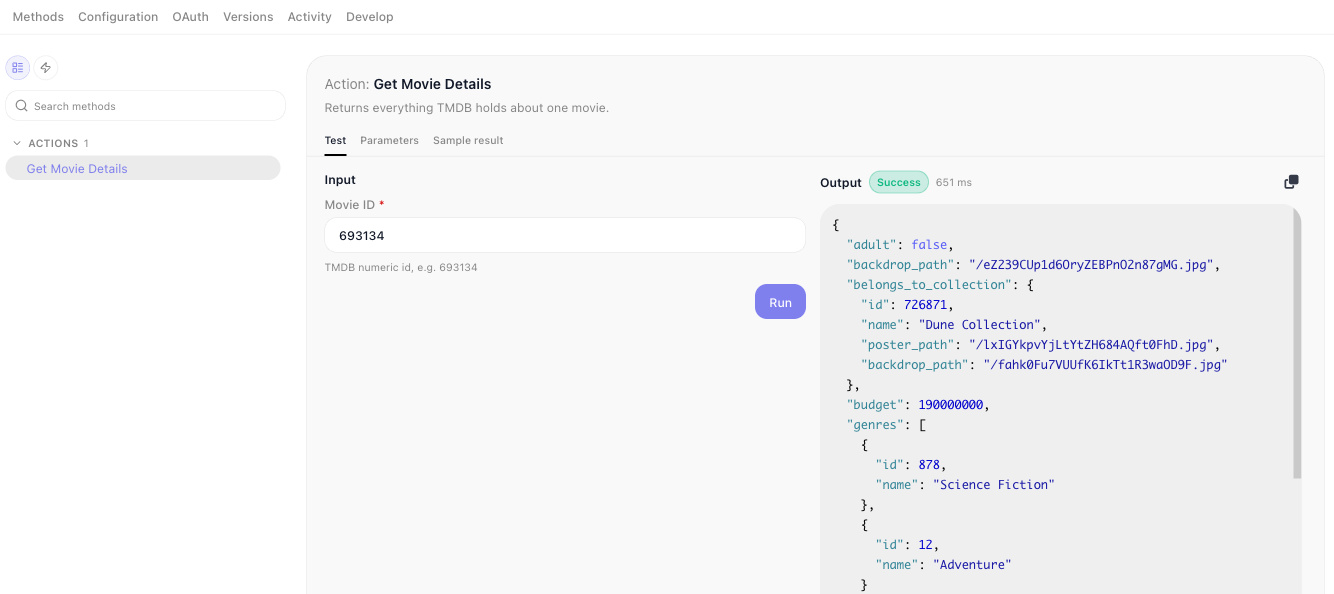
Each field gets the control for its type: a toggle for a boolean, a number box for a number, a dropdown for an enum or a dictionary, a date picker for a date, and a text area where you type JSON for an object or a list. A required field has a red asterisk, and Run checks every field first: a problem shows in red under its field, such as "«Movie ID» is required", and nothing is sent. Triggers and OAuth methods cannot be run here, because FlowRunner runs them itself.
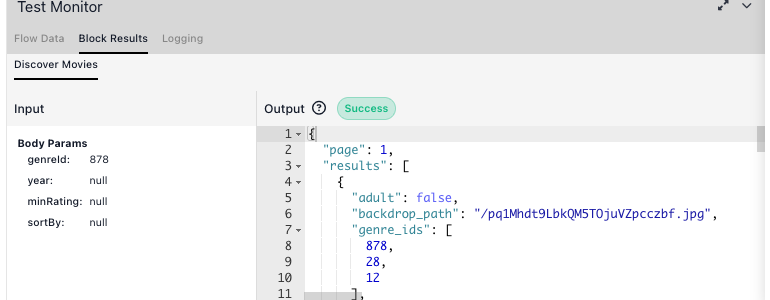
Inside a flow, the Test Panel at the top of a selected block's configuration does the same in place, and the Test Monitor below the canvas shows the input alongside the result:
Designing an action
- One action, one operation. A block that switches on a mode parameter has a
resultthat describes none of its outputs. - Name the label for the canvas, not for the API -
Get Movie Details, notmovieEndpoint. Ids are frozen after the first deploy; labels can change whenever you like. - Group with
categoryso related blocks arrive together in the palette.
Related
- Parameters & Types - the fields on the block
- Dictionaries - filling a field from the live API
- Testing - running an action through the real runtime with HTTP intercepted
- Service Structure - where
apiRequest,contextandhelperscome from