Workspace
A workspace is the home your automations live in, and everything they need to do real work lives there with them. Not only the flows you build, but the connections and keys that let those flows reach other services, the knowledge your agents search, the people on your team, and the guardrails that keep it all safe - all of it belongs to one workspace. You can keep several, one per client or product or environment, and each is self-contained: nothing in one spills into another.
If you have worked in a project or an organization in another tool, you have the shape of it. A workspace is your container for one body of automation work, with its own team, its own billing, and its own settings. Everything else in these docs - flows, triggers, agents, knowledge - lives inside a workspace, so it is the place to start.
What a workspace holds
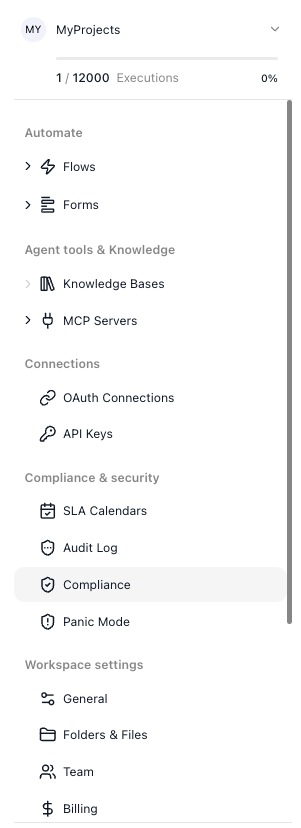
A workspace is organized into a few areas, each a doorway to the things your automations are built from and draw on:
- Automate - the work itself: the flows you design and run, and the Forms people fill in to start or feed them.
- Agent tools & Knowledge - what your AI agents reach for: Knowledge Bases they search to ground their answers, and MCP Servers whose tools they can use.
- Connections - the credentials a flow acts through: OAuth Connections, the accounts you have signed in to, and API Keys, the keys a block supplies directly.
- Compliance & security - the guardrails over access and activity: the activity logs, SLA calendars, HIPAA compliance, and a panic switch, all covered in Compliance & Security.
- Workspace settings - administering the workspace itself: its name and credentials, your team, your billing, and your files.
What you can do with a workspace
A workspace is not only something to fill - it is something you set up and run. The common things you can do with one, and where each lives:
- Rename it when its purpose has drifted from its name - on Workspace Settings.
- Add people to it, and choose what each one can touch - on Team. There is no per-seat charge, so the team can be as large as the work needs.
- Open it to outside systems with the workspace's credentials, so a form, another flow, or your own code can start its flows - on Workspace Settings.
- Check your plan and execution allowance, and move to a larger one as your flows grow - on Billing.
- Transfer it to another account, or delete it when the work moves on or is finished - on Workspace Settings.
Switching workspaces and your usage
You move between your workspaces from the switcher at the top of the navigation: it lists the ones you belong to, searches them when there are many, and creates a new one from scratch. The name shown is the current workspace's. When you belong to more than seven workspaces, the list opens with a Recent group, the three you opened last in this browser with the current one first, followed by All workspaces, every workspace sorted by name.
Just below it, an executions counter reads something like 0 / 12000 Executions. An execution is one run of a flow - one instance - whatever it does along the way: a run of fifty blocks counts the same one as a run of two. Your plan grants a monthly allowance, and the counter climbs by one for each instance your flows produce. The Billing area lists the tiers - 12,000, 75,000, and 250,000 per month - and is where you move to a larger one as your flows grow. The bar under the counter turns amber at 80% of the allowance and red at 95%, and a red warning icon appears at 100% - see Running out of executions.
Related
- Flows and Instances - a flow is the design, an instance is one run of it
- Forms - the screens that start and feed your flows
- Knowledge Bases and MCP Servers - what your agents draw on
- OAuth Connections and API Keys - the workspace's two credential stores
- Compliance & Security - the activity logs, panic mode, and the rest of the guardrails
- Workspace Settings, Team, and Billing - setting up, staffing, and paying for a workspace