Actions Group
This group holds several actions and starts them all at the same time, so independent work runs side by side instead of one step after another.
How it works
It is a block container that runs its inner actions in parallel. You drop two or more actions inside it, and when the flow reaches the group every one of them starts together rather than waiting its turn.
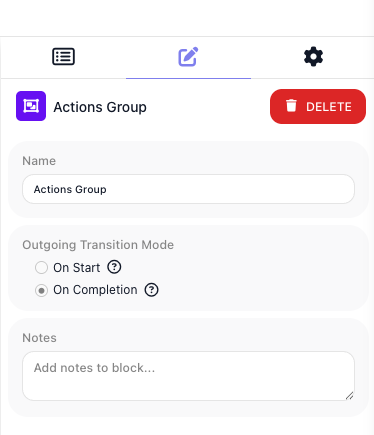
You decide when the rest of the flow is allowed to move on by setting the group's Outgoing Transition Mode. On Start releases the downstream path the moment the actions have all been kicked off, without waiting for any of them to finish. On Completion holds the path until every inner action has finished - and because the actions overlap, the group then takes about as long as its slowest action rather than the sum of all of them.
When to use it
Reach for it when you have two or more actions that do not depend on each other and you want them to run at the same time instead of waiting one after another - calling three separate services to enrich a record, or kicking off several independent setup steps at once. The payoff is wall-clock time: three calls that each take a second finish in about a second together rather than three seconds in sequence. Choose On Completion when a later step needs the work actually done before it runs; choose On Start when you only want to launch the actions and let them finish on their own while the flow carries on. If you need each action's result available downstream, On Completion is the safe choice - On Start can move ahead before any of them have produced anything.
Example
Suppose a flow has created a new customer record, and three pieces of enrichment can all happen independently: look up the company from a data provider, fetch the credit score, and pull recent support tickets. None of them needs the others, so running them one after another would waste time. Drop all three actions - each an HTTP Request to a different service - inside an Actions Group:
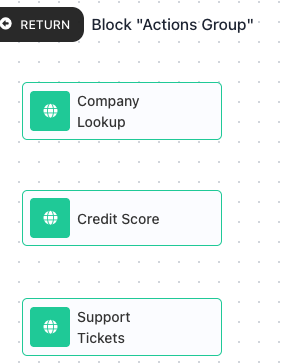
The next step builds a single enriched profile that needs all three results, so the flow must not move on until every call is done. Set the group's Outgoing Transition Mode to On Completion:
Inside the Actions Group (all start together):
  Action A: HTTP Request "Company Lookup"     finishes at ~0.6s
  Action B: HTTP Request "Credit Score"       finishes at ~1.1s
  Action C: HTTP Request "Support Tickets"    finishes at ~0.4s
All three calls leave at once. Action C comes back first at about 0.4 seconds, Action A at about 0.6, and Action B last at about 1.1. Under On Completion the group holds the downstream path until Action B - the slowest - lands, so the whole group takes about 1.1 seconds rather than the roughly 2.1 seconds the three calls would add up to in sequence. Only then does the flow continue to the step that reads all three results and builds the profile.
Had you chosen On Start instead, the flow would have moved on the instant the three calls were launched, long before any of them returned - fine if you only wanted to fire the calls off, but wrong here, because the profile step would find no results waiting for it.
Configuration
| Field | Description |
|---|---|
| Outgoing Transition Mode | When the rest of the flow is allowed to continue. On Start releases the downstream path as soon as every inner action has been started, without waiting for results. On Completion holds it until every inner action has finished. |
Things to watch for
- The inner actions run side by side, not one after another, so you cannot count on one finishing before another starts. If an action needs another's result, those two cannot share a single Actions Group.
- Under On Start the flow moves on the moment the actions have been launched, before they have produced anything. If a later step needs their results, use On Completion instead so the group waits for them to finish.
- The group itself does not hand back a combined result. To use what the actions produced, read each inner action's own result downstream.