AI Router
This block branches your flow on a judgment an AI model makes, the way a person would read an incoming message and decide where it belongs. Instead of matching a fixed value, you name the branches you care about - angry, pleased, neutral - and the model reads the request and sends the flow down whichever one fits.
How it works
You give the model a request in plain language - what you want it to decide, such as "Determine the sentiment of the message" - and a set of named branches it is allowed to choose from, such as positive, negative, and neutral. Each branch you name becomes its own output connector on the block. When the flow reaches the block, the model reads the request, picks exactly one of your branches, and the flow leaves through that branch's connector.
One branch is always there for you: Everything Else, the fallback the model takes when nothing you named fits. Whatever the model cannot place still has somewhere to go, so the flow is never stuck.
Often the request alone is enough for the model to decide. When the decision needs more to go on, you can attach Decision Data - extra context the model can read without you stuffing it all into the request and bloating the prompt, like a database query result or a large list. Each piece of Decision Data has a name, and you mention that name in the request so the model knows which dataset to use for the decision.
When to use it
Reach for it when the branch your flow should take depends on a judgment a human would make rather than a value you can match exactly - is this message angry or pleased, is this request a refund or a complaint, is this ticket urgent. A Value Router or a Condition can split the flow when the deciding factor is a known value (status equals "cancelled", priority equals "high"), but neither can read a sentence and tell you the mood behind it. The trade-off is that the answer comes from an AI model, so it costs a model call and the same input will not always route the same way.
Example
Suppose an External Callback trigger receives an incoming support message, and you want to route it by how the customer sounds. The trigger hands you a payload like this:
{
  "message": "I have been waiting three days and nobody has replied. This is unacceptable.",
  "customerId": 4821
}
Add an AI Router - it lives in the AI group of the block palette. In AI Decision Request, write the instruction for the AI: "Determine the sentiment of the message." In Decision Data, add one named input - call it message - and point it at the trigger's message field. In Expected Decisions, list the three labels you want to handle: positive, negative, and neutral. The block keeps a fourth label, Everything Else, as the fallback. Each of these four labels now shows up as a named output connector on the block.
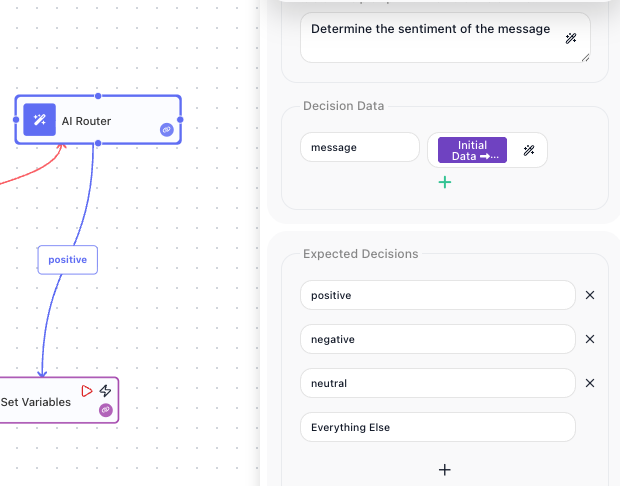
On the negative connector, place a Set Variables block that stores a Sentiment variable set to "negative" (and the matching value on the other two branches). When the flow runs against the message above, the AI reads it, judges the tone as angry, and chooses negative - so the flow leaves through the negative connector and runs the block that marks the message negative. A calm "Thanks, that fixed it!" would instead leave through the positive connector. Anything the AI cannot place in positive, negative, or neutral leaves through Everything Else, so the message is never stuck with nowhere to go.
The routing is the point here - you act on the decision by building different steps off each connector, not by reading a value afterward. The block does still store the label it chose under its result alias, though, so a step on any branch can reuse it. The stored result is an object with one decision property, so with the default alias a Set Variables block reads AI Router Result → decision, which on this run resolves to "negative". That saves you re-typing the branch's label by hand when several branches need to record the same value.
Configuration
| Field | Description |
|---|---|
| AI Model | Required. The model that makes the decision, chosen from one list grouped by provider (Claude, GPT, Gemini, and others); the provider is implied by the model you pick. |
| AI API Key | Required. The key that authorizes the model call. Pick one you have already saved, or type a new one right here - the same control, and the same store, as the AI Agent block. The switch beside the label turns the field into an expression, so it can read the key from an API KEY placeholder instead. |
| AI Decision Request | Required. The instruction telling the AI what to decide, labeled AI Decision Request (prompt) in the panel. Starting it with "Determine" works well, for example "Determine the sentiment of the message". |
| Decision Data | The values the AI judges. Each one has a name and an expression pointing at the data to evaluate, usually a previous block's result or a trigger's payload. |
| Expected Decisions | Required. The labels the AI is allowed to choose from. Each label becomes a named output connector on the block. One of them, Everything Else, is the fallback the AI takes when none of the others fit. |
Common settings (available on most blocks):
| Field | Description |
|---|---|
| Name | A label for this block on the canvas. |
| Reference Result Data As | The alias used to reference this block's result in later blocks. |
| Assign to a Variable | Optionally store the result in a Data Bucket variable too; you choose the bucket and the variable name. |
| Logging | What to log to the Logging panel while the flow is LIVE, both on start and on completion. |
| Notes | Freeform notes for documenting the block; they do not affect execution. |
Things to watch for
- The named output connectors are only visible when you hover the block - one for each label in Expected Decisions, plus Everything Else - so that a block with many decisions does not crowd the canvas with permanent labels. If a branch looks unwired, hover the block to find its connector.
- Because an AI makes the call, routing is not deterministic - the same input can take a different branch on a different run. Do not rely on it for decisions that must be exact and repeatable; use a Value Router or a Condition for those.
- The block needs a model and a saved API key before it can run. Without a working key the decision cannot be made.
- Always handle the Everything Else branch. The AI sends anything it cannot place into one of your labels down this path, so leave it wired to something rather than a dead end.