Assign Instance Name
This block gives the current run of your flow a human-readable name, so you can find a specific run later at a glance instead of hunting through a list of machine IDs. You supply the name, and it stands in for the run's automatic Instance ID wherever the run is listed.
How it works
Every time a flow runs, that run is one instance, and FlowRunner gives it an automatic Instance ID to tell it apart from every other run - a long string you would not recognize at a glance. This block sets a display name for the instance it runs in, something you choose and can actually read. From the moment it runs, the Instances tab shows that name in place of the Instance ID. The name can be fixed text or built from values already in the run.
When to use it
Reach for it when you will later go looking for a specific run in the Instances tab and a column of near-identical Instance IDs would not help you find it. A name built from the run's own data - the customer email, an order number - turns that list into something you can scan. Put it early in the flow: the name only applies from the point this block runs, so a run that fails before reaching it is still listed by its Instance ID.
Example
Suppose a flow runs once per support ticket, and each run starts with this trigger payload, which the flow exposes as Initial Data:
Drop an Assign Instance Name block (in the block list under Actions) in early, and in the Expression Editor set its Instance Name to a composite that pulls the customer in from Initial Data, so each run announces who it is for:
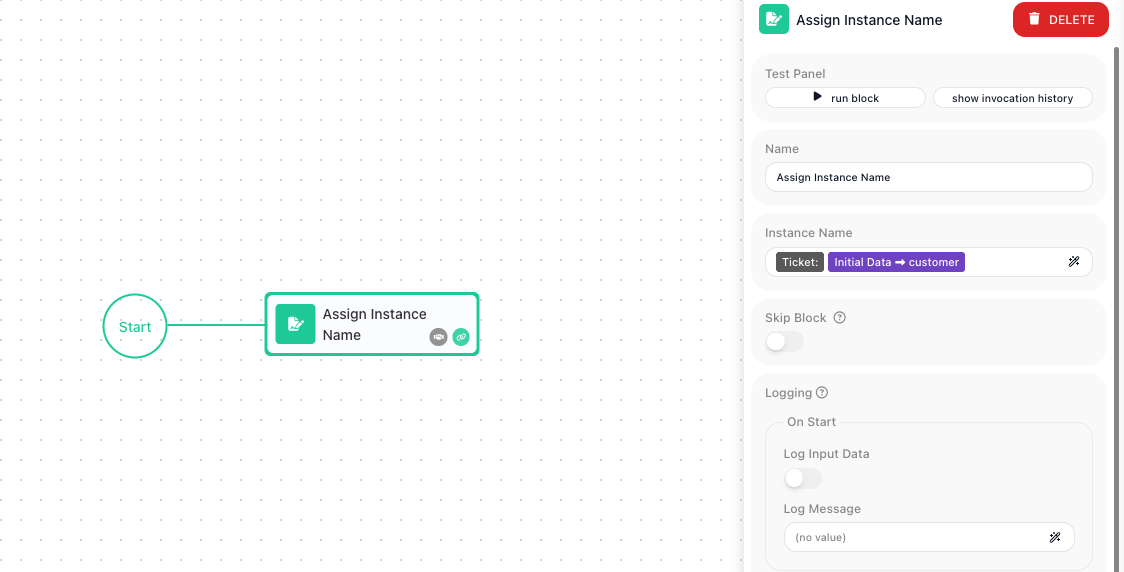
Here Initial Data → customer reads the customer field from that payload, so for the payload above this run is named Ticket: acme@example.com. Open the Instances tab and that is the row you see, in place of the run's Instance ID. A second run for a different customer gets its own name the same way, so the two are clear to tell apart.
Configuration
| Field | Description |
|---|---|
| Instance Name | Required. Static text, dynamic values, or a composite (e.g. "User: name"). |
Common settings (available on most blocks):
| Field | Description |
|---|---|
| Name | A label for this block on the canvas. |
| Skip Block | When on, the block is skipped during execution and the value in Simulated Result is used as its output. |
| Logging | What to log to the Logging panel while the flow is LIVE, both on start and on completion. |
| Notes | Freeform notes for documenting the block; they do not affect execution. |
Behavior
- Sets the instance's name; appears in the Instances list (else the raw GUID shows).
Things to watch for
- This block does not produce an output you can reference later in the flow - it only sets the run's display name.
- Assign early so the name is visible throughout the instance lifecycle.