Call Flow
This block reuses a whole flow as a single step. A routine you have already built - creating a record, sending a notification, running a billing check - can be called from anywhere it is needed, so it lives in one place instead of being copied into every flow that uses it. You hand the called flow the values it needs to start, and choose whether to wait for its result or let it run on its own.
How it works
Call Flow lives in the Actions palette. Think of it as one flow handing part of its work to another. When the flow reaches this block it starts a fresh run of the flow you chose - a separate Instance with its own data - and the values you supply become that run's Initial Data, which the called flow reads the same way it would the payload from its own trigger. The one real choice is whether this flow waits for that run, set by Wait for completion. If you need the called flow's answer, leave it on: this flow pauses until the called flow finishes and takes back the value from its Return Result block. That value becomes this block's result, read downstream through the block's result alias - the Reference Result Data As name, Call Flow Result by default - so a returned { "id": 88412 } reads as Call Flow Result → id in the Expression Editor. If you only need the work set in motion, turn it off: there is no result to wait for, so instead the block hands back an executionId, an identifier for the run it started, and this flow carries straight on while the called flow finishes on its own.
When to use it
Reach for it when a piece of logic is worth keeping as its own flow and running from several places - creating a record, sending a notification, running a billing routine. Building that work once as a standalone flow and calling it keeps each flow shorter and means a fix lives in one place instead of being copied around. Turn Wait for completion on when you need what the called flow produces before this flow can carry on, and off when you only need to set the work in motion and do not care to wait for it - for example launching a long job you will check on later. If the reusable steps only ever run inside this one flow, a SubFlow keeps them inline without a second flow to manage.
Example
Suppose you have a flow named Create Beneficiary that takes a few details, writes a beneficiary record, and finishes with a Return Result block that hands back the new record's id. You want to use it from a parent flow that is setting up an account, where an earlier block, Create IRA, has already produced the account it belongs to.
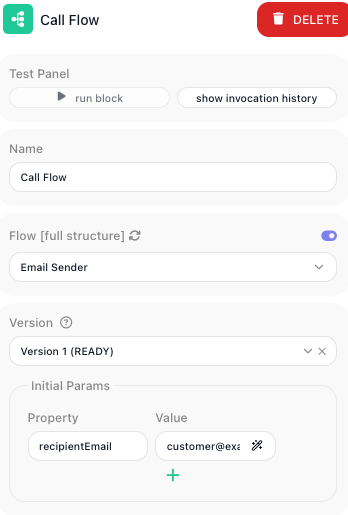
Add a Call Flow block, set Flow to Create Beneficiary, and turn on Wait for completion so the parent flow waits and reads back the id. Then map the values the called flow needs to start under Initial Params. Each row pairs a Property - the name the called flow expects in its Initial Data - with a Value, an expression that supplies it from this flow. Bind a row named deposit_id to the account id the earlier block produced:
Flow:        Create Beneficiary
Wait for completion: on

Initial Params:
  deposit_id   <-  {{Create IRA Result->id}}
  first_name   <-  {{Initial Data:beneficiary.firstName->}}
  last_name    <-  {{Initial Data:beneficiary.lastName->}}
When the parent flow reaches this block, it starts a run of Create Beneficiary with those three values as its Initial Data, then pauses. Create Beneficiary writes its record and its Return Result block sends back the new id, say { "id": 88412 }. That object becomes this block's result under its alias - here the default Call Flow Result. The next block reads the id straight from it: a Create Relationship block links the beneficiary to the account by binding its owner field to Call Flow Result → id in the Expression Editor. Had you turned Wait for completion off instead, the block would hand back an executionId right away - there is no returned record to read yet - and the parent flow would continue without waiting for the beneficiary record to be written.
Configuration
| Field | Description |
|---|---|
| Flow | Required. The flow this block runs, picked from a dropdown that lists all of your workspace flows; the refresh icon beside it re-reads the list after you create a flow elsewhere. The flow you call has to be LIVE (published) for the call to run - only a published flow can be started, so a draft in the list cannot actually be invoked. |
| Version | Which version of the chosen flow to run. Once you pick a Flow, a Version selector appears beside it listing that flow's versions (each marked with its state, e.g. READY); the call runs the version you select. |
| Initial Params | The values handed to the called flow to start its run. Each row pairs a Property - the name the called flow expects in its Initial Data - with a Value, an expression that supplies it from this flow. |
| Wait for completion | When on, this flow waits for the called flow to finish and this block's result is the value from the called flow's Return Result block. When off, this flow does not wait and the block returns an executionId for the run it started. |
Common settings (available on most blocks):
| Field | Description |
|---|---|
| Name | A label for this block on the canvas. |
| Reference Result Data As | The alias used to reference this block's result in later blocks. |
| Assign to a Variable | Optionally store the result in a Data Bucket variable too; you choose the bucket and the variable name. |
| Logging | What to log to the Logging panel while the flow is LIVE, both on start and on completion. |
| Notes | Freeform notes for documenting the block; they do not affect execution. |
Things to watch for
- The dropdown lists every other flow in your workspace, but the flow you call has to be LIVE (published) to run. If a call does nothing or errors, check that the target flow is published, not still in draft.
- A flow can call itself. The Flow dropdown leaves out the flow you are editing, so turn on Expression Mode beside the field and type the flow's own name. Every call starts a new run that counts as an execution, and there is no limit on how deep the calls go, so put a Condition in front of the Call Flow block to end the chain. Without one, the flow keeps starting runs until the workspace reaches its monthly execution limit or its limit on runs going at once.
- What the block hands back depends on Wait for completion. With it on, the result is the value from the called flow's Return Result block, read downstream as Call Flow Result → (or Call Flow Result → field for one field). With it off, this flow does not pause for the run, so its result cannot be the called flow's output yet - it is only an executionId, an identifier for the run, not the work it produced. If a later step expects the called flow's output, leave Wait for completion on.
- If you are not waiting, the called flow runs on its own afterward, so this run finishing does not mean the called flow's run has finished too.