Condition
This block lets you gate, guard, or fork a flow on a yes-or-no test. Ask a question about a value - is this order over 1000 dollars, is this record valid, is the box checked - and only the runs that match go down one path while everything else branches the other way.
How it works
A Condition is a fork in the flow built around a single yes-or-no question. You frame the question - is this amount greater than 1000, is this status equal to cancelled, is this flag on - and when a run reaches the block, the question comes out either true or false. True sends that run down the block's Yes path; false sends it down the No path. The two paths leave the block separately, and you build different steps on each, so the flow handles a match one way and everything else another. That is the whole idea: one question, two ways out.
The question does not have to be a single test. You can ask several things at once and weigh the answers together - is the amount over 1000 or is the order expedited, is the record valid and is the customer active. Each extra test joins the ones before it with AND or OR, and brackets let you group tests so you control which ones are weighed together before the rest. The run still comes out with one answer, true or false, and still leaves by Yes or No - the multi-part test lets a single fork stand in for a question too involved to phrase in one comparison.
When to use it
Reach for it at any point where the flow should do one thing in one case and something else in another - a gate that lets work continue only when a record is valid, a guard that stops before a risky step, a fork that handles paid and unpaid orders differently. When you are choosing between exactly two outcomes from a single test, this is the most direct block for the job. If instead you are routing one value across many possible cases, a Value Router keeps that tidier than a stack of Conditions, and an AI Router decides the path from natural language rather than a fixed comparison.
Example
Suppose a flow processes an order, and an earlier step left the order details in Initial Data. You want orders over 1000 dollars to go through a manual approval step, while smaller orders are fulfilled right away. The order looks like this:
Add a Condition - it lives in the Utils group of the block palette - and set its Value to Check to the order amount, read from Initial Data. Set Value Data Type to INT, since the amount is a whole number, then pick the Operation GREATER THAN and set the value to compare against to 1000. That is the whole test: is the amount greater than 1000?
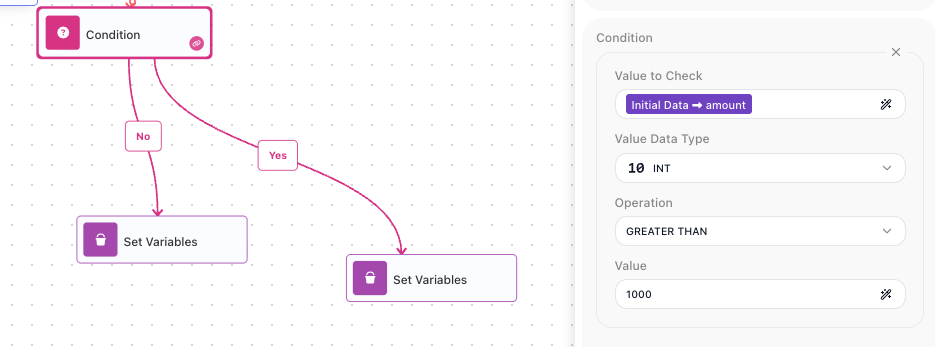
For this order the amount is 1450, so the test is true and the flow takes the Yes path - where you place the manual approval step. An order with an amount of 600 would come out false and take the No path, where you place the steps that fulfill it straight away.
Now suppose approval should also kick in for any expedited order, whatever its size. Instead of a second Condition, add a second part to this one with the + control: keep the amount check as the first part, add a part that checks the expedited flag Value Data Type BOOLEAN / CHECKBOX, Operation IS TRUE, and join the two parts with OR. The Yes path now runs whenever the amount is over 1000 or the order is expedited, and only orders that are both small and not expedited fall through to the No path.
A Condition routes the flow by its Yes and No paths, so most of the time the place each path leads to already tells you the answer and you never read the result by hand. The block still stores the outcome, though: it sets Reference Result Data As so the true-or-false result is available downstream under the alias Condition Result. That is useful when a later step needs to record or react to which way the fork went without sitting on a single branch - a block further down the flow reads it in the Expression Editor as Condition Result, which resolves to true or false.
Asking AI instead of comparing
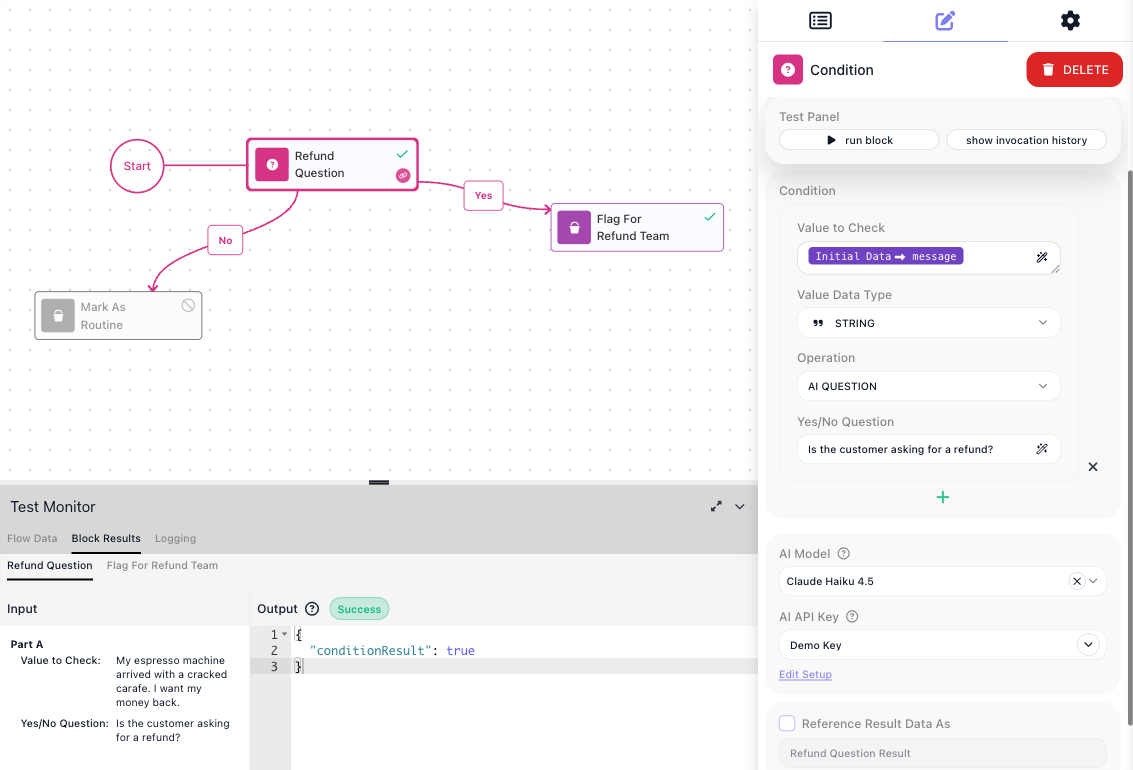
Every Value Data Type offers one more operation after its comparisons: AI QUESTION. Instead of testing the value against something fixed, you ask a model a yes-or-no question about it. Pick AI QUESTION as the Operation and three settings appear:
- Yes/No Question - the question, in plain language: "Is the customer asking for a refund?".
- AI Model - the model that answers, picked from a provider-grouped list.
- AI API Key - the key the call runs on; the field unlocks once a model is picked and offers your saved key setups. The switch beside its label turns it into an expression, so it can read the key from an API KEY placeholder.
The model reads the value in Value to Check and answers the question about it. True takes the Yes path and false takes the No path, exactly like a comparison. In a multi-part condition the AI Model and AI API Key are set once for the whole block - every AI QUESTION part uses the same model and key.
An AI QUESTION costs a model call on every run, and the same question can occasionally come back with a different answer. Keep it for judgments a fixed comparison cannot make, and let the comparisons handle everything exact.
Configuration
| Field | Description |
|---|---|
| Value to Check | Required. The value the test runs against - usually an expression that reads from a previous block's result, Initial Data, or a Data Bucket variable. |
| Value Data Type | Required. The kind of value you are checking, such as STRING, INT, DOUBLE, BOOLEAN / CHECKBOX, DATETIME, JSON OBJECT, or JSON ARRAY. The available comparisons depend on this choice, so a number offers GREATER THAN while a checkbox offers IS TRUE. |
| Operation | Required. The comparison to run against the value, for example GREATER THAN, EQUALS, IS TRUE, or IS NOT EMPTY. Comparisons that take a second value - such as EQUALS - show a field where you supply the value to compare against. |
| Parts | Additional sub-tests added with the + control. Each part is its own value, type, and comparison. Parts are joined with AND or OR, and brackets group parts so you control which ones are weighed together. |
Common settings (available on most blocks):
| Field | Description |
|---|---|
| Name | A label for this block on the canvas. |
| Reference Result Data As | The alias used to reference this block's result in later blocks. |
| Notes | Freeform notes for documenting the block; they do not affect execution. |
Things to watch for
- The Yes path runs when the test is true and the No path runs when it is false. Both paths leave the block; if you build steps on only one of them, the other case quietly leaves the flow with nothing to do.
- The comparisons offered depend on the Value Data Type you choose, so set the type to match the value. Checking a number as a STRING, for example, compares it character by character rather than by size, which can give a surprising answer.
- With several parts, the AND or OR connector between them can be switched, and the brackets decide which parts are grouped. With a mix of AND and OR, the grouping changes the outcome, so set the brackets deliberately rather than leaving the default.
- The block will not validate until at least one of its Yes or No connections is wired: until then it carries an error badge reading "One of the Yes or No connection must be connected", and Run Block stays disabled.
- A null value does not fail the block. When Value to Check resolves to null, the comparison comes out false and the run carries on down the No path, so a value that is sometimes missing needs no guard ahead of the block. Note that this makes IS EMPTY answer false for a null value as well - it reports on an empty value, not a missing one.
- A value of the wrong type does not fail the block either. When Value to Check resolves to a string where Value Data Type says JSON OBJECT, or to text where it says INT, the comparison comes out false, the run takes the No path, and a WARN line naming the value, the operator and the reason is written to the flow log. Together with the null rule this means no shape of incoming data stops a run at a Condition: the No path is the one that has to be safe, so gate anything privileged there explicitly.