Agent Memory
A support chat can pick up the thread instead of asking the customer to repeat themselves, and a multi-step helper can build on a decision it made a few turns ago - once the AI Agent can remember its recent exchanges. Turning on Messages History is what gives it that memory.
How it works
An AI Agent can carry its recent exchanges from one run to the next - but only if you ask it to. By default it has no memory: every run starts cold, knowing only its System Prompt and the User Prompt it was handed this run. The User Prompt is usually where the run's own data goes - the customer's latest message, whatever is specific to this moment - and the instant the run ends, the agent forgets all of it. That cold start is right for a step that judges one thing at a time, but no good for a conversation, where the agent needs to remember what came before.
Messages History is what you turn on to fix that - a toggle on the AI Agent block's own config panel, with a Messages History Limit for how many recent messages to keep. With it on, the agent keeps a running record of its recent messages - each run's prompt and the agent's reply are added to that record, and on the next run the agent is shown the record along with the new prompt. So it can follow a thread: remember a name the user gave it a moment ago, build on an answer it already gave, stop asking for something it has already been told.
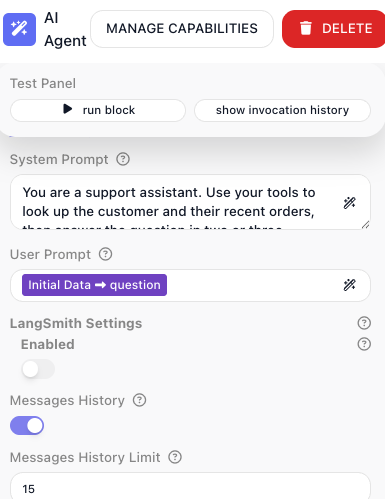
FlowRunner™ manages that record for you - it loads the history into the agent at the start of each run and appends the new turn at the end, all behind the toggle. There is no result alias to read and nothing to add to the agent's prompts; turning the toggle on is the whole job.
The record is bounded. When you turn Messages History on the limit starts at 15, and you can set it anywhere up to 20 messages; only that many of the most recent messages are carried forward, and older ones fall off the back. Each exchange is two messages - the prompt and the reply - so a limit of 20 keeps roughly the last ten back-and-forths.
Underneath, that history lives in Shared Memory - the flow's own key/value store that holds values between runs - so it survives from one run to the next the same way anything in Shared Memory does.
When to use it
Turn Messages History on when each run continues the same conversation - a chat assistant that should remember what the customer just said, a multi-step helper that refers back to an answer it gave a few turns ago. Leave it off when every run stands alone, like a classifier that rates one item at a time; carrying history it will never use only adds cost. When it is on, keep the limit only as wide as the conversation needs - every remembered message makes the prompt longer and the call dearer.
Giving each caller their own memory
When the same flow serves many people - or many outside systems calling in - one caller's conversation could bleed into another's, because by default every run shares one memory. You keep them apart with the flow's Memory Anchor, on the Flow Settings tab - the gear tab at the top of the flow editor's right-hand panel: anchor on a value that identifies the caller, and each one gets its own separate conversation.
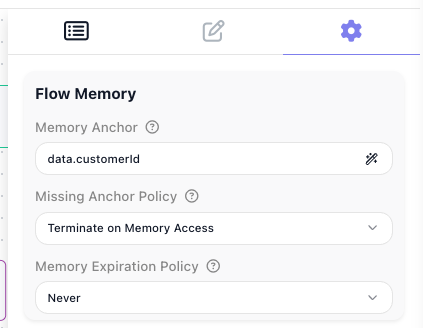
The Memory Anchor is the value that decides which memory a run uses: runs that arrive with the same anchor value share one memory, and a different value gets its own. In the screenshot the anchor is data.customerId, so every run carrying the same customer id shares that customer's memory, and two customers never mix.
You set the anchor through a small Memory Anchor Selection dialog: pick an Anchor Source - where the value comes from - and give an Anchor Property, the path to the value. For a customer id carried in the flow's Initial Data, that is Initial Data with the path data.customerId. Left at the default source, Flow Memory, there is no split: every run shares the one memory.
Two companion settings sit beside the anchor in the same panel - a Missing Anchor Policy for when a run arrives with no anchor value (the shot shows its default, Terminate on Memory Access) and a Memory Expiration Policy for how long an idle conversation is kept (shown at its default, Never). Each opens into a set of options; choosing an anchor and pairing it with those policies is walked through end to end in Per-User Memory.
Example
Picture a support chat backed by an AI Agent, where each message from the customer is one run of the block. On the first run the customer writes "Hi, I'm Dana and order 10473 still has not arrived." The agent answers, and that exchange is saved to its history.
On the next run the customer writes only "So when will it get here?" - no name, no order number. With Messages History on, the agent still has the earlier turn in view: it knows the customer is Dana and the order in question is 10473, so it answers about that order without asking again. With it off, this second run would have no idea what "it" refers to and would have to ask the customer to repeat themselves.
Configuration
| Field | Description |
|---|---|
| Messages History | Turn on to give the agent memory of its earlier runs. When on, the messages from recent prior runs of this block are fed back to the model along with the new prompt, up to the limit you set (maximum 20). When off, every run starts with no memory of earlier runs. |
Things to watch for
- The agent's memory lives in the flow's Shared Memory, so clearing that store clears the conversation too - a Shared Memory: Delete with All on wipes the agent's history along with everything else, which is easy to forget when you reset a flow's store for unrelated reasons.