List Iterator
This block runs the same set of steps once for each item in a list. You give it an array, build the per-item steps inside it, and it runs them for every item.
How it works
It is a block container, dropped from the Utils category of the block palette: the steps you build inside it run once for each item in the list, and on each pass the current item is made available to those steps as Current Iteration Item - the whole item. The loop also exposes the pass number as Current Iteration Number, counting up from 0, so a step can tell which pass it is on.
When to use it
Reach for it whenever you have a list and need to do the same work for every entry: send a message to each recipient, validate each row, enrich each record. For a small, fixed set of items a few separate blocks might be simpler, but as soon as the count is dynamic, or you would be copying the same blocks again and again, one List Iterator is far cleaner.
Example
Suppose an earlier block, an HTTP Request, returned this list of orders:
[
  { "id": 1024, "customer": "Acme",    "status": "open" },
  { "id": 1025, "customer": "Globex",  "status": "cancelled" },
  { "id": 1026, "customer": "Initech", "status": "open" }
]
Say you want to collect the id of every order you process, stopping as soon as you reach a cancelled one. Each entry is an order with an id, a customer, and a status. Point the loop's List at that result and the steps inside run once for each order, with that order handed to them as Current Iteration Item - the whole order. To read the current order's status, you build the expression Current Iteration Item → status in the Expression Editor, picking Current Iteration Item under Flow Context and reaching its status property:
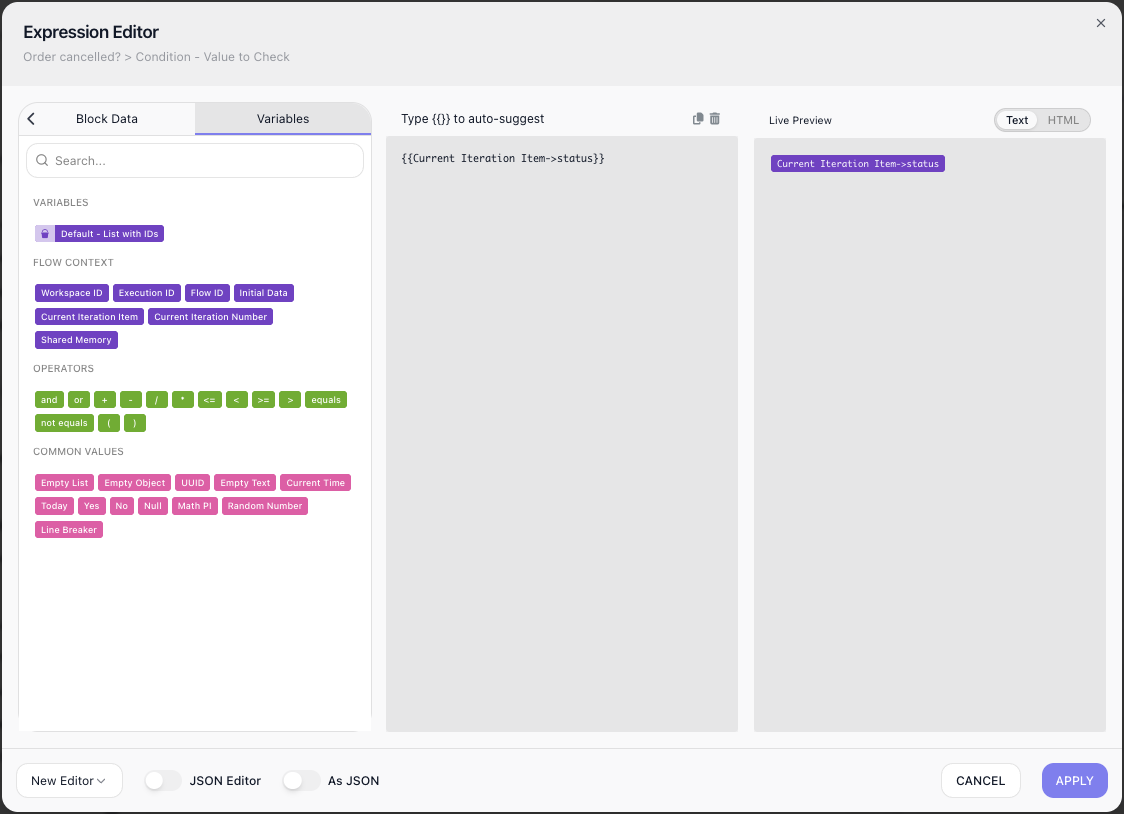
So for the Acme order Current Iteration Item → status reads "open", and for the Globex order, "cancelled" - the value the loop will check to decide whether to keep going.
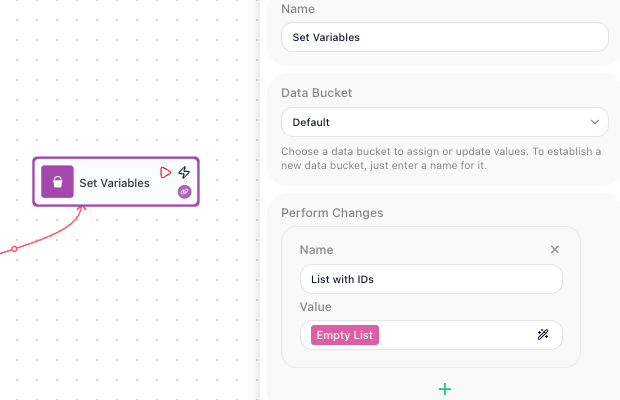
Now the work. A loop cannot hand a value back to the rest of the flow on its own, so you collect what you build up in a variable that lives outside it - a Data Bucket variable. Before the List Iterator, a Set Variables block declares that variable, here List with IDs, and sets it to Empty List, a built-in value that gives you a fresh list with nothing in it yet:
Inside the loop, a Condition named Order cancelled? checks Current Iteration Item → status against "cancelled": its Value to Check is the Current Iteration Item → status expression, its Operation is EQUALS, and its Value is cancelled:
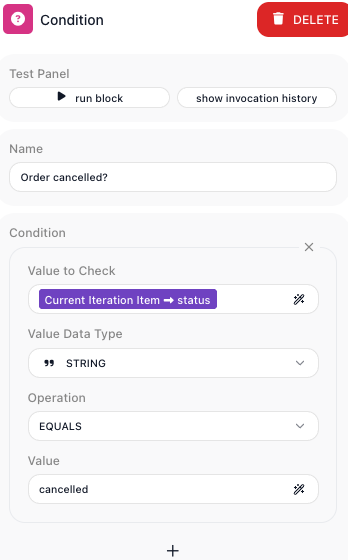
A Condition splits the flow in two: its Yes branch runs when the check is true, its No branch when it is false. The check here is status equals "cancelled", so the everyday per-order work sits on the No branch (the order is not cancelled) and the early exit on the Yes branch (it is). While an order is not cancelled, the Condition's No branch runs a Transform Data block named Add To List Operation. A Transform Data block lets you pick an operation; here you choose Add To List, which appends the order's id to List with IDs and writes the result back to that same variable, so the list grows by one entry each pass:
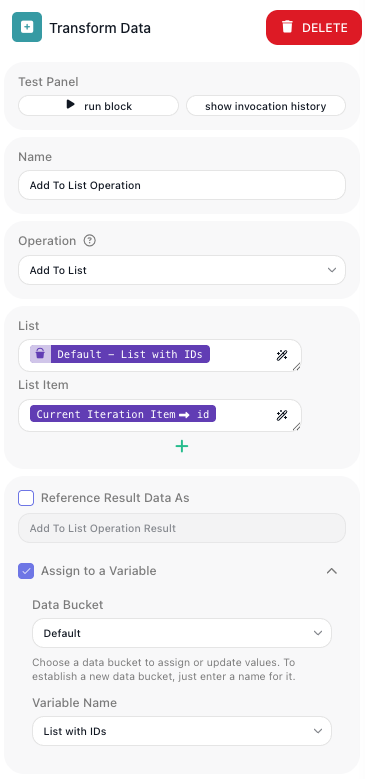
The moment an order is cancelled, the Condition's Yes branch runs a Break that ends the loop. Put together, the loop looks like this:
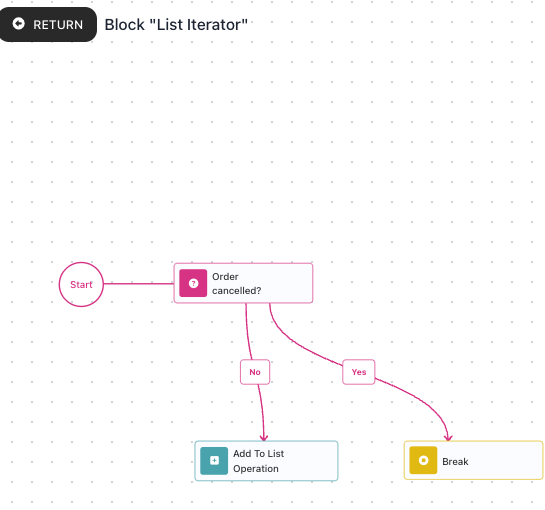
Here is what happens, order by order:
- The Acme order (
1024,open): not cancelled, so the No branch adds its id -List with IDsbecomes[1024]. - The Globex order (
1025,cancelled): the Yes branch fires the Break and the loop stops; its id is never added. - The Initech order (
1026) is never reached.
After the loop, List with IDs holds [1024] - the orders you got through before the cancelled one. A block after the loop reads it back through the Expression Editor as Data Buckets:List with IDs → .
Configuration
| Field | Description |
|---|---|
| List | Required. The array to loop over, usually an expression pointing at a previous block's result. |
Common settings (available on most blocks):
| Field | Description |
|---|---|
| Name | A label for this block on the canvas. |
| Skip Block | When on, the block is skipped during execution and the value in Simulated Result is used as its output. |
| Notes | Freeform notes for documenting the block; they do not affect execution. |
Behavior
- The inner steps run once per item, and each pass exposes that item as Current Iteration Item and the pass number as Current Iteration Number (counting from 0).
- A block's result inside the loop is scoped to the current pass - it is not available to a later pass or after the loop; carry values across passes or out of the loop through a Data Bucket variable.
- A Break block inside the loop ends it immediately, leaving any remaining items unprocessed.
- You can inspect any single pass afterwards in the flow's analytics - the view of a past run - stepping through each pass block by block.
Things to watch for
- If you set List to an array you typed by hand, turn on the Expression Editor's As JSON toggle so it is read as structured data. Without it, FlowRunner sees the whole thing as one piece of text rather than a list of separate items, so there is nothing for the loop to step through. A list that comes from a previous block's result is already structured.
- If the list is empty, the inner steps do not run at all.
- To edit the steps inside the loop, step into it: hover the loop and choose Expand, then use Return at the top-left to come back out.
- A block's result inside the loop lives only for the current pass - each pass overwrites it, and a later pass cannot read an earlier pass's block result. Nothing an inner block produces is available after the loop, either. To carry a value from one pass to the next, or out of the loop, accumulate it into a Data Bucket variable declared outside the loop, then read that variable after the loop finishes (the Example walks through this with List with IDs).