Shared Memory: Delete
This block resets persisted state so the next run starts clean. Shared Memory carries values forward from one run to the next, and sometimes that is exactly what you do not want - a cursor that should restart, a counter that should go back to zero. Name the keys to clear, and the next run finds them gone and falls back to its starting point.
How it works
Shared Memory is a key/value store that belongs to the flow and holds onto what you save in it between runs. This block lives in the Actions palette under the Shared Memory group, and it reaches into that store and removes entries. You work it one of two ways, chosen by the Mode radio. With Mode set to Keys you list the specific keys to remove in the Key field, and only those are erased while everything else in the store stays put. With Mode set to All the block clears the entire store - every key the flow has ever saved - in one step. A key that was never written is harmless to name: the block has nothing to remove for it.
The block does its work as a side effect on the store - it does not hand you a result to read afterward. There is no count of how many keys were removed and no list of what was cleared, so do not wire a later block to read its output. To confirm a key is gone, read it back with a Shared Memory: Read, which returns its Default Value once the key is absent.
When to use it
Reach for it when persisted state has done its job and should not carry into the next run. A cursor that marks how far a flow got last time, a counter you want to reset to its starting point, a one-time token you no longer need - removing the key makes the next run start clean, because a later read of a missing key falls back to its default. Naming the keys under Mode set to Keys leaves the rest of the store intact, which is the careful choice; setting Mode to All is the blunt reset for when you want the flow to forget all of its memory at once.
Example
Suppose a flow walks through a large list of records a batch at a time, and after each run it saves where it stopped in Shared Memory under the key cursor, so the next run picks up where the last one left off. A Shared Memory: Read block reads cursor to find the starting point, and a Shared Memory: Put block saves the new position.
Now say the flow finishes the very last batch - there is nothing left to process. You want the next run to start over from the beginning rather than resume past the end of the list. Drop a Shared Memory: Delete block on the path that runs when the work is done. Set Mode to Keys and name the single key to remove in the Key field:
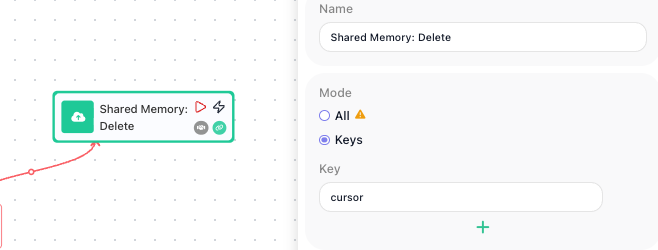
When that path runs, the block erases cursor from Shared Memory and leaves any other saved keys untouched. The block returns nothing of its own, so nothing reads its output here; the proof that it worked shows up on the next run. The Shared Memory: Read block looks up cursor, finds nothing stored, and returns its Default Value instead - so the flow starts fresh from the top of the list, exactly as it did the first time.
Configuration
| Field | Description |
|---|---|
| Mode | Chooses what gets removed. All clears the entire Shared Memory store, removing every key. Keys removes only the specific keys you list, leaving everything else in the store intact. |
| Key | Shown when Mode is Keys. The keys to remove; add a row per key with the + button. Name at least one - leaving it empty raises "At least one key should be specified". Listing a key that was never written does no harm, as the block has nothing to remove for it. |
Common settings (available on most blocks):
| Field | Description |
|---|---|
| Name | A label for this block on the canvas. |
| Reference Result Data As | The alias used to reference this block's result in later blocks. |
| Logging | What to log to the Logging panel while the flow is LIVE, both on start and on completion. |
| Notes | Freeform notes for documenting the block; they do not affect execution. |
Things to watch for
- With Mode set to All, the block clears the whole store - every key the flow has ever saved, not only the one you had in mind. Use it only when you mean to wipe all of the flow's memory; to remove a single value, set Mode to Keys and name the key.
- With Mode set to All you also erase any AI Agent's Messages History in this flow - the conversation memory an agent keeps is stored in Shared Memory, so clearing the whole store makes every such agent forget its earlier runs and start cold. If you only meant to clear your own keys, set Mode to Keys and name them.
- With Mode set to Keys you have to name at least one key in the Key field, otherwise the block raises "At least one key should be specified" and has nothing to remove.
- This block hands back no result, so there is nothing to wire into a later block. To check that a key is gone, read it: a Shared Memory: Read of a key that is gone returns that read's Default Value, the same as if the key had never been written.