Shared Memory: Put
This block makes state outlive a single run. A Data Bucket variable is gone the moment a run ends, but a value you write into Shared Memory - a counter, a cursor, a token to reuse - stays put for a later run to pick up. You name each value and supply what to store, and the flow's own key/value store holds onto it until you change or clear it.
How it works
You find this block in the Actions group of the block palette. You give it a set of name-and-value pairs, and it writes each one into Shared Memory under its name. What makes this stick is that Shared Memory belongs to the flow itself, not to any one run of it: every instance the flow spawns reads and writes the same store, so a value one run saves is still there for the next run - even a much later one - to read. A Data Bucket variable, by contrast, lives only inside the run that set it and is wiped clean the moment that run ends. The value you store can be a fixed value you type or an expression worked out at run time, so you can save the result of earlier steps. Writing to a name that already holds a value updates it in place; writing to a new name creates it.
When to use it
Reach for it when a piece of state has to outlive a single run of the flow - a running counter, a cursor marking how far you got last time, a token you want to reuse next run. A Data Bucket variable resets every run and cannot carry anything forward, so it is the wrong tool for state that has to persist; Shared Memory is the store that remembers. In practice you pair this with a matching Shared Memory: Read: the Read pulls the saved value in, the flow works with it, and this block writes the updated value back, so the two together carry state forward run after run.
Example
Suppose you want a flow to number each run it makes - run 1, run 2, run 3 - even though each run starts fresh and remembers nothing on its own. The trick is to keep the count in Shared Memory under a name like runCount, read it at the start of every run, add one, and write the new total back with this block.
Early in the flow a Shared Memory: Read block reads runCount, with its Default Value set to 0 so the very first run (when nothing has been saved yet) gets a clean starting point. That Read exposes its value under a result alias - say it is named Read Count in Reference Result Data As - so the rest of the flow can refer to the count it pulled in by that alias. A Shared Memory: Put block writes the new total back: in its Perform Changes list you add one entry, with the name runCount and a value of that count plus one - built in the Expression Editor by picking the Read's result and adding one, so it is not a string you type or paste in by hand.
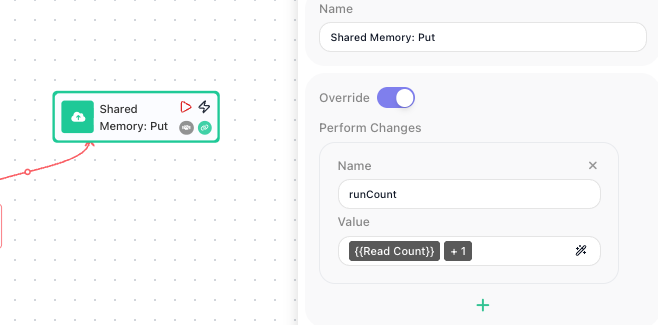
On the first run, the Read returns the Default Value 0, the flow works out 1, and this block writes 1 to runCount, replacing the old value in place. The next run reads 1, works out 2, and writes 2; the run after that reads 2 and writes 3. The number climbs run after run because Shared Memory holds onto it between runs, which a Data Bucket variable could never do.
Configuration
| Field | Description |
|---|---|
| Perform Changes | The list of values to save. Each entry has a name (the key it is stored under in Shared Memory) and a value, which can be a fixed value you type or an expression. Add a row for each value you want to write in one go. |
| Override | When on, writing to a name that already holds a value replaces it with the new value. |
Common settings (available on most blocks):
| Field | Description |
|---|---|
| Name | A label for this block on the canvas. |
| Reference Result Data As | The alias used to reference this block's result in later blocks. |
| Logging | What to log to the Logging panel while the flow is LIVE, both on start and on completion. |
| Notes | Freeform notes for documenting the block; they do not affect execution. |
Things to watch for
- Shared Memory keeps what you save between runs of the flow, unlike a Data Bucket variable, which resets every run. That is the whole point of using it, but it also means a value lingers until something overwrites or clears it.
- This block does not hand back a result you can reference in later blocks - it writes to the store rather than producing a value. To use what you saved, read it back with a Shared Memory: Read block keyed to the same name; that Read exposes the stored value under its result alias, which later blocks reference as the Read's alias (or assign to a Data Bucket variable from the Read itself).
- Writing to a name that already holds a value updates it. If you mean to add to a value rather than replace it - bump a counter, append to a list - read the current value first, work out the new one, and write that back; the block does not combine the new value with the old one for you.