Shared Memory: Read
This block reads back state that an earlier run left behind. Shared Memory is the flow's own key/value store, and what you saved into it is still there next time the flow runs - so you can pick up a counter, a cursor, or a last-seen value where the previous run left off. Name the key and the block hands you what is stored, with a default to fall back on the first time round.
How it works
You give the block a key, and it returns whatever value is stored under that key. The thing that makes Shared Memory different from a Data Bucket variable is that it survives between runs: a value one run of the flow saves is still there for the next run to read. When the key has never been written yet, the block returns the Default Value you set instead of nothing, so the very first read still gives you something usable.
When to use it
Reach for it when a piece of state has to outlive a single run of the flow - a running counter, a cursor marking how far you got last time, the last value you saw. A Data Bucket variable resets every run, so it cannot remember anything from one run to the next; Shared Memory is the store that does. Pair this Read with a matching Shared Memory: Put to write the value back, and the two together let a flow carry state forward run after run.
Example
Suppose you want a flow to number each run it makes - run 1, run 2, run 3 - even though each run starts fresh and remembers nothing on its own. Keep the count in Shared Memory under the key runCount.
Drop a Shared Memory: Read block (it lives in the Actions group of the block palette) into the flow. Set its Key to runCount, and set its Default Value to 0 so the first run (when nothing has been saved yet) reads a clean starting point instead of an empty value. Leave Reference Result Data As at its default alias, Shared Memory: Read Result - that is the name later blocks use to read what this block returned.
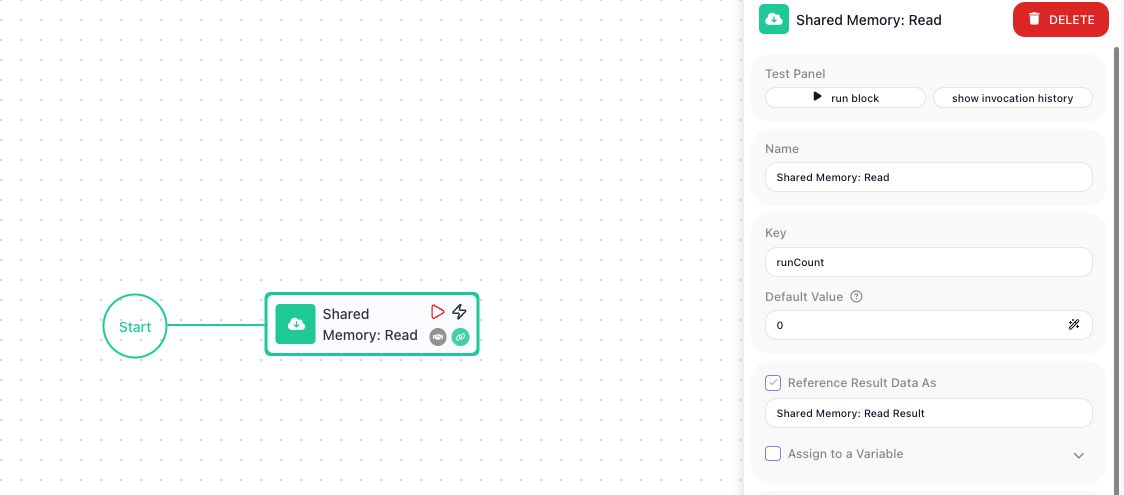
Downstream, you read that returned value by its alias. Build the new count in the Expression Editor by picking the read value under Block Data (it appears as Shared Memory: Read Result) and adding one - you build it there by picking the reference and the operator, not by typing or pasting the text in. Feed that into a Shared Memory: Put block aimed at the same runCount key, so each run leaves the next run a higher number.
On the very first run, no value has been stored under runCount, so the Read block returns the Default Value, 0. The expression turns that into 1, and the Shared Memory: Put block writes 1 back to runCount. The next run reads 1 and writes 2, and the run after that reads 2 and writes 3. The value climbs because Shared Memory holds onto it between runs, which a Data Bucket variable would not do.
Configuration
| Field | Description |
|---|---|
| Key | Required. The shared-memory key to read. |
| Default Value | Value used when the key does not exist yet (first run). The return value if the value for the key has not yet been put |
Common settings (available on most blocks):
| Field | Description |
|---|---|
| Name | A label for this block on the canvas. |
| Reference Result Data As | The alias used to reference this block's result in later blocks. |
| Assign to a Variable | Optionally store the result in a Data Bucket variable too; you choose the bucket and the variable name. |
| Skip Block | When on, the block is skipped during execution and the value in Simulated Result is used as its output. |
| Logging | What to log to the Logging panel while the flow is LIVE, both on start and on completion. |
| Notes | Freeform notes for documenting the block; they do not affect execution. |
Behavior
- Returns the stored value for the key, or the Default Value if absent.
- Optionally assigns the value to a Data Bucket variable.
Things to watch for
- Shared Memory persists between runs of the flow, unlike a Data Bucket variable, which resets every run.
- On the first run, when the key has not been written yet, the block returns the Default Value as its result, and assigns it to the variable too if you set one.